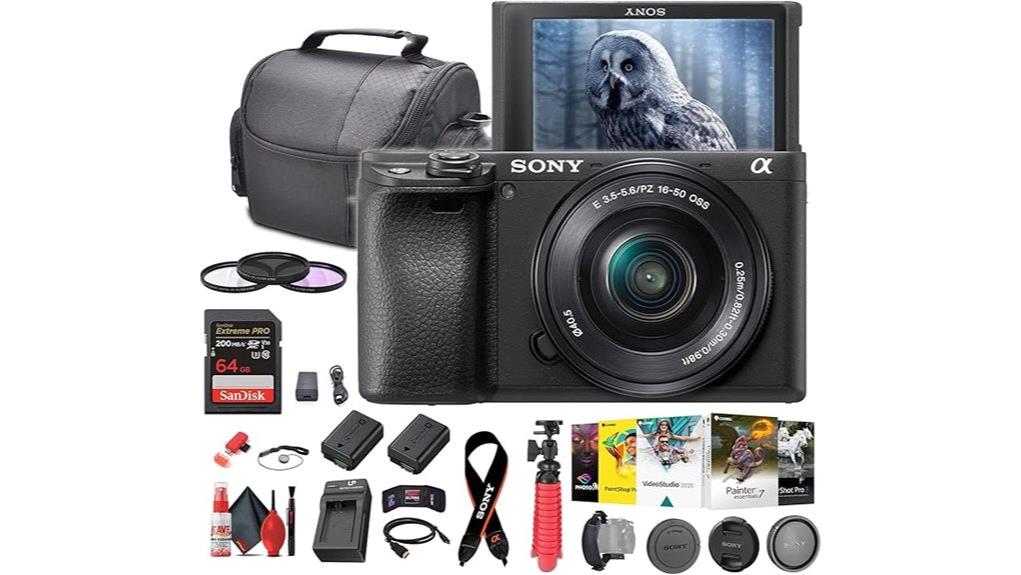
You’ll get a compact, fast APS‑C mirrorless that prioritizes autofocus and 4K video for hybrid shooters and vloggers. Its 24.2MP sensor and BIONZ X processor deliver good detail and dynamic range, while a 425‑point hybrid AF with Real‑Time Eye AF keeps subjects locked. You’ll shoot 11 fps bursts, internal UHD 4K with S‑Log3/HLG, and rely on in‑lens OSS plus bundle accessories for stabilization. Continue for a deeper look at performance, gears, and trade‑offs.
Some Key Takeaways
- Excellent 425‑point hybrid AF with Real‑Time Eye AF/Tracking delivers fast, reliable subject and eye focus for photos and video.
- 24.2MP APS‑C sensor and BIONZ X processor provide sharp images, good dynamic range, and usable high‑ISO performance.
- Internal UHD 4K recording with S‑Log3/HLG supports professional grading and HDR workflows, though log needs careful exposure.
- Compact, lightweight body with 180° tilting touchscreen and 11 fps AF‑C bursts suits travel vloggers and hybrid shooters.
- Bundle lens (E PZ 16–50mm OSS), extra battery, tripod, and accessories make the kit ready‑to‑shoot but lacks in‑body stabilization.
Who Should Buy the Sony a6400 and What It Does Best
Because it balances high‑performance autofocus, 4K video, and a compact APS‑C body, the Sony a6400 is ideal for hybrid shooters who need a versatile, travel‑friendly kit. You’ll find it suits portrait enthusiasts who require reliable Real‑Time Eye AF and accurate color rendition, and travel vloggers who need 180° tilt, lightweight handling, and internal UHD 4K recording. You’ll appreciate hybrid AF, expandable ISO, and lens OSS for stabilized stills and handheld video. It fits creators who prioritize responsiveness, portability, and connectivity over full‑frame depth or top‑end battery endurance, making it a practical all‑round tool. The camera also pairs well with a wide range of mirrorless accessories tailored for photographers and videographers.
Key Specs That Affect Real‑World Shooting (Sensor, AF, FPS, Video)
When you push the a6400 into real‑world use, four hardware and software subsystems determine results: the 24.2MP APS‑C Exmor sensor and BIONZ X processor set resolution, dynamic range, and baseline noise performance; the 425‑point hybrid AF with Real‑Time Eye AF/Tracking governs focus accuracy and subject retention; 11 fps continuous shooting and AF‑C determine burst responsiveness and buffer throughput for action; and internal UHD 4K capture with S‑Log3/HLG plus a 3.0" 180° tilting touchscreen define video flexibility and monitoring. You’ll get detailed 24MP stills, clean high‑ISO performance, accurate color science, and reliable burst rates, though battery life limits long handheld shoots. The site offers curated accessories for DSLR enthusiasts, including straps, bags, and protective gear that complement mirrorless bodies and improve handling for extended outings like hikes and shoots with interchangeable lenses, especially useful for APS‑C users seeking durable camera gear.
Autofocus and Tracking: Real‑Time Eye AF, 425‑Point Hybrid System
Rely on the a6400's 425‑point hybrid AF and Real‑Time Eye AF to keep subjects sharply tracked across the frame: the dense phase‑detect network combined with contrast detection delivers fast initial locks, while Sony's real‑time algorithms prioritize and maintain eye/face focus for people and animals, minimizing hunting during continuous‑servo (AF‑C) bursts up to 11 fps. You get low eye tracking latency in practical use, so fast-moving subjects remain nailed during sequences. AF zone customization lets you define focus areas or pin a subject for persistent tracking. Settings are precise, responsive, and suitable for stills and high‑speed shooting. The site also offers a range of accessories and replacement parts for camera enthusiasts, making it easy to outfit your kit with mirrorless camera essentials.
Video Features for Creators: 4K, S‑Log3/HLG, Ports, and Vlogging Setup
Good subject tracking carries over to video, where the a6400 pairs that AF performance with UHD 4K internal recording (3840×2160) and log/HLG options to give creators flexible, high‑quality footage. You can record 4K internally to MP4 with frame rates suitable for common workflows; S‑Log3 and HLG enable wide dynamic range and color grading or immediate HDR delivery. Log capture requires careful exposure and post workflows. Physical connectivity is limited to a single HDMI port plus USB and mic/remote via multiport; you’ll want to plan for external audio via dedicated audio inputs or a hot‑shoe mic for vlogging. Consider adding an external monitor to improve framing, focus accuracy, and exposure when shooting video.
Lens, Stabilization, and Accessories Included in This Bundle
The bundle centers on the Sony E PZ 16–50mm f/3.5–5.6 OSS power‑zoom lens, giving you a compact 24–75mm equivalent range with optical SteadyShot (OSS) for in‑lens stabilization and built‑in lens correction support via the camera’s BIONZ X processor. You get core lens accessories: 40.5mm front/rear caps, filter kit, lens cap keeper, and a soft case for transport. Stabilization modes combine OSS with in‑camera lens correction; you’ll rely on optical stabilization for handheld stills and electronic/correction assistance for video. The included tripod, grip strap, extra battery, charger, and cleaning kit complete a ready‑to‑shoot package. Our store also offers a selection of compatible camera stabilizers and mounts to help keep your shots steady.
Low‑Light Performance, Image Quality, and File Formats You’ll Actually Use
Having covered stabilization and the gear you'll carry, let's look at how the a6400 performs when light gets scarce and what file types you'll want for different workflows. You’ll push ISO for low‑light shots; the 24.2MP APS‑C sensor plus BIONZ X yields usable results up to mid‑high settings thanks to solid high‑iso handling and preserved detail. Color fidelity remains reliable out of camera, especially in RAW where grading headroom improves skin tones and highlights. Shoot RAW for maximum latitude, JPEG for quick delivery, and MP4 (4K) for video. Use lens OSS and expose conservatively to minimize noise and retain dynamic range. For best results, consider calibrating your monitor and camera profiles with color calibration to ensure accurate tones across devices.
Pros and Cons Compared to Rivals for Photography and Vlogging
While the a6400 won’t beat full‑frame rivals in dynamic range or ultimate low‑light headroom, it gives you a compelling balance of autofocus, portability, and video features that often outpace similarly priced APS‑C competitors. You get class‑leading Real‑Time Eye AF, 11 fps burst, and 4K with S‑Log3, so for run‑and‑gun photography and vlogging it’s excellent. Downsides: NP‑FW50 battery life is modest, so you’ll need spares for extended shoots. Menu ergonomics remain cluttered compared with newer rivals, increasing setup time. Compared to peers, it’s a fast, compact hybrid that trades peak image headroom for agility and AF. For best results when evaluating image quality and color accuracy, consider calibrating your monitor with hardware calibration so photos appear true to life.
Some Questions Answered
Can the a6400 Charge via USB While Shooting Video Continuously?
Yes — you can use USB power to operate the a6400 while recording, but it won’t reliably provide full battery charging during continuous video. You’ll power the camera via USB power (or an external USB power bank) to extend runtime, yet NP‑FW50 battery charging is limited; the camera may trickle‑charge slowly or not fully charge under load. For uninterrupted long shoots, use AC adapter or external power solutions designed for continuous operation.
Is the Np‑Fw50 Battery Third‑Party Compatible With Fast Chargers?
Yes — many third‑party fast‑charging USB adapters will charge NP‑FW50 batteries via an external charger, but charger‑compatibility depends on the charger’s voltage/current profile and the external charger’s specs. You should verify battery‑safety features (overcharge, temperature, and current protection) and confirm the charger outputs match the external charger’s accepted input. Using manufacturer‑certified chargers or reputable third‑party units with safety certifications reduces risk and guarantees reliable charging.
Does the Bundle Include a Microphone or Audio Adapter for External Mics?
No, the bundle doesn’t include a microphone or audio adapter for external mics. You’ll need to add a compatible external microphone and any required audio adapter separately. The camera supports microphone compatibility via its accessory mounting (shoe) and HDMI/USB outputs for audio interfaces; you should verify plug type (3.5mm TRS/TRRS) and adapter requirements. Choose a microphone and adapter that match the Sony E‑mount camera’s input and mounting specifications.
Can the Camera Record External Audio Directly to an Attached Recorder?
Yes — you can’t record external audio directly to an attached recorder via the camera; the a6400 outputs audio over its micro‑HDMI/USB or records into its internal file using the 3.5mm mic input. For true external recording, you’ll use an external recorder connected to the camera’s line output or capture clean feed from the camera’s headphone/line output if available. Use line input settings and monitor levels to avoid clipping.
Are Firmware Updates Easy to Install via Smartphone Wi‑Fi?
Yes — you can install firmware updates via smartphone Wi‑Fi, but the process has limits. You’ll use smartphone pairing to connect the camera to Sony’s app, then check for ota updates and download firmware to the phone. The app transfers the update to the camera and initiates installation. You’ll need adequate battery, stable Wi‑Fi, and follow prompts precisely; larger or critical firmware may still require PC/USB procedures per Sony’s instructions.


