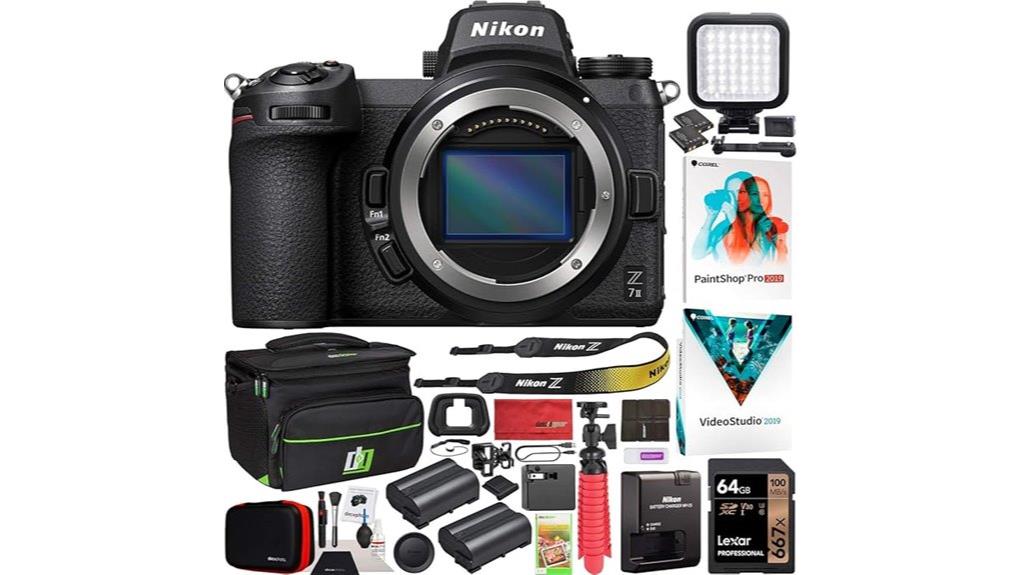
You’ll get a pro-grade 45.7MP Z7II body with fast dual processors, 5-axis IBIS, reliable hybrid AF and dual CFexpress/SD slots, plus an accessory kit (battery, spare, charger, CFexpress-capable SD, bag, tripod, light and cleaning tools) that gets you shooting immediately. Image detail, dynamic range and low-light AF are excellent, and 4K60 with 10-bit external output suits hybrid work. Keep going and you’ll find specifics on performance, workflows and who this bundle fits best.
Some Key Takeaways
- 45.7MP sensor and dual EXPEED 6 deliver exceptional detail and wide dynamic range for professional stills and landscapes.
- 5-axis IBIS, robust build, and reliable hybrid AF suit demanding hybrid photo/video workflows.
- Dual card slots (CFexpress/XQD + UHS‑II SD) and 10 fps continuous shooting support long RAW bursts and fast event work.
- 4K up to 60p internally with 10‑bit HDMI output externally, but use external recorder for full 10‑bit workflow.
- Included accessories (spare battery, CFexpress‑class SD card, tripod, LED light, bag, cleaning kit) enable immediate on‑location shooting.
Quick Verdict: Is the Nikon Z7II 1653 Bundle Worth Buying?
Though the Z7II 1653 bundle carries a premium, it delivers professional-grade stills and video performance that justifies the price for serious photographers and hybrid shooters. You’ll get 45.7MP resolution, robust 5-axis IBIS, reliable hybrid AF, and dual card slots that suit demanding workflows. Lens options on the Z mount continue expanding, so you’ll cover portrait, landscape, and event needs without compromise. Expect regular firmware updates that refine AF, video features, and stability. If you prioritize high resolution, durable build, and hybrid capability, this bundle’s extras and performance make it a practical investment. This bundle is especially appealing for mirrorless camera enthusiasts who want accessories and gear tailored to their system.
What’s Included in the 1653 Bundle and Why Each Item Matters
The 1653 bundle pairs the Nikon Z7II body with a all-inclusive accessory kit so you can shoot professionally straightaway: it includes the EN‑EL15c battery and MH‑25a charger (plus a spare EN‑EL15), a Lexar Professional 64GB UHS‑3 SDXC card and reader, a Deco Gear travel bag and accessory kit (blower, sensor brush, cloths), a 12" tripod/grip, LED photo/video light, screen protectors, strap and body caps, plus software (Corel PaintShop Pro & VideoSuite) and cabling (UC‑E24 USB, mini‑HDMI). You get immediate uptime with an extra battery, reliable storage and a memory organizer, plus a cleaning kit and lens filters. The travel case, strap upgrades and tripod extend usability and protection. Choosing the right camera bag insert helps you organize and protect your gear with customizable padding and compartment sizes for camera gear.
Nikon Z7II Core Specs That Photographers Need to Know
Start by focusing on what matters most: the Z7II pairs a 45.7‑MP BSI full‑frame sensor with dual EXPEED 6 processors to deliver high-resolution stills, responsive performance (up to 10 fps continuous shooting), and 4K UHD video up to 60p, while its native ISO 64–25,600 (expandable to 32) and 5‑axis in‑body VR give you flexibility across lighting conditions. You’ll get 45.7 MP sensor resolution for large prints and tight crops, 493-point hybrid AF, a 3.2" tilting 2.1M‑dot LCD and 0.8× EVF, dual card slots, 14‑bit RAW, maximum 1/8000s shutter speed and robust shutter durability for heavy professional use. External camera monitors can enhance framing and focus accuracy with larger displays and exposure tools like zebras and histograms, especially when shooting high-resolution stills and 4K video with the Z7II external monitors.
Real-World Performance: Image Quality, AF, IBIS, and Low-Light Shooting
When you push the Z7II into real shooting situations, its 45.7‑MP BSI sensor and dual EXPEED 6 processors deliver images with exceptional detail and wide dynamic range, preserving highlight and shadow information that’s critical for landscape and commercial work. You’ll notice dynamic range preservation across exposures, enabling recovery in post. Autofocus tracking is reliable with 493 phase‑detect points and low‑light AF to −3 EV, keeping subjects sharp in continuous shooting. IBIS effectiveness provides up to several stops of stabilization for slower shutters, aiding handheld work. High iso resilience is strong; defaults yield clean 14‑bit RAW files with manageable noise. For accurate color rendition and consistent results across shoots, consider using color calibration tools to profile your workflow.
Video Capabilities: 4K60, Codecs, and Practical Recording Limits
Although you’re primarily buying the Z7II for stills, its video chops are serious: the camera records 4K UHD up to 60p using H.264 in MOV/MP4 containers, leverages dual EXPEED 6 processors for robust handling, and offers 10‑bit output via HDMI in supported setups. You’ll get reliable 4K60 recording with full‑frame readout crop options, steady IBIS support, and eye‑AF for video. Pay attention to Codec compatibility when mixing workflows—internal H.264 8‑bit limits grading latitude compared with external 10‑bit capture. Practical limits include file‑size ceilings, overheating mitigation, and card speed requirements for sustained high‑bitrate clips. If you shoot DSLR-style handheld stills or video frequently, consider essential accessories like camera bags and extra batteries to support extended sessions.
Workflow and Storage: Dual Card Slots, RAW Handling, Battery Life
Get your cards and batteries organized before a shoot: the Z7II’s dual-slot design (CFexpress/XQD plus UHS-II SD) gives you flexible backup, overflow, or segregated media workflows, and that flexibility matters when you’re shooting 45.7‑MP RAW files or long 4K60 clips. You’ll set Card Management to mirror for instant File Backup or to overflow for long runs. 14‑bit RAW demands fast media—use CFexpress for buffer clearing. Battery Optimization comes from carrying the spare EN‑EL15c and switching to low‑power settings between takes. For extended sessions bring portable Power Stations and USB-C charging to avoid downtime. High-speed memory cards can significantly improve write and buffer performance when shooting high-resolution RAW or high-bitrate video, so consider using high-speed cards for best results.
Who Should Buy This Bundle (Use Cases and Buyer Decision Guide)
Because the Z7II bundle pairs high-resolution imaging with pro-grade accessories, you'll want it if you need a versatile, dependable kit for demanding stills and video work. You should buy this bundle if you shoot landscapes or travel photography and need 45.7MP detail plus stabilization for handheld low light. Studio beginners get useful accessories—tripod, LED light, software—that shorten the learning curve. Wedding backup and event shooters will value dual card slots, fast AF, and spare battery for long days. Hybrid shooters who switch between high-res stills and 4K60 video will appreciate the processing power, connectivity, and included media. It's also a great match for photographers who frequently carry gear on location and need a durable, camera-focused pack like those offered by Perfect Camera Backpacks.
Some Questions Answered
Does the Bundle Include a Warranty and How Long Does It Last?
Yes — the bundle includes a Nikon USA authorized warranty. You’ll get a warranty duration that matches Nikon’s standard coverage for the camera body (typically one year), and coverage details include manufacturer defects and service through authorized Nikon channels. Accessories may carry separate terms; check included paperwork for exact durations and exclusions. If you want, I can summarize the specific warranty clauses and how to register or file a claim.
Can the EN-EL15C Be Charged In-Camera via USB-C?
Yes — you can charge the EN-EL15c in-camera via USB-C. USB charging offers convenient power top-ups using the supplied UC-E24 cable and EH-7p adapter or compatible USB-C PD sources. Battery compatibility is guaranteed for the EN-EL15c model used with the Z7II; full charging times vary by power source. For fastest, safest charging use a USB-C PD charger rated for camera-compatible voltage/current to avoid slow or incomplete charges.
Are Firmware Updates Easy to Install and Where to Download?
Yes — firmware updates are straightforward. You’ll download official updates from Nikon’s support website, verify your model and serial, then copy the firmware file to a formatted memory card or use Nikon’s UX/Camera Control utilities for USB-C transfers. Firmware reliability is high; Nikon tests thoroughly, and update frequency is moderate—periodic fixes and feature additions. Follow Nikon’s step-by-step instructions, keep battery charged, and don’t interrupt the process to avoid bricking.
Is the LED Light Color Temperature Adjustable for Video Shoots?
Yes — the included LED light offers color temperature control. You’ll get a specified adjustable range with bi color control so you can shift between warm and cool tones for video shoots. It provides continuous dimming for smooth brightness adjustments without flicker, letting you fine-tune exposure and color balance. You’ll appreciate the precise, gradual control when matching ambient light or achieving consistent skin tones in varied shooting conditions.
Will Third-Party Lenses Support Full AF and IBIS on This Body?
Yes — many third-party lenses will provide AF compatibility and IBIS interaction, but behavior varies. You’ll get in-body stabilization working with most adapted lenses, while autofocus performance depends on lens mount adapter, lens electronics and firmware. Native Z-mount third-party optics often offer full AF compatibility and predictable stabilization behavior; adapted F‑mount or other lenses may show limited AF speed, eye‑detect or continuous tracking depending on the adapter’s protocol and firmware.


