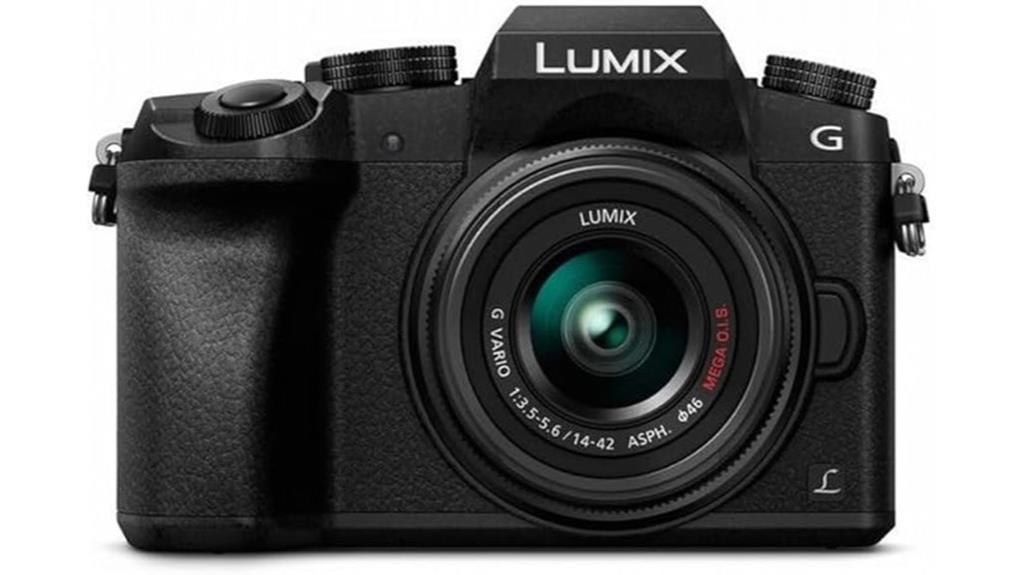
You’ll get an affordable, compact 4K-capable mirrorless that delivers sharp 16MP stills, usable 4K/30p video, and flexible RAW/4K Photo options, though noise rises past ISO 1600 and dynamic range is modest. Contrast AF with 49 points can hunt on fast action, and the body lacks IBIS so optically stabilized lenses are wise. The OLED EVF, articulating touchscreen, mic jack and solid ergonomics make it great for learners and budget pros—keep going to see detailed limits and workarounds.
Some Key Takeaways
- Affordable Micro Four Thirds mirrorless offering 4K UHD up to 30p, 4K Photo, and RAW support for enthusiasts and learners.
- 16MP sensor delivers clean JPEGs and flexible RAWs, though noise and dynamic range drop noticeably past ISO 1600.
- Contrast-detect 49-point AF is usable for moderate motion but can hunt on fast action; 7 fps continuous shooting with limited RAW buffer.
- Good handling with OLED EVF, articulating touchscreen, external mic port, and extensive MFT lens options; body lacks IBIS.
- Practical 4K video for web delivery, but expect bitrate/heat limits, rolling shutter on fast pans, and need for fast UHS cards.
Quick Verdict: Is the Panasonic Lumix G7 4K Worth Buying?
Bottom line: the Lumix G7 is a smart buy if you want a compact, affordable 4K-capable mirrorless that punches above its weight for stills and video. You get 4K video, 4K Photo, RAW support and 7 fps in a Micro Four Thirds body that behaves like a budget mirrorless with surprisingly capable controls. Contrast AF and kit stabilization aren’t top-tier, but practical features—OLED EVF, articulating touch screen, external mic port—cover most needs. You’ll appreciate vintage ergonomics: tactile dials and a DSLR-like grip. It’s a practical, cost-conscious tool for learning shooters and creators. It’s also a great match for enthusiasts looking for essential mirrorless accessories to expand their kit.
Who the G7 Is For and Real-World Use Cases
If the quick verdict convinced you the G7 punches above its weight, here’s who’ll get the most from it: hobbyists and content creators who want affordable 4K video and fast stills in a compact, controllable body. You’ll appreciate its 4K video, 7 fps burst and articulating touchscreen for run-and-gun shooting. Beginner vloggers get external mic input, flip screen framing and Wi‑Fi for quick transfers. Travel photographers benefit from lightweight Micro Four Thirds lenses, MEGA O.I.S. and a robust EVF for varied light. It’s ideal when you need versatile video/still capability without pro-level cost or bulk. Gear Guide serves that audience by specializing in products and advice for digital cameras and camera enthusiasts.
Image Quality and Stills Performance (16MP, RAW, 4K Photo)
When you push the G7's 16MP Micro Four Thirds sensor, it delivers clean, detailed JPEGs and flexible RAW files that suit online sharing and moderate prints, though noise rises noticeably past ISO 1600. You’ll appreciate solid dynamic range for a 16MP MFT chip, retaining midtone detail and recoverable highlights in RAW. Color fidelity is generally accurate straight from camera, with pleasant skin tones and punchy greens; you can tweak hue/saturation in post without severe artifacts. 4K Photo is a practical stills hack—extract ~8MP frames for fast action—but expect limited latitude versus true RAW bursts. For photographers who need fast, reliable storage when shooting 4K or burst sequences, consider high-performance CFexpress cards to minimize write bottlenecks and safeguard files.
4K Video, Frame Rates, and Practical Recording Limits
Although the G7's headline feature is 4K UHD at up to 30 fps, you should treat it as a practical, rather than cinematic, tool—its 3840×2160/30p capture gives sharp, high-detail footage and enables 4K Photo extraction, but recording is constrained by bitrate, coding limits, and heat/buffer considerations that affect continuous runtime and workflow. You’ll appreciate clean 4K output for web and delivery, but 4K limitations show in prolonged clips: buffer fills, thermal throttling can cut runtimes, and the sensor’s rolling shutter exaggerates fast pans. Use short takes, fast U3/UHS cards, monitor audio via the 3.5mm jack. Consider pairing footage offloads with a drive docking workflow to streamline handling and archiving.
Autofocus, Continuous Shooting, and Low-Light Behavior
Beyond frame rates and file limits, you’ll want to know how the G7 handles focus and stills under real shooting conditions. You’ll find contrast-detection AF with 49 points—no on-sensor phase detection—so initial lock can lag versus newer hybrids. Continuous-Servo AF and modest tracking algorithms work for moderate motion; fast action occasionally yields hunting. Continuous shooting tops out at 7 fps, reliable for bursts but limited buffer depth in RAW. In low light the 16MP sensor pushes ISO; noise performance is acceptable up to mid ISOs but detail and dynamic range fall off sooner than on newer sensors. Perfect Tripods offers a range of sturdy supports ideal for minimizing camera shake during longer exposures and low-light shooting, including options suited for mirrorless systems like the G7 and its tripod accessories.
Lenses, Stabilization, Viewfinder, and Handling on Shoots
Because the G7 uses the Micro Four Thirds mount, you get a wide, mature lens ecosystem that keeps the camera versatile without compounding weight or cost. You’ll appreciate lens selection tips: prioritize compact primes for low-light, stabilized zooms for run-and-gun, and adaptors for legacy glass. MEGA O.I.S. on kit glass helps, but understand stabilization tradeoffs—optical beats digital for motion; body lacks IBIS, so heavier stabilization rigs or fast glass matter for handheld 4K. The OLED EVF color is punchy and reliable for exposure judgment. Tilt screen ergonomics aid low/high angles; controls and grip handle extended shoots comfortably. Consider exploring lens accessories to get the most from your Micro Four Thirds setup.
Battery, Ports, Connectivity, Media Support, and Bundled Items
Curious how the G7 holds up as a daily shooter? You’ll get solid battery longevity from the included pack; expect full‑day casual use but pack spares for heavy 4K shooting. Port durability is decent—micro‑HDMI, USB2.0, 3.5mm mic and 2.5mm remote are well seated but watch strain from frequent swaps. Wi‑Fi pairing is straightforward for quick transfers and remote control, though range is typical 2.4GHz. Media support covers SDXC UHS‑I/UHS‑II and U3/V30 classes for reliable 4K writes. Bundled accessories are generous: charger, AC cable, USB cable, strap, body cap, DVD—useful out of the box. If you're looking to extend shooting time, consider reputable spare camera batteries matched to the Lumix G7 for best results.
Some Questions Answered
Does the G7 Support In-Camera Focus Peaking for Manual Lenses?
Yes — you get focus confirmation and manual assist. You can enable focus peaking in the G7’s menu to highlight in-focus edges when using manual lenses, and use magnified view for precise adjustments. That manual assist combo speeds critical focus, especially with adapted glass lacking electronic coupling. It’s contrast-detect AF camera, so rely on peaking plus focus confirmation rather than phase-based indicators for accurate manual focusing.
Can the G7 Charge via USB While Shooting?
No — you can’t rely on USB powering to charge the G7 while shooting; the camera doesn’t support true battery passthrough. You can power it via USB for limited operation with a compatible external power source, but full in-camera charging and continuous USB passthrough charging during active shooting isn’t supported. For reliable long sessions, use a charged battery, AC adapter or dummy battery solution designed for continuous power.
Is the Camera Weather-Sealed or Splash-Resistant?
No — the G7 doesn’t have weather sealing or splash resistance. You shouldn’t expose it to heavy moisture, rain, or dusty conditions without protection. If you’ll shoot outdoors in uncertain weather, you’ll want a rain cover, sealed housing, or a weather-resistant lens and body. Relying on the kit G 14–42mm lens’ MEGA O.I.S. won’t protect electronics; treat the camera as not weatherproof and plan accordingly.
How Long Does the Battery Typically Last for 4K Recording?
You’ll get roughly 30–40 minutes of continuous 4K recording on a single battery, depending on settings and temperature; battery life drops faster with Wi‑Fi, LCD use, and heavy processing. Heat management matters: the body can thermally throttle or stop recording in hot environments, so you’ll want spare batteries and periodic cool-downs. For extended 4K shoots, use external power or swap batteries to maintain consistent performance and avoid overheating.
Can the G7 Output Clean HDMI for External Recorders?
Yes — the G7 can output clean HDMI for external monitoring and recording, but with caveats. You’ll get 4K via HDMI only for monitoring while recording internally; full clean 4K external output without overlays isn’t always guaranteed across firmware/record modes. For true 4K clean HDMI recording, confirm your firmware and mode settings, use compatible external recorders/monitors, and test overlays, frame rates, and power/heat during extended shoots.


