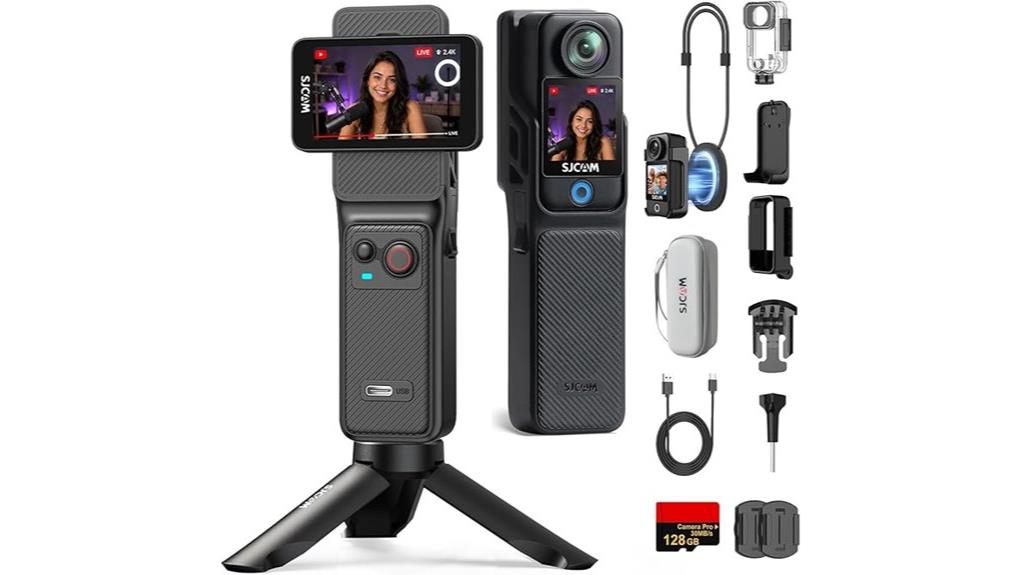
You’ll get a pocketable, rugged 4K action camera that’s tuned for travel vlogging: durable waterproofing to 30 m, a wide 154° lens, and reliable 6-axis EIS with horizon steady. Footage looks sharp in good light but softens and gets noisy in low light; colors are punchy outdoors. Battery life is exceptional—about seven hours—while controls and mounts suit on-the-go use. Keep auto-upload off for privacy, and continue for specifics on performance, workflow, and alternatives.
Some Key Takeaways
- Compact, rugged 4K action camera ideal for travel storytelling with a pocketable 189 g body and waterproofing to 30 m.
- 6-axis EIS with horizon steady delivers stable footage for walking, biking, and casual action vlogging.
- 154° f/2.0 wide-angle lens captures immersive shots, though fine detail and low-light performance are limited.
- Exceptional battery life (≈7 hours) makes it reliable for long travel shoots; carry spare batteries for nonstop use.
- Quick 5G WiFi pairing and touchscreen control enable convenient live preview and remote operation, but disable auto-upload for privacy.
Quick Verdict: Is the SJCAM C400 Right for Travel Vloggers?
If you need a compact, rugged 4K camera for on-the-go storytelling, the SJCAM C400 delivers a lot of travel-ready features in a small package. You’ll appreciate portable durability: waterproofing to 30m, 6-axis EIS with horizon steady, and a pocketable 189 g form factor that survives bumps and trails. Image and video options cover most travel needs—4K, wide-angle, time-lapse, slow motion—while long battery life keeps you recording. Be mindful of user privacy when linking the app over 5G WiFi; disable auto-upload if you want tighter control. It’s practical, not perfect, for creators. This camera pairs well with essential drone camera gear for capturing aerial perspectives on your trips.
What You Get in the Box and Key Specs at a Glance
Now that you know where the C400 fits for travel vlogging, let’s open the box and see what you get and the headline specs at a glance. You’ll find unboxing essentials: the C400 body, preinstalled 128GB microSD, single battery, compact tripod, carrying case, and user manual. The accessory checklist also notes a USB-C charging cable and basic mounts for helmet or handlebar use. Key specs at a glance: 4K MP4 capture, 154° wide-angle f/2.0 lens, 1/2.8″ CMOS, 6-axis EIS with horizon steady, 2.3″ touchscreen, 5G WiFi, waterproof to 30m, ~7-hour battery life. Our Gear Guide offers curated accessories and tips to help action camera enthusiasts get the most from their setups, including compatible mounts and protective gear like cases and filters for action camera photography.
Real-World Image, Video, and Stabilization Tests (4K, Low Light, Underwater)
When you take the C400 out for real-world shoots, its 4K footage looks detailed in good light but reveals the limits of a 1/2.8″ sensor in dim conditions; colors stay punchy outdoors and the wide 154° field gives immersive framing, yet noise and softened fine detail appear as ISO climbs. You’ll notice EIS tames handshake and reduces motion blur on walks and bike rides, though fast panning shows mild rolling shutter. Dynamic range is modest—retain highlights but shadows crush sooner than on larger sensors. Underwater color holds well to 10m with the housing, but fine detail and low-light grain persist. For longer travel shoots, consider a protective waterproof housing to safeguard the camera and maintain image quality waterproof camera housings.
Day-to-Day Usability: Battery Life, Controls, Connectivity, and Accessory Fit
Typically, you’ll get excellent runtime from the C400—its high-performance battery promises up to 7 hours (460 minutes) of continuous recording, which means you can shoot a full day of POV clips or extended vlogs without swapping power. You’ll still practice battery management by toggling WiFi and using lower-res modes when idle. The button layout is logical and tactile; quick access to recording and mode changes keeps you efficient on the move. App pairing is swift over 5G WiFi for live preview and remote control. Accessory compatibility is solid with included mounts and a tripod; third-party mounts fit standard interfaces. For longer shoots and dual-device setups, consider investing in a dual battery charger to keep spare batteries ready and minimize downtime.
Who Should Buy the SJCAM C400 : Alternatives and Final Recommendation
If you want a rugged, pocketable action camera that prioritizes long runtime and 4K capture without breaking the bank, the SJCAM C400 deserves serious consideration. You’ll appreciate seven-hour battery life, waterproofing to 30m, and reliable 6-axis EIS for travel vlogging and action sports. Buy it if you need durable, straightforward 4K footage and easy app-based control. Consider budget alternatives like older SJCAM or Akaso models if you need lower cost with similar basic features. If you need pro-grade color science, sensor size, or advanced codecs, look to professional competitors such as GoPro and DJI instead. Gear Guide caters to enthusiast photographers and camera fans, offering reviews and product recommendations for digital camera accessories and gear, including action cameras like the C400 and other camera-related products.
Some Questions Answered
Does the C400 Support External Microphones or Bluetooth Audio Input?
No — the C400 doesn’t list a dedicated external mic jack or native bluetooth audio input. You’ll rely on the built-in microphone or wireless app streaming via 5G WiFi for remote preview, not true bluetooth audio capture. If you need higher-quality external mic sound, you’ll have to record audio separately (lav or shotgun into a phone/recorder) and sync in post. That workflow’s practical for vlogging and action use.
Can the Touchscreen Be Used With Gloves or Waterproof Housing On?
No — you won’t reliably use the touchscreen with gloves or while the waterproof housing’s on. Glove usability is limited unless you wear thin, touchscreen-compatible gloves; thick gloves block touch. Housing compatibility prevents direct touch input, so you’ll need the physical buttons or the phone app for remote control. Practically, test your gloves and housing before shoots, rely on button controls and the app, and keep firmware updated for best responsiveness.
Is the Included 128GB Card Pre-Formatted and Replaceable With Larger Cards?
Yes — the included 128GB card arrives pre formatted and you can replace it for capacity upgradeability. You’ll want to confirm file system and format in the camera menu before use, then test recording. Swap to a higher-capacity microSD if you need more space, but stick to recommended speed/class for 4K. Regularly back up and reformat in-camera to maintain reliability and maximize performance.
Are Firmware Updates Available and How Are They Installed?
Yes — firmware availability exists and you can update it. Download the latest firmware from the manufacturer site, unzip the file, and copy the firmware file to the camera’s microSD card. Installation steps: insert the card, power on the camera, navigate to Settings → System → Firmware Update, and follow prompts. Don’t power off during flashing. Verify version afterward. Keep the battery charged and back up your card before updating.
What Mounting Accessories (Standard Mounts/Gopro Compatibility) Does It Support?
You can use GoPro compatible mounts and Adhesive mounts with this camera; it fits standard action-camera mounting systems so you’ll attach it to helmets, chest harnesses, tripods, and handlebars. You’ll also use adhesive mounts for curved or flat surfaces and quick-release GoPro-style plates for fast swaps. Test fit and tighten before activity, and keep the included tripod and carrying case handy for stable shots and secure transport.


