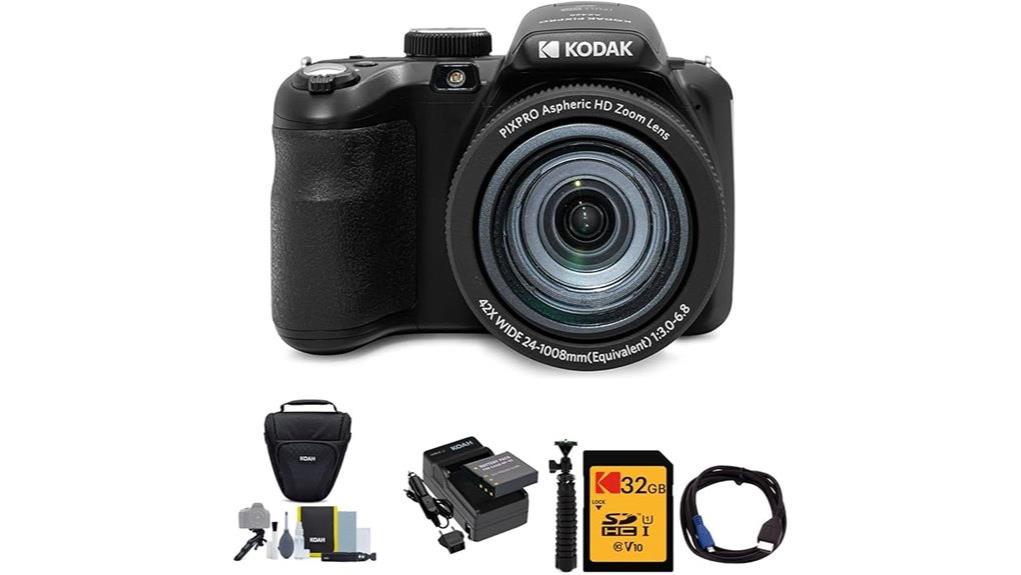
You’ll get an affordable travel-ready bridge camera with a massive 42x (24–1008mm) zoom, 20MP JPEGs from a 1/2.3″ CCD, and basic A/S/M controls in a compact body. Daylight shots are sharp with natural color, stabilization helps at long reach, but high-ISO noise, slow contrast AF in dim scenes, and 720p video limit its use. It’s great for beginners shooting travel and casual wildlife; keep a spare battery and tripod handy, and more details follow.
Some Key Takeaways
- Affordable travel-friendly bridge camera with 42x (24–1008mm equiv.) zoom and optical image stabilization.
- 20MP 1/2.3″ CCD yields good daylight JPEGs but limited high-ISO and RAW flexibility.
- Manual A/S/M modes and 9 FPS burst appeal to beginners learning exposure and stabilization.
- 720p/30fps video and basic Wi‑Fi suit casual clips, not professional video work.
- Best for travel, wildlife, and casual night shots; tripod, spare battery, and beginner guides recommended.
Who This Review Is For and the Camera’s Quick Verdict
If you want an affordable bridge camera that packs serious reach without the complexity of interchangeable lenses, the KODAK PIXPRO AZ425 is worth a look — it gives amateurs a 42x optical zoom (24–1008mm equivalent), 20MP stills, and basic manual controls in a compact, travel-ready body. You’ll find it suits beginners looking for travel, wildlife, and casual night shots; it isn’t for pros needing high ISO fidelity or RAW capture. Use it with a beginners guide to learn exposure and stabilization. Astrophotography tips will help you attempt star fields, but expect limits from the small CCD sensor. This review is tailored to mirrorless camera enthusiasts who shop for essential gear and accessories for mirrorless cameras.
What the KODAK PIXPRO AZ425 Astro Zoom Offers (Key Specs at a Glance)
Although it’s aimed at amateurs, the PIXPRO AZ425 packs a surprising feature set into a compact bridge body: a 20MP 1/2.3″ CCD sensor, a 42x optical zoom lens (24–1008mm equivalent), optical image stabilization, and basic manual exposure modes (A, S, M) alongside full auto. You get 20MP JPEGs, 9 FPS burst, contrast-detect AF with 9 points, panorama and scene modes, plus 720p video. Exposure options include aperture, shutter, and full manual controls, while metering and flash modes are versatile. The bundle adds a 32GB UHS-I card, spare battery, cables and case for immediate use. Perfect Tripods caters to photographers looking for tripod-compatible gear and accessories, making it easy to outfit the AZ425 for stable shooting with tripod accessories.
How the AZ425 Performs for Photos: Daylight, Telephoto, Low Light, and Autofocus
When you shoot in good daylight the AZ425 delivers sharp, usable 20MP JPEGs with natural color and decent dynamic range for its 1/2.3″ CCD sensor, especially at wide and short telephoto focal lengths; images stay crisp thanks to the optical image stabilization and the lens’ solid resolving power up to about mid-zoom. You’ll appreciate lens sharpness and consistent color rendition in landscapes and portraits. At long telephoto you’ll see softness and noise rise; stabilize well or use a tripod. In low light expect limited high-ISO performance and slower contrast-detection autofocus, which hunts in dim scenes but is reliable in brighter conditions. For enthusiasts interested in exposure tools, pairing the camera with a dedicated light meter can help achieve more consistent results.
Video, Screen, Connectivity and Ease-of-Use in Everyday Shooting
While the AZ425 won’t replace a dedicated camcorder, its video features are straightforward and usable for casual clips: you get MP4 capture at up to 720p/30fps, basic continuous movie recording, and simple exposure controls in movie mode, though detail and low-light performance are limited by the small 1/2.3″ CCD and 720p ceiling. You’ll find the 3-inch LCD clear but not lightning-fast; screen responsiveness is adequate for framing and menu work but lags in quick autofocus hunting. Physical controls are intuitive, HDMI/USB make playback simple, and wifi reliability is fine for basic transfers and remote shooting, not pro workflows. This camera can pair well with external camera monitors to improve composition and visibility during everyday shooting.
Battery Life, Storage Limits and Bundle Accessories That Matter
Because the AZ425 uses a single rechargeable lithium‑ion cell and accepts only one SD/SDHC card up to 32 GB, you’ll want to plan shots and power carefully for longer outings. The included battery kit improves battery longevity versus generic spares, but expect to carry a spare for extended trips. Card compatibility is limited to 32 GB UHS‑I U1/Class 10 cards—your bundle’s 32 GB card provides decent buffer but fills faster with video. Accessory durability in the bundle (holster, tripod, cables) is reasonable for casual use. Charging convenience is solid with the AC adapter and USB cable included. For photographers who prioritize uninterrupted shooting, consider adding a dedicated spare battery to your kit.
Strengths and Trade-Offs Compared to Similar Bridge Cameras
Although the AZ425 targets enthusiasts who want vast reach without a heavy rig, it balances impressive telephoto capability and ease of use with clear compromises you should weigh. You get a standout zoom range (24–1008mm equivalent) and usable optical stabilization that keeps distant shots steady without gimbals. Manual controls and shooting modes let you shape exposure more than typical point-and-shoots, though the 1/2.3″ CCD and modest low-light performance trail rivals with larger sensors. Build quality is adequate for travel but not rugged; autofocus is serviceable but slower than hybrid systems. Overall, it’s a reach-focused, budget-minded bridge option. Consider pairing it with a lightweight travel tripod to stabilize long-reach shots on the go.
Should You Buy It? Best Use Cases and Final Buying Recommendation
If you need extreme reach without hauling a heavy lens system, the AZ425 is a sensible, budget-friendly pick that delivers 24–1008mm equivalent zoom, useful stabilization, and manual controls for creative shooting. You should buy it if you want a lightweight travel telephoto for landscapes, wildlife at a distance, or casual vacations where flexibility matters more than ultimate image quality. It’s also a plausible entry for budget astrophotography when you’re learning night framing and long exposures, though sensor limits cap faint-detail capture. Skip it if you need low-light excellence, fast RAW workflows, or pro-level optics. It also pairs well with high-resolution drones accessories and content for photographers exploring aerial perspectives.
Some Questions Answered
Does the Camera Support RAW (Dng/Raw) Image Capture?
No — the camera doesn’t offer RAW support; it records JPEGs only. You’ll rely on in-camera Image processing for color, sharpening, and noise reduction, so you can’t extract the extra tonal latitude or flexibility that DNG/RAW files provide. If you’re serious about heavy post-processing, you’ll want a camera with RAW capture. For casual shooting the AZ425’s JPEG output is usable, but it limits advanced editing options.
Can the AZ425 Be Powered via USB While Shooting?
No — you can’t rely on USB power to run the AZ425 while shooting. The camera supports battery charging via USB adapter for the rechargeable lithium-ion battery, but it doesn’t offer power passthrough to operate during capture. You’ll need external power solutions like a fully charged spare battery or a dedicated external power adapter/battery pack that replaces the internal cell to guarantee uninterrupted shooting. Battery charging and external power aren’t simultaneous.
Is There Built-In Bluetooth for Remote Control or Transfer?
No — the camera doesn’t include built‑in Bluetooth for remote control or transfer. You’ll rely on Wi‑Fi, wired USB/HDMI, or a physical wireless remote (if supported) for remote shutter use. App connectivity via Kodak’s app is listed for Wi‑Fi features, letting you transfer images and control some functions, but Bluetooth pairing and native Bluetooth remote support aren’t provided, so expect limited wireless remote flexibility.
Can the Lens Be Fitted With Screw-On Filters or Accessories?
Yes — you can fit screw-on filters and accessories to the lens using the camera’s filter threads, though sizes vary by adapter. You’ll often need a specific adapter or step-up ring to match common filter sizes because the built-in lens barrel isn’t a standard DSLR mount. A compatible lens hood (vendor-specific or threaded) helps reduce flare; check thread diameter and adapter compatibility before buying to guarantee a proper fit and secure attachment.
Does the Bundle Include a Spare/Pre-Charged Battery?
Yes — the retailer bundles include a rechargeable lithium-ion battery and charger kit, so battery availability is covered and you’ll get a spare pack feel. You shouldn’t expect pre charged options guaranteed; some listings ship uncharged. Check the specific retailer bundles to confirm whether batteries arrive charged, or to buy additional spare packs. That helps make certain you’ve got power on hand for travel or extended shooting sessions.


