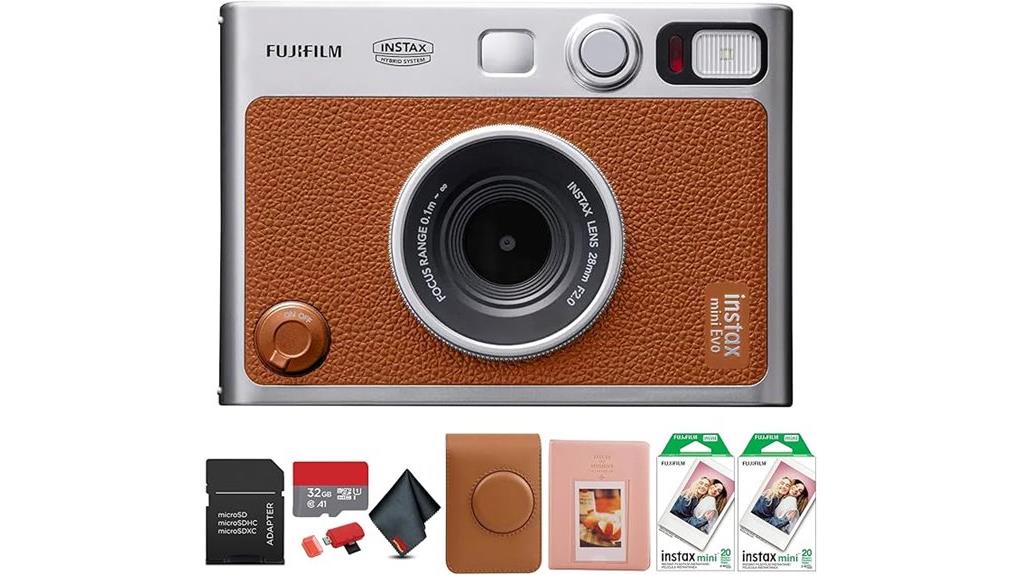
You’ll find the FUJIFILM INSTAX MINI EVO blends tactile retro controls with modern digital precision, giving you punchy midtones, limited shadow detail, and 100 stylistic combinations from ten lens and film effects. It saves high-res JPEGs to internal memory or a 32GB microSD, previews on a 3.0-inch LCD, and queues prints for selective output. Bluetooth and an app enable remote shooting and transfers. It’s bulky for pockets but travel-friendly; continue for a full breakdown of features and workflow. fujifilm instax mini camera features an automatic exposure control that adjusts to lighting conditions, ensuring vibrant, well-lit photos in various environments. With its compact design, this camera is perfect for spontaneous moments, allowing you to capture memories with ease. The built-in self-timer adds an element of fun to group shots, making it a great choice for parties and gatherings.
Some Key Takeaways
- Hybrid design combines digital JPEG capture with Instax Mini prints, letting you preview and save images before printing.
- Ten lens and ten film effects provide up to 100 stylistic combinations for on-camera creative control.
- 3.0-inch LCD, tripod mount, adjustable exposure/white balance, and macro mode improve framing and image quality.
- Bluetooth app connectivity, internal memory plus 32GB microSD, and reprint capability streamline backup and mobile printing.
- Solid build with tactile controls and good ergonomics, but bulkier than pocket Instax models and not water-resistant.
Hands-On First Impressions: Build, Size, and Usability
The Mini Evo feels noticeably solid in your hands, blending classic film-camera cues with modern heft—the brown body weighs about 2.18 pounds and measures 1.4 × 4.8 × 3.4 inches, so it’s bulkier than typical pocket Instax models but still manageable for shoulder-strap carry. You’ll notice tactile controls—film and lens-effect dials, dual shutter buttons—providing precise, immediate feedback. Layout is logical: grip, viewfinder, and screen align for efficient operation. Pocket portability is limited, so plan for the included shoulder bag. Materials and finish resist scuffs in normal use, and control spacing minimizes accidental inputs. For carrying options and protective designs, consider choosing a camera bag with dedicated compartments and padding for camera bags.
How It Shoots: Image Quality, Modes, and Creative Effects
Expect a mix of digital flexibility and classic Instax character: the Mini Evo captures JPEGs to internal memory or a microSD card while letting you apply 10 lens effects and 10 film effects in-camera for up to 100 stylistic combinations before you print. You’ll evaluate sharpness, dynamic range, and color rendering objectively: images lean toward punchy midtones with limited shadow detail. Adjustable exposure, white balance, and macro mode give control; tripod mount helps reduce unwanted motion blur. The effect dials enable practical on-camera color grading and stylistic trials, letting you iterate digitally and selectively print only the strongest compositions. The camera pairs well with post-processing tools and Lightroom presets to further refine printed results.
Printing Workflow: From Capture to Instax Mini Print
Because you can preview and save shots digitally, the Mini Evo gives you a controlled, step-by-step printing workflow that minimizes wasted film. You review images on the 3.0-inch LCD, select exposure or film-effect variations, then queue prints to manage print sequencing precisely. You can reprint from internal memory or microSD, reducing impulse prints. The mechanical lever and print motor produce consistent timing for exposure development; Fujifilm’s dye chemistry in Instax Mini film yields predictable color shifts across effects. Overall, the pipeline combines digital curation with tactile output so you optimize each physical print for composition and tone. This workflow pairs well with dye-sublimation printing techniques that also prioritize color fidelity and tactile output, especially when paired with dye-sublimation photo printers.
Connectivity and Storage: App, Bluetooth, and Memory Options
Several connectivity and storage paths give you precise control over how images move between the Mini Evo, your phone, and archival media. You pair via Bluetooth to the INSTAX MINI EVO app for remote shooting, smartphone printing, and lossless transfer of selected captures. The camera saves to internal memory or the included 32GB microSD, letting you batch-select images for mobile printing without re-shooting. Use the app to adjust metadata, then export to your phone for cloud backup or external archives. Physical prints remain optional; reprint from the camera’s screen or print directly from the app when you need a tangible copy. For smartphone photographers looking for accessories, consider essential camera remotes like Bluetooth remotes to expand your shooting options.
Who Should Buy the INSTAX MINI EVO and Final Verdict
If you value tactile instant prints but also want digital control and selective saving, the INSTAX MINI EVO is a strong fit: it blends classic analog charm with a flexible hybrid workflow that lets you shoot, tweak exposure and effects, preview on the 3.0-inch screen, then decide which shots to print or archive to the included microSD. You should buy it if you want deliberate creativity, easy reprints, and app-driven transfers. It suits travel photographers who want compact instant output and digital backups, and gift buyers seeking a distinctive, usable present. Final verdict: thoughtful hybrid design, solid features, limited water resistance. The MINI EVO is an excellent choice for fans of instant cameras who appreciate both physical prints and digital convenience.
Some Questions Answered
Does the Camera Support RAW or Uncompressed Digital File Formats?
No — the camera doesn’t offer RAW support or Lossless capture. You’ll get compressed JPEGs for digital storage and the internal screen lets you reprint selected frames. That means you can’t extract uncompressed sensor data for heavy post-processing workflows. If you need RAW or true lossless files, you’ll want a different camera system; here, the hybrid design prioritizes instant-print convenience and creative film-effect presets over professional RAW workflows.
Can I Use Third-Party Instax-Compatible Film Cartridges?
Yes — you can use third party cartridges, but check film compatibility carefully. You’ll want reputable Instax-compatible film from makers that match Instax Mini dimensions and chemistry to avoid jams, exposure issues, or print quality loss. Third-party films often work, yet may vary in color balance, sensitivity, and frame alignment. Test a pack before critical shoots, inspect expiry, and return to Fujifilm originals if you encounter consistent defects or mechanical problems.
Is the Battery User-Replaceable or Rechargeable via USB-C?
The battery is user replaceable; you can remove and swap it when needed, and the camera also supports usb c charging for convenient recharges. You’ll want to confirm compatible replacement cells and follow Fujifilm’s instructions to avoid damage. Expect typical hybrid-camera runtime constraints when printing frequently. Keep spares or charge with usb c before outings to maintain shooting and printing continuity; storage and handling affect battery lifespan and performance.
Are Firmware Updates Available and How Are They Installed?
Yes — firmware availability exists and Fujifilm occasionally releases updates. You check for firmware availability via the INSTAX MINI EVO app or Fujifilm support pages. The update process involves downloading firmware to your computer or smartphone, transferring it to the camera’s internal memory or microSD, then initiating installation from the camera menu; follow on-screen prompts and keep power steady. You’ll verify version afterwards in settings. In addition to firmware updates, the Fujifilm Instax Mini camera features a variety of modes that enhance user experience. Photographers can easily switch between different settings to capture the perfect moment, whether it’s a brightly lit outdoor scene or a cozy indoor gathering. Furthermore, the compact design makes it a portable choice for both everyday use and special occasions.
Does the Camera Include Multilingual On-Screen Menus and Manuals?
Yes — you’ll find on-screen menu languages and a printed manual to guide setup and operation. The camera’s 3.0-inch LCD supports multiple menu languages for interface navigation, while the bundled printed manual covers basic functions, safety and warranty pointers. You’ll still want to check the included literature for full language listings and consult Fujifilm support or the online manual PDF if you need additional language options or more detailed troubleshooting.


