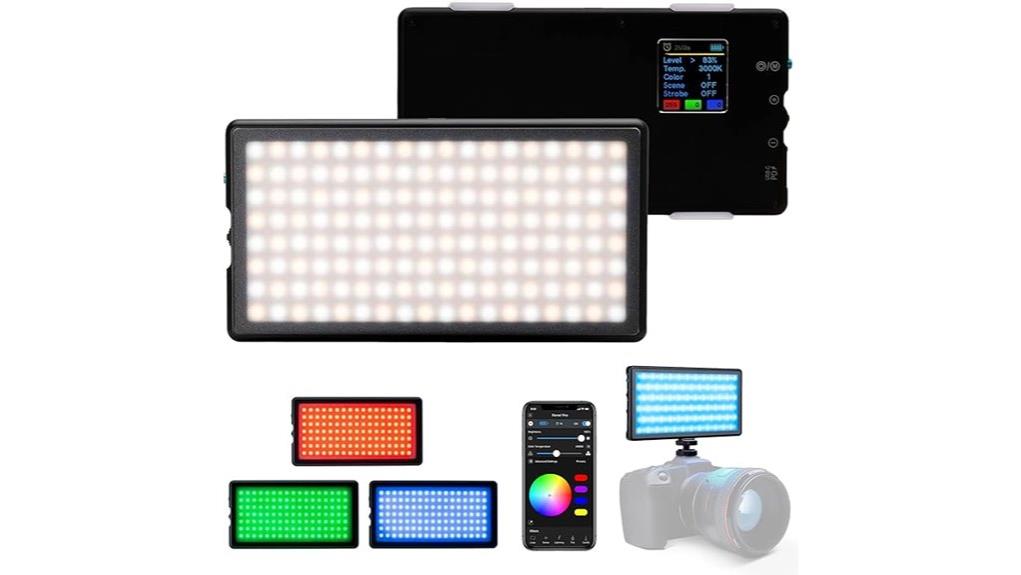
You’ll find the Lume Cube Panel Pro 2.0 RGB is a compact, mountable on‑camera light that gives honest full‑spectrum color from 2700–7500K, linear dimming from 1–100%, and flicker‑free output for 24–120 fps. It’s built for run‑and‑gun and small studio work, snaps on a diffuser, and mounts via cold shoe or 3/4″‑20 thread. Battery life is predictable at mid power and the Bluetooth app handles presets and multi‑panel control — keep going to see detailed performance and alternatives.
Some Key Takeaways
- Compact, mountable RGB LED panel for DSLR use, ideal for run-and-gun and small-studio workflows.
- Full-spectrum white control (2700K–7500K) with honest color rendering and minimal hue drift.
- Smooth app-driven color/temperature adjustments, presets, group controls, and responsive Bluetooth pairing.
- Brightness 1%–100% with linear scaling, flicker-free at 24–120 fps; snap-on diffuser for consistent output.
- Over four hours runtime at 50% brightness; predictable drain but saturated RGB reduces battery life.
What the Lume Cube Panel Pro 2.0 RGB Actually Is and Who It’s For
Although it’s compact enough to mount on a DSLR, the Lume Cube Panel Pro 2.0 RGB is a professional-grade, portable LED panel that gives you full-spectrum color control and a wide 2700K–7500K temperature range for precise lighting adjustments. You’ll find it’s engineered for creators who need reliable, compact portable lighting and creator gear that integrates with DSLR setups. You’ll appreciate app-driven Bluetooth controls, adjustable 1%–100% brightness, and a snap-on diffuser for consistent output. Its runtime and mounting options suit run-and-gun photo and video workflows. It’s for shooters who prioritize color flexibility, control, and on-camera convenience. This panel is a great fit for photographers and videographers focused on portable LED panels who want reliable, mountable lighting for both studio and field work.
Color, Temperature, and Brightness: Real-World Performance Tests
Having established what the Panel Pro 2.0 is and who it suits, let’s test how its color, temperature, and brightness hold up under real shooting conditions. You’ll find color rendering honest across the 2700K–7500K range, with smooth white balance shifts and minimal hue drift when dialing presets via the app. RGB modes deliver saturated tones useful for accenting, while dynamic gels emulate practical gels without physical filters. Brightness scales linearly from 1% to 100%, giving usable output for close-up portraits and fill light. At mid power settings you get clean, flicker-free output suitable for 24–120 fps capture. Panels like the Panel Pro 2.0 are ideal for photographers seeking perfect lighting in studio and on-location shoots.
Battery Life, Mounting, and Portability on Shoots
When you’re shooting on location, the Panel Pro 2.0’s battery performance is straightforward and dependable: a single charge delivers over four hours of continuous runtime at 50% brightness, which covers most run-and-gun portrait or B-roll sessions without swap-outs. You’ll find predictable drain rates across color temps and RGB settings; high-CRI white and intense saturated hues reduce runtime. Mounting is versatile: cold shoe plus threaded 3/4"-20 options let you attach on-camera or rig it on arms for a long throw when needed. The snap-on diffuser and compact form enable quick swap configurations and genuinely portable setups for field workflow. This makes it a strong choice for photographers looking to brighten photos with a compact, versatile light.
App Controls and Workflow: Bluetooth, Presets, and Usability
How quickly can you dial in the exact hue, temperature, and output you need? You connect via Bluetooth pairing in seconds; the Lume Cube App discovers the Panel Pro 2.0 reliably and maintains a stable link on set. Controls are responsive—color, 2700K–7500K temperature, and 1%–100% brightness adjust with minimal latency. Preset management is straightforward: save, recall, and rename scenes for repeatable setups. The UI exposes numeric values and color wheels for precise tweaking, plus group controls for multi-panel rigs. Workflow is efficient for run-and-gun shoots and controlled studio work, with predictable, technical control. Their compact panels pair well with 5-in-1 reflectors to shape and refine your light on location.
Should You Buy It? Use-Case Recommendations and Alternatives
If you need a compact, full‑spectrum on‑camera light that gives precise control over hue, color temperature (2700–7500K), and output (1–100%), the Lume Cube Panel Pro 2.0 is a strong choice—its reliable Bluetooth app, presets, and multi‑panel grouping make repeatable setups fast, while the included snap‑on diffuser and DSLR mounting options suit run‑and‑gun and small studio shoots. You should buy it if you prioritize portable, controllable accents, practical runtime, and integrated app workflows for hybrid photo/video work. For dedicated studio lighting or tight budgets, compare pro LED panels or cheaper budget alternatives that sacrifice app features and form factor. For more consistent results in your sessions, pair it with continuous LED lighting to shape and maintain steady illumination.
Some Questions Answered
Does It Include a Built-In Microphone or Speaker for Video Capture?
No, it doesn't include a built in microphone or onboard speaker. You’ll rely on your camera or external audio gear for capture. The panel focuses on lighting: adjustable RGB color, temperature, and brightness with Bluetooth app control. Its onboard features are limited to lighting adjustments and mounting options; there’s no audio input/output hardware. For video shoots you should plan for a dedicated microphone or recorder to guarantee quality sound capture.
Can the Panel Pro 2.0 RGB Be Used Underwater or in Rain?
No — it’s not rated for underwater use or heavy rain exposure. You won’t find an official waterproof rating for submersion, so avoid depth limits entirely. You can use it in light, controlled drizzle with protective housing, but prolonged wet conditions risk damage. For wet shoots, you should employ a fully waterproof case or select a light with an IP waterproof rating specifying safe depth limits for reliable underwater operation.
Are There Firmware Updates, and How Are They Installed?
Yes — firmware updates are available and you’ll install them via the Lume Cube app. Updates improve stability, add features, and fix bugs. Installation methods: connect the panel to your phone over Bluetooth, open the app, check for firmware updates, then start the download and follow prompts; keep the light powered and close to your phone during transfer. The process is straightforward, but don’t interrupt power or Bluetooth mid-update.
Does It Support DMX Control or Studio Lighting Integration?
No — it doesn’t natively support DMX workflow or direct console mapping. You’ll rely on Bluetooth and the Lume Cube app for color, temperature, and brightness control, so integrating into a traditional DMX studio requires an intermediary (DMX-over-Bluetooth bridge or a smart controller that maps app commands to DMX channels). Technically, you can achieve console mapping via third-party hardware/software, but expect added latency and limited professional DMX feature parity.
Is There an International Power Adapter for Charging Included?
No, an international adapter for charging isn't included. You’ll get the rechargeable battery and standard charging cable, but no dedicated international adapter for global charging. That means you'll need a separate plug adapter or a region-appropriate charger to use outlets abroad. Technically, confirm the supplied charger’s input voltage; if it accepts 100–240V, you’ll only need a plug adapter for sockets, not a voltage converter, for international use.


