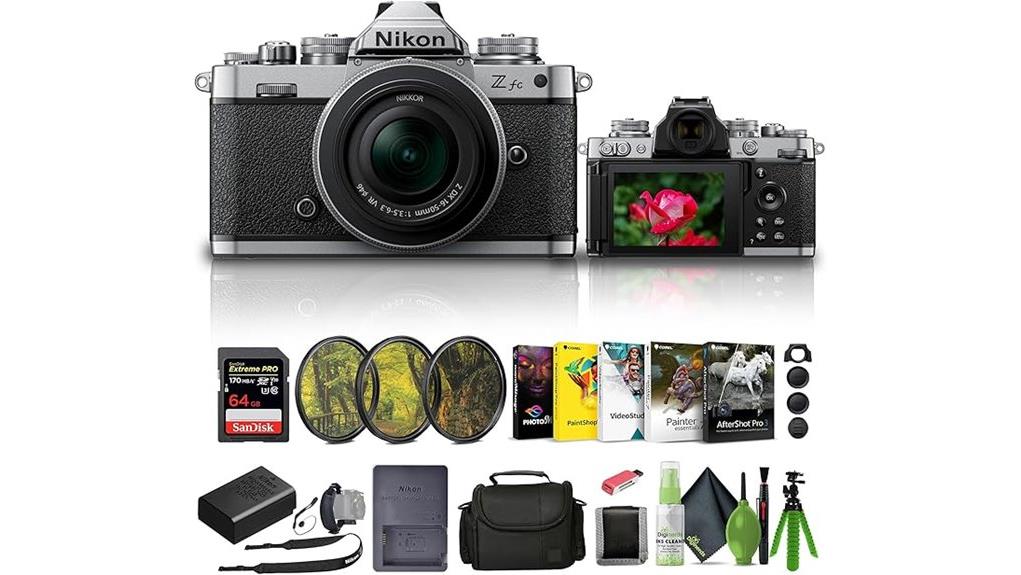
The Nikon Zfc with the 16–50mm Z lens gives you a compact, retro-styled mirrorless body with a 20.9MP DX sensor, reliable eye-detection AF, and 11 fps bursts—great for street, travel, and everyday use. You’ll get pleasant JPEGs straight from camera, usable high‑ISO performance, and effective lens VR for handheld stills and video; the kit lens is versatile but limited in low light and bokeh, so consider primes for more reach and isolation. More specifics follow below.
Some Key Takeaways
- Retro-styled Nikon Zfc paired with compact 16–50mm VR lens offers modern mirrorless performance in a discreet, portable package.
- 20.9MP DX sensor and EXPEED 6 deliver balanced image quality with usable ISO up to 25600; shoot RAW for maximum grading latitude.
- Fast and reliable autofocus with eye detection, 11 FPS burst, and good subject switching for street and everyday action.
- Kit lens provides effective VR stabilization and versatility, but limited aperture reduces low-light and bokeh capability.
- Strong for vloggers: 4K UHD, articulating touchscreen, external mic, HDMI Type A, and USB streaming, though battery life is modest.
Quick Verdict: Who the Nikon Zfc + 16–50mm Is Best For
If you want a compact mirrorless that mixes retro style with modern performance, the Nikon Zfc paired with the 16–50mm kit lens is a strong choice. You’ll appreciate its tactile dials, articulating touchscreen, and light kit bundle for travel and quick shoots. It suits beginners enthusiasts seeking intuitive controls and solid autofocus, plus hobbyists who value a polished JPEG pipeline for social sharing. Street photographers will like the discreet silhouette, responsive AF, and stabilised kit lens for handheld framing. It’s not for demanding pros who need larger sensors or pro-grade lenses, but it’s versatile and approachable. It also benefits from an ecosystem of essential accessories for mirrorless users, including camera bags and spare batteries.
20.9MP DX Sensor and Image Quality: Photos, Low Light, and JPEG vs RAW
Because the Zfc uses a 20.9MP DX-format CMOS and Nikon’s EXPEED 6 engine, you get a balance of resolution and noise control that favors everyday shooting and social-ready output. You’ll capture crisp 20.9MP files with ample detail for prints and web use. High ISO performance is respectable: ISO up to 25600 yields usable images with conservative noise reduction, preserving midtone detail. Shoot JPEGs for fast turnaround—the camera’s JPEG processing delivers pleasant color and sharpening straight from camera. If you need latitude for grading or heavy edits, shoot RAW to retain highlight and shadow information for careful post-processing. Keeping your sensor clean with proper sensor swabs ensures those crisp files are free of distracting spots and artifacts.
Autofocus, Burst Shooting, and Stabilization: Real-World Performance Tests
To get a clear sense of how the Zfc performs in everyday shooting, I tested its autofocus tracking, burst rates, and lens VR across a variety of real-world scenarios — daylight sports, dim indoor events, and handheld video. You’ll find Eye tracking accuracy strong on faces and eyes at wide apertures, with quick AF subject switching between people and moving subjects. Continuous shooting at 11 FPS is usable; the Burst buffer holds several dozen compressed frames before slowing. Lens VR steadies handheld frames effectively for stills and casual panning, though low-light AF hunts more often at slower shutter speeds. For storing and quickly transferring all those high-speed images, a fast memory card reader is essential to keep your workflow efficient.
Video and Vlogging: 4K, Mic Support, Flip Screen, and Live Streaming Workflow
While the Zfc looks like a retro stills camera, its video features make it a capable tool for vlogging and live streaming, offering UHD 4K capture, external mic support, and a fully articulating touchscreen that simplifies framing and monitoring. You’ll get clean 4K MP4 clips with reliable AF and lens VR for handheld b-roll. The flip screen and HDMI Type A output let you add an external monitor for better color-critical framing and multicam feeds. USB/ Wi‑Fi streaming works with computers and mobile devices, but plan for modest battery life during long sessions or use USB power for extended live workflows. For better-looking footage in tight indoor setups, consider pairing the camera with video light panels to improve subject illumination.
What’s in the Box, Value for Money, and Should You Buy the Kit Lens or Upgrade?
Look inside the box and you’ll find a surprisingly complete starter kit: the Zfc body in silver, the NIKKOR Z DX 16–50mm f/3.5–6.3 VR kit lens, EN‑EL25 battery and MH‑32 charger, body and lens caps, DK‑32 eyecup, AN‑DC23 strap, a SanDisk Extreme PRO 64GB card, a 46mm three‑piece filter set, soft bag, 12‑inch flexible tripod, card reader and wallet, cleaning kit, hand strap, lens cap keeper, and Corel photo software — everything you need to start shooting and streaming right away. That breadth boosts value for money: you get a capable 20.9MP DX body, stabilization, 4K video and accessories for content creation. The 16–50mm is compact and versatile, but its aperture limits low‑light lens performance and bokeh. If you prioritize low‑light, subject isolation or faster AF, consider upgrade or budget alternatives like the 35mm f/1.8 DX for a higher‑quality, affordable prime. Gear Guide for Enthusiast Photographers and Camera Fans notes this kit is well suited to hobbyists and content creators seeking a compact system with camera accessories to get started.
Some Questions Answered
Does the Zfc Support In-Camera Battery Charging via USB-C?
No, the Zfc doesn’t support in-camera USB charging. You’ll need to recharge the EN-EL25 battery in the supplied MH-32 charger or use an external USB-C charger with a compatible battery adapter. USB charging absence affects USB charging convenience but not Battery life itself; expect typical EN-EL25 runtimes (moderate for a 20.9MP mirrorless) and plan to carry spare batteries or a power bank with a proper charger to maintain shooting sessions.
Can the Camera Shoot Time-Lapse or Intervalometer Sequences Natively?
Yes — you can create interval shooting sequences natively; the camera offers timelapse settings via its Interval Timer Shooting menu. You’ll set interval duration, number of shots, and start time, then the camera captures frames automatically for later assembly into a timelapse. It’s precise and suitable for long runs, and you can combine it with exposure modes, silent shooting, and external power for extended interval shooting sessions.
Is There In-Body Image Stabilization (IBIS) in the Zfc Body?
No — the Zfc lacks in-body image stabilization, so you won’t get sensor shift stabilization from the camera body. You’ll rely on the kit lens’ optical VR (lens-based stabilization) for shake reduction. As an advanced user, you’ll plan shooting accordingly: use VR lenses, faster shutter speeds, tripods for low light, or higher ISOs. The Zfc’s stabilization approach is lens-dependent rather than sensor-shift IBIS inside the camera.
What Third-Party Lenses Are Fully Compatible With Z-Mount Autofocus?
Most third-party Z‑mount lenses from Sigma and Tamron, plus many Viltrox and Samyang models, support native autofocus on Nikon Z bodies when they’re made for Z‑mount. You’ll want to verify model-specific compatibility and firmware updates for full AF, aperture control, and stabilization. Check manufacturers’ compatibility lists and Nikon’s firmware notes; some adapted F‑mount lenses via FTZ adapter also deliver reliable AF, but performance can vary by lens and camera firmware.
Does the Kit Include a Warranty Card and International Coverage?
No, the kit doesn’t explicitly include a warranty card or international registration paperwork. You’ll get the standard product warranty and a voluntary 30-day return guarantee, but warranty duration specifics and international coverage depend on your region and retailer. You should register the product online or contact Nikon support for international registration, confirm warranty duration, and request any physical warranty card if needed to guarantee full global support and service eligibility.


