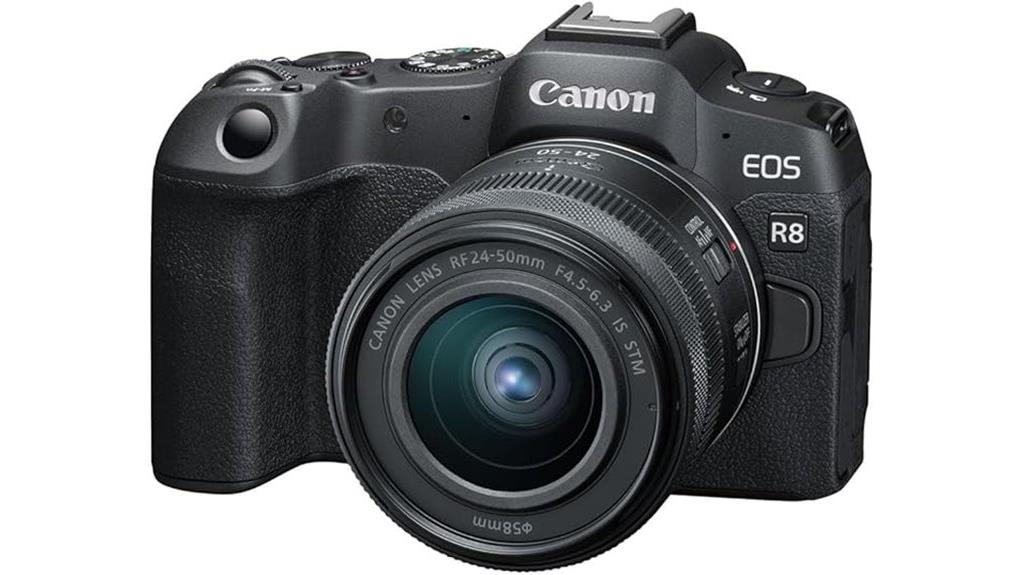
You’ll get a compact full‑frame hybrid that balances stills and video: a 24.2MP sensor with DIGIC X delivers clean RAWs and usable high‑ISO performance, while 10‑bit 4K up to 60p and reliable sensor‑based AF cover vlogging and travel shooting. The RF 24–50mm kit lens is lightweight with optical IS and quiet STM focus, though there’s no in‑body stabilization and battery life is modest during heavy 4K60 use — keep exploring for detailed tradeoffs and alternatives.
Some Key Takeaways
- Compact full‑frame mirrorless offering 24.2MP stills and DIGIC X processing for clean JPEGs and usable RAW.
- 10‑bit 4K video up to 60p with microphone/headphone jacks, USB‑C, and movie‑rotation metadata.
- Includes RF 24–50mm f/4.5–6.3 IS STM lens, providing versatile travel focal range and lens‑based optical IS.
- Fast sensor‑based AF with reliable eye/animal tracking and near‑silent STM focusing for vlogging.
- Built‑in Wi‑Fi/Bluetooth with UVC/UAC webcam support enables clean Full HD streaming without drivers.
Quick Verdict : Who the EOS R8 + 24–50mm Is Best For
Who needs the EOS R8 with the 24–50mm kit? You do if you want a compact full-frame system that balances stills and video performance. The 24.2MP sensor and DIGIC X processor deliver usable RAW and 10-bit 4K up to 60p, so beginner vloggers get clean footage and UVC/UAC streaming without complex setup. Travel photographers benefit from the lightweight body, 24–50mm versatile field of view, and lens IS for handheld shots. Autofocus is fast and quiet with STM, and connectivity supports remote control and transfers. It’s optimized for creators prioritizing portability, image quality, and straightforward workflow. The kit is particularly appealing to mirrorless camera enthusiasts who value compact gear and interchangeable lenses.
What’s in the Box and Key Specs at a Glance
Below is what you’ll find in the box and the headline specs to know at a glance: the package includes the EOS R8 body, Canon RF 24–50mm f/4.5–6.3 IS STM lens, LP‑E17 battery, LC‑E17 charger, camera cover, and strap, while the camera itself pairs a 24.2MP full‑frame CMOS sensor with a DIGIC X processor, 10‑bit 4K/60p video, 6.5 fps continuous shooting, lens‑based optical IS, USB‑C and micro‑HDMI ports, microphone/headphone jacks, built‑in Wi‑Fi/Bluetooth with UVC/UAC webcam support, a 3‑inch 2.36M‑dot LCD and an electronic viewfinder. You’ll get accessory compatibility via the RF mount and ports; color options are limited to black. Many camera enthusiasts will also want essential HDMI accessories like adapters, cables, and capture devices for clean HDMI output and monitoring with external recorders HDMI accessories.
Image Quality and Low-Light Performance (24.2MP Full-Frame, RAW/DNG)
After covering the box contents and headline specs, let’s look at the EOS R8’s performance, particularly its lowlight performance and image quality. You get a 24.2MP full‑frame sensor and DIGIC X processing that yield clean files with controlled noise. High iso performance is solid to ISO 3200–6400 for usable detail; push further with noise reduction in raw workflow. Dynamic range preserves midtones and recoverable highlights in RAW/DNG files. Low light autofocus locks reliably on subjects using sensor-based detection, aiding handheld shots. Overall, the R8 balances resolution, noise control, and tonal latitude for practical low‑light use. For those who use motion control gear like camera sliders, pairing the R8 with a quality slider can help capture smooth low‑light timelapses with stable camera movement.
Autofocus, Stabilization, and Real-World Shooting Speed
When you need quick, reliable subject acquisition, the R8 delivers with fast sensor-based AF aided by the RF 24-50mm lens’s STM motor for near‑silent, smooth focusing. You’ll get consistent eye tracking for people and animals, improving keeper rates in unpredictable scenes. Lens firmware updates refine focus mapping and compatibility; install updates to maximize performance. Stabilization modes rely on the lens’ optical IS; handheld shots benefit but you shouldn’t expect in-body compensation. Burst responsiveness is adequate for everyday action at 6.5 FPS, with processor buffering that favors JPEGs over long RAW bursts. Controls remain intuitive for rapid adjustments. Consider pairing the kit with a tripod head designed for quick pans and secure locking to fully leverage stable shooting with tripod heads.
Video Features for Creators : 4K60, 10-Bit, UVC/UAC Streaming
Frequently, creators will find the R8’s video toolkit meets pro-level needs: it records 4K UHD up to 60p in 10-bit, offers MP4 and MOV containers, and embeds movie-rotation metadata and Aspect Markers for vertical and social formats. You’ll capture 10-bit footage that preserves tonal latitude for efficient Color Grading, and the DIGIC X pipeline maintains detail at higher bitrates. For livestreaming, UVC/UAC support delivers clean Full HD webcam output without drivers, simplifying setup for conferencing or Live Switching workflows. File naming, metadata, and portable codecs make post, multicam, and switcher integration straightforward and predictable. Consider adding a field monitor to your kit for reliable exposure and framing during shoots.
Ergonomics, Battery Life, Ports, and Day-to-Day Usability
Although compact, the R8’s control layout and light weight make it easy to hold for extended shoots, with a modest grip that balances well with the RF 24–50mm kit lens and leaves quick-access dials within thumb-and-index reach. You’ll appreciate deliberate button placement that reduces accidental presses and speeds mode changes. Grip comfort is sufficient for long handheld sessions, though larger hands may want an aftermarket thumb rest. The LP‑E17 battery delivers typical mirrorless runtime—full day with modest shooting or shorter during heavy 4K60 recording. Menu layout is logical; screen articulation aids framing and vlogging. Ports include USB‑C, micro‑HDMI, mic and headphone jacks. Explore our range of camera straps designed for passionate photographers to improve comfort and carry during long shoots.
Final Buying Considerations : Alternatives, Pros/Cons, and Who Should Skip It
If you’re weighing the R8 against other options, focus on what you need most—compact full‑frame image quality and versatile 4K video in a lightweight body—because that’s where this camera excels. For alternatives, consider mid‑range full‑frame bodies or APS‑C hybrids if budget or size tradeoffs matter; a price comparison will show rivals with slower processors or different ergonomics. Pros: excellent sensor, DIGIC X processing, UVC streaming, solid accessory compatibility via RF mount. Cons: modest battery, limited weather sealing, kit lens slow aperture. Skip it if you need rugged pro durability, top-tier fps, or guaranteed long term reliability without frequent firmware updates. Also remember to pick essential accessories like a sturdy camera bag and extra batteries to get the most from your setup and protect your gear, especially when using DSLR accessories.
Some Questions Answered
Can the R8 Use RF-S or EF Lenses With Adapters?
Yes — you can use RF-S and EF glass on the R8 with adapters. RF S compatibility requires an RF‑mount adapter (Canon EF‑EOS R or third‑party) that maintains electronic communication for AF and IS; EF adapters also let you mount EF lenses, preserving autofocus and stabilization in most cases. You’ll retain EXIF and aperture control, though some older EF lenses may have limited AF performance or slower tracking compared to native RF lenses.
Is In-Body Image Stabilization (IBIS) Available?
No — the R8 doesn’t offer In body stabilization? It lacks sensor shift IBIS, so you won’t get body-based motion correction. You’ll rely on the RF 24‑50mm lens’s optical image stabilizer and electronic stabilization for Video stabilization during recording or streaming. That means stabilization performance depends on lens OIS plus in-camera electronic processing; for best results, use stabilized lenses or gimbals for handheld shooting and smooth footage.
Does the Camera Support Dual Card Slots?
No — the camera doesn’t offer dual slots. You’ll have a single SD card slot, so you can’t use dual slots for simultaneous recording or memory redundancy onboard. That limits in-camera backup and overflow workflows; you’ll need to rely on frequent offloads, external backups, or tethered recording to achieve redundancy. For professional shoots where immediate backup is required, consider bodies with native dual-slot support or establish rigorous post-shoot redundancy procedures.
Can It Record External Clean HDMI Output Continuously?
Yes — you can output a clean HDMI feed to external recorders, and it delivers an uncluttered video signal suitable for capture. You’ll use the micro‑HDMI port for continuous external recording, provided your recorder supports the camera’s 4K/60p and 10‑bit capabilities. Make sure your recorder and power solution can handle long takes; the camera itself doesn’t impose a clean‑HDMI time limit aside from battery and heat constraints.
Is the Lp‑E17 Battery Compatible With USB-C Charging?
Yes — you can charge the LP‑E17 via USB‑C when the R8 supports USB‑C battery charging or when using an external USB‑C charger/power bank with appropriate output. For in‑camera USB‑C battery charging, verify firmware and accessory compatibility. Battery charging speed varies; using third‑party batteries may disable USB charging or void warranty, so confirm manufacturer specs. Always use reputable third‑party batteries and chargers that support proper voltage, current, and safety features.