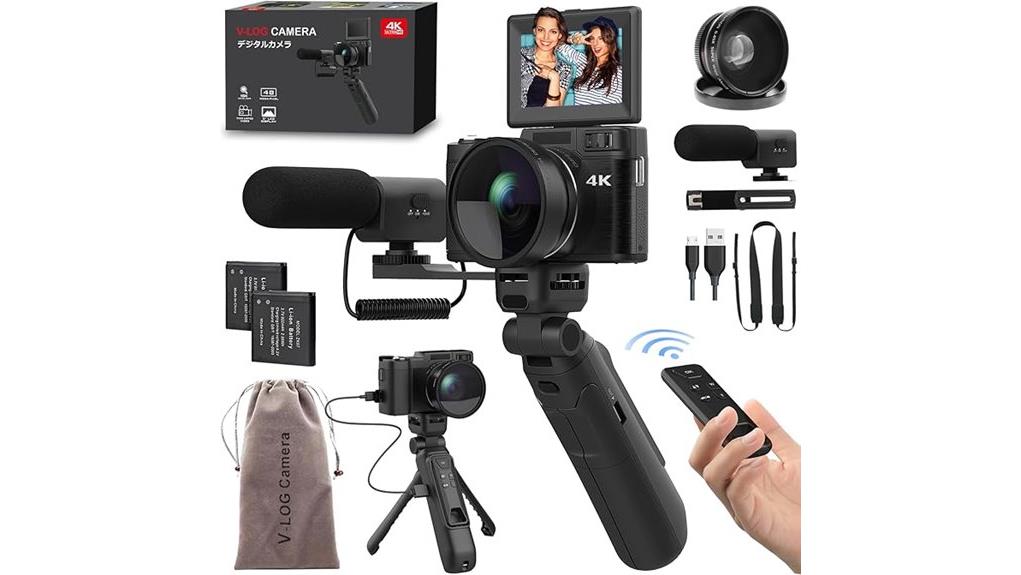
You’ll find the V‑CamPro‑7 a compact, budget 4K vlogging camera that gives sharp 48MP stills, a 180° flip screen, and bundled tripod-grip, mic and lenses—great for travel and streaming via USB. Its small 1/3.2″ sensor and digital stabilization limit low‑light and panning performance, so controlled lighting or a tripod helps. Battery life varies with 4K use; twin batteries and accessory kit add immediate value. Keep going and you’ll get specifics on image quirks, controls, and buying tips.
Some Key Takeaways
- V-Campro-7 records 4K video and captures sharp 48MP stills, ideal for vlogging and travel content in good light.
- Small 1/3.2″ sensor limits dynamic range and low-light detail, causing earlier shadow clipping and increased noise.
- Flip screen, compact body, and logical controls favor selfie framing and run-and-gun shooting ergonomics.
- Digital stabilization is available but crops the frame and can introduce judder during pans.
- Included accessory kit (tripod grip, mic, wide/macro lenses) and USB webcam support add strong out-of-box value.
V‑CamPro‑7 at a Glance: Who This 4K Camera Is For
Who should pick the V‑CamPro‑7? You should consider it if you need a compact vlogging camera that balances features and cost. You’re a creator who wants flip-screen framing, basic autofocus with tracking, and a kit that includes a tripod grip and external mic without high expense. It’s suited to budget travelers who prioritize portability, interchangeable shooting modes (time-lapse, slow motion), and USB webcam capability for streaming. You shouldn’t expect weather sealing or professional-grade stabilization. Choose this model when sensor size, convenience, and accessory value outweigh top-tier low-light or pro-level optics for your content workflow. It’s also a good choice for enthusiasts looking for essential mirrorless accessory bundles that simplify on-the-go shooting.
Real‑World Image and Video Performance (4K, 48MP Stills, Stabilization)
While the V‑CamPro‑7 can capture sharp 48MP stills and 4K video in good light, real‑world results reveal clear limits in dynamic range, noise control, and stabilization that you’ll notice in challenging conditions. You get detailed daylight captures with respectable color accuracy, but shadows clip sooner than on larger‑sensor rivals. In low‑light performance the small 1/3.2‑inch sensor struggles: luminance noise rises and fine detail softens despite the f/2 lens. Digital stabilization helps handheld 4K clips but introduces crop and occasional judder during panning. For controlled lighting or tripod work you’ll extract strong stills and usable 4K footage. If you’re frequently transferring large photo and video files, pairing the camera with a fast memory card reader can noticeably speed up your workflow.
Design, Controls, and Usability for Vloggers and Travelers
After you’ve seen how the V‑CamPro‑7 performs in varied lighting, its physical design and controls become a key part of whether you’ll actually use it for vlogging or travel. You get lightweight handling from a compact black body and recessed grip that reduces fatigue during long handheld shots. Buttons are logically placed; the flip screen rotates 180° for framing selfies and low angles. Intuitive menus make mode changes quick, though terse labels demand a brief learning curve. Dedicated macro and selfie controls speed workflows. Overall ergonomics favor run-and-gun creators, balancing portability with practical control placement. Perfect Tripods offers a range of compatible tripod mounts to enhance stability for on-the-go shooting with the V‑CamPro‑7 and other cameras, making them a useful accessory for travelers and vloggers looking to improve their setup with tripod gear.
Accessories, Battery Life, and Connectivity for Creators
Packed with a creator-focused accessory kit and two rechargeable batteries, the V‑CamPro‑7 aims to keep you shooting longer and more flexibly; the kit includes a tripod grip, external mic, wide-angle and macro lenses, a hot-shoe/threaded double-head bracket, and a 5‑m remote, covering common vlogging and travel scenarios. You get two lithium-ion cells for immediate use; measured Battery longevity varies with 4K use and LCD flip-screen time, so expect mid-length sessions rather than marathon shoots. USB connectivity supports webcam mode and fast file transfer, while limited Wireless connectivity (remote only) means you’ll still rely on cables for streaming and charging. Gear Guide for Enthusiast Photographers and Camera Fans highlights how accessory bundles can enhance camera versatility for hobbyists and creators.
Final Verdict: Strengths, Trade‑Offs, and When to Buy
The accessory kit and twin batteries make the V‑CamPro‑7 a practical choice for creators who need immediate, flexible shooting options, but the final decision should weigh its real-world strengths against clear trade‑offs. You get 4K video, 48MP stills, versatile lenses, flip-screen framing, and plug‑and‑play webcam utility — strong value for vlogging and travel. Trade‑offs include a small 1/3.2″ sensor, digital stabilization and non‑waterproof build. Consider buying timing: grab it during promotions or when a bundled accessory matters. Do a competitor comparison with similarly priced models offering larger sensors or optical stabilization before you commit. Also consider battery options and longevity when choosing accessories, especially compatible camera batteries for extended shoots.
Some Questions Answered
Does It Accept External Microphones via Hot Shoe or Only the Included Mic?
Yes — you can use an external mic via the hot shoe; you’re not limited to the included mic. You’ll get microphone compatibility with standard hot-shoe mounts and the camera’s external mic input (check connector type). If your mic uses a different connector you can use adapter options (hot shoe-to-TRS, TRRS adapters, or XLR adapters with a preamp). Verify pinout and power requirements to guarantee proper operation.
Can It Record While Charging via USB Power Bank?
Yes — you can record while charging via USB power bank; the camera supports battery passthrough so you won’t stop mid-shoot. Expect recording longevity to depend on power-bank output and heat: continuous 4K will draw more and may trigger thermal limits, so use a high-capacity, stable 5V/2A+ bank and monitor temps. Keep spare charged batteries and consider swapping when possible for uninterrupted longer sessions and safer performance.
Is the Flip Screen Usable in Harsh Sunlight Without Viewfinder?
Yes — you can use the flip screen in harsh sunlight, but expect screen glare that can reduce visibility. You’ll still frame shots, though fine detail may wash out. Touch responsiveness stays reliable, so menus and focus adjustments work even with bright light. For best results, shade the screen, angle it away from direct sun, or use a loupe; otherwise rely on histogram and exposure preview to confirm framing and exposure.
Are Firmware Updates Available and How Are They Installed?
Yes — firmware updates are available; check the seller or manufacturer for firmware availability. You’ll download the firmware file, copy it to a compatible microSD card, insert it into the camera, and follow the installation procedure in the manual (power on, navigate firmware/update menu). Don’t remove power during update. Verify firmware version after reboot. If unsure, contact support for the correct file and step‑by‑step guidance.
Does the Camera Support Interval RAW Captures for Timelapse?
No — it doesn’t support interval RAWs for timelapse. You’ll be limited to JPG sequences in time-lapse or looping modes, and silent shooting isn’t listed as an available capture option. You can use the built-in time-lapse and remote control features for automated intervals, but expect compressed JPG output and digital stabilization artifacts. For true interval RAWs and silent capture, you’ll need a different model or external intervalometer workflow with RAW-capable firmware.


