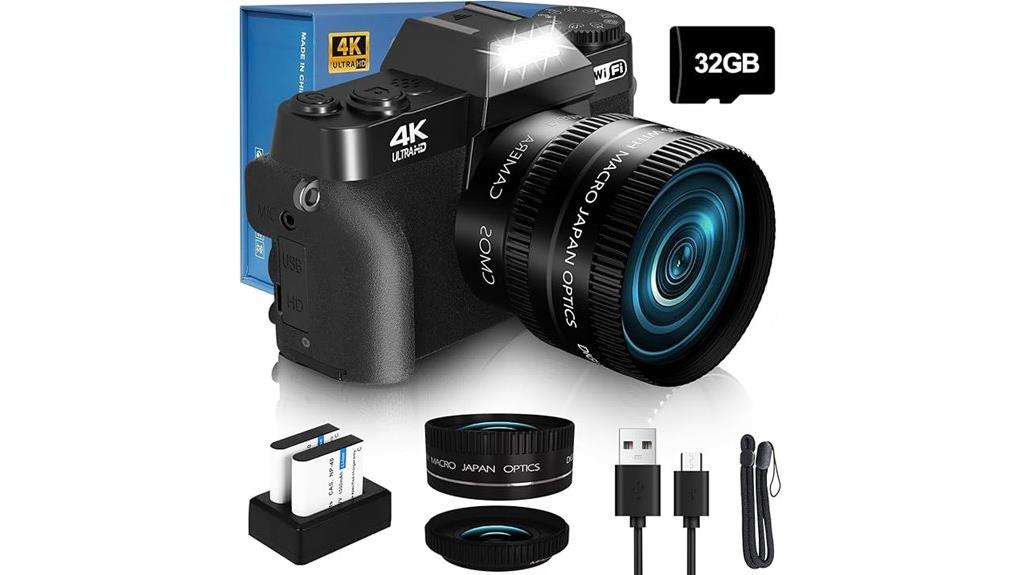
You’ll find the VJIANGER W02 (2026 Upgrade) a compact, easy-to-use vlogging camera that favors 4K clips and high‑resolution stills over low‑light prowess. It delivers sharp daylight photos, usable 4K video, a handy flip touchscreen, and plug‑and‑play webcam mode, but the small 1/2.5‑inch sensor, F3.5 lens, modest zoom, and capped 32 GB storage limit versatility. Autofocus and controls are straightforward, batteries run average, and further details on performance, accessories, and trade‑offs follow below.
Some Key Takeaways
- Compact vlogging camera with 1/2.5″ CMOS sensor offering up to 64 MP stills and 4K UHD video recording.
- Flip 3″ touchscreen, one‑touch record, and snappy autofocus make it easy for selfie and vlog workflows.
- Fixed 52 mm‑equivalent F3.5 lens supports close‑range macro but has limited low‑light reach and shallow zoom.
- Image quality strong in daylight and high‑res crops; noise and detail degrade at higher ISO and in low light.
- Good connectivity: Wi‑Fi, USB 2.0 webcam mode, microSD (32 GB included, 32 GB max), and micro HDMI for external monitors.
Who This Review Is For and Quick Verdict on the VJIANGER W02 (2026 Upgrade)
If you want an affordable, pocketable camera for casual vlogging, social videos, and family snapshots, the VJIANGER W02 (2026 Upgrade) delivers exactly that: simple 4K recording, a flip touchscreen for selfies, and Wi‑Fi webcam capability — all geared toward amateurs, students, and gift buyers rather than pros. You’ll get straightforward controls, reliable autofocus, and compact handling that suit beginner workflows and quick social uploads. Expect limits in low light and manual depth control, but battery and storage extras soften those constraints. For straightforward content creators and practical gift recommendations, it’s a sensible, budget-minded choice. It’s a good match for anyone building a kit around mirrorless cameras with essential accessories.
Key Specs at a Glance: Sensor, Lens, Video, Battery, and Connectivity
While it’s compact enough to slip into a pocket, the VJIANGER W02 packs a specific set of trade-offs you should know: a 1/2.5-inch CMOS sensor offering up to 64 MP stills (variants list 48–56 MP), a fixed 52 mm-equivalent wide/macro lens with F3.5 and 1× optical (up to 16× digital) zoom, and true 4K UHD video recording. You’ll get modern sensor tech in a small package, simple one-piece optics (limited lens coatings), basic digital stabilization, and JPEG output. Battery performance relies on two included cells; storage via microSD. Connectivity standards are Wi‑Fi and USB 2.0 for remote, transfer, and webcam use. It’s well suited for photographers who want to brighten your photography with compact on-camera LED lights.
Real-World Photo and Video Performance: Daylight, Low Light, Macro, and 4K Clips
Because the W02 pairs a small 1/2.5‑inch CMOS sensor with a fixed F3.5 lens, you’ll notice sharp, detailed images in good daylight but faster degradation as light falls off — high-res 64MP output gives pleasing crops outdoors yet reveals noise and detail-loss once ISO climbs. In daylight video and 4K clips you’ll get stable, serviceable footage with decent color fidelity and usable dynamic range for social uploads. Low light exposes the sensor’s limits: grain, softened edges, and blown highlights if you push exposure. Macro shots are surprisingly competent at close range but rely on steady hands and good light. For cleaning and maintaining that sharp daytime performance, proper lens care with lens cleaners significantly helps preserve image clarity.
Usability and Controls: Screen, Menus, Autofocus, and Vlogging Features
Although compact, the W02’s controls are straightforward and designed for quick vlogging setups, so you’ll spend less time fiddling and more time shooting. You’ll appreciate the 3-inch flip screen for framing and preview; screen responsiveness is good for taps and quick framing changes, though heavy gestures lag occasionally. Menu navigation is logical: core settings sit near the top level, so you’ll reach ISO, exposure, and video modes without an in-depth exploration. Autofocus is snappy in good light, with a clear focusing indicator when you press the shutter. Vlogging features like flip LCD, simple mic input, and one-touch record speed workflow. For better-looking footage in those quick setups, pairing the W02 with continuous LED lighting can make a noticeable difference.
Connectivity, Storage, Webcam Use, and Battery Life in Day-to-Day Use
If you plan to use the W02 as a daily vlogging tool or webcam, its connectivity and storage options are straightforward and reliable: Wi‑Fi handles remote control and quick transfers to your phone, while the USB 2.0 port lets you run it as a PC webcam in Camera mode without extra drivers. You’ll appreciate Wi‑Fi stability for remote framing, though range and interference matter. Storage management is simple with the included 32 GB microSD (max 32 GB); swap cards for extended shoots. As a USB webcam it’s plug‑and‑play, and two included batteries improve Battery longevity for all‑day use. For photographers who rely on external displays, using a quality micro HDMI cable can ensure a reliable connection between camera and monitor.
What It Gets Right and the Trade-Offs: Strengths, Limitations, and Who Should Buy It
When you’re deciding whether the VJIANGER W02 is right for you, focus on its clear strengths—compact, easy-to-use design, 4K video and high-megapixel stills, flip LCD for vlogging, Wi‑Fi and plug‑in webcam functionality—and weigh them against compromises like a small 1/2.5″ sensor, modest F3.5 aperture, limited optical zoom, and capped storage/battery expectations. You’ll appreciate solid build quality and usable color accuracy for online content, fast processing speed for basic edits, and straightforward webcam use. Trade-offs: limited low-light performance, constrained framing flexibility, and average battery longevity. Buy it if you want affordable, portable vlogging and casual photography. If you’re also exploring wider shooting options, consider how this fits into a broader 360 camera gear setup for capturing more immersive angles.
Practical Buying Tips: Accessories, microSD Choice, Mounting, and Warranty Considerations
For practical buying, focus on a few targeted upgrades and checks that directly affect daily use: pick a high-quality microSD card (UHS‑I U3 or better) to sustain 4K recording, budget for spare batteries to offset modest runtime, and choose a low-profile 1/4″ tripod or tabletop mount for stable vlogging; also verify the seller’s warranty and return policy before purchase so you’re covered for defects or compatibility issues. Create an accessory checklist: extra 32–128GB U3 cards, two spare batteries, compact charger, soft case, and small LED light. Watch warranty pitfalls: confirm length, what’s excluded, and authorized repair channels. Consider pairing the camera with a portable power bank from a reputable power solutions provider to extend shooting time on location.
Some Questions Answered
Can This Camera Shoot in RAW Format?
No — it doesn’t offer RAW support. You’ll get JPEG-only files, so Sensor performance is constrained by in-camera processing. You’ll still be able to tweak Color profiles and white balance, but you’ll lose the latitude RAW gives for highlight recovery and heavy edits. Expect limited Dynamic range compared with RAW-capable models; rely on careful exposure and conservative edits to preserve detail when shooting scenes with challenging contrast.
Is the Lens Filter Thread Compatible With Common Filters?
Yes — the lens filter thread size is 52 mm, so you’ll find broad filter compatibility. Given the fixed 52 mm thread size and compact wide-angle optics, common screw-on filters (UV, ND, CPL) will physically fit and function, though vignetting or limited effectiveness can occur with thick filters at wide angles. For best results, use slim-profile filters rated for 52 mm and test for edge darkening before critical shoots.
How Long Do Replacement Batteries Last and Where to Buy?
You’ll get roughly 1.5–3 hours per replacement battery depending on use; Battery lifespan over many charge cycles is typically 300–500 full cycles before noticeable capacity drop. For Retail sources, buy OEM-style replacements from the manufacturer’s store, major marketplaces (Amazon, eBay), or specialty camera shops for tested cells. Check capacity (mAh), voltage match, and seller reviews; consider buying two batteries to cover long shoots and reduce wear.
Does the Camera Support External Microphones for Better Audio?
No — it doesn’t have a dedicated external mic jack, so you can’t plug an External mic directly in. You can, however, use a USB audio interface or wireless mic that pairs via USB or Wi‑Fi, though latency and compatibility may vary. There’s no Hot shoe for mounting standard shotgun mics, so you’ll need compact wireless transmitters or a separate recorder. Test setups before important shoots to confirm audio quality and sync.
Is There a Built‑In Intervalometer or Time-Lapse Mode?
No — the camera lacks a built‑in intervalometer or dedicated time‑lapse mode. You’ll need an intervalometer absence workaround: use the self‑timer repeatedly or connect via Wi‑Fi to a phone app (if app supports timed captures) or use your PC webcam mode with external software to trigger timed shots. That time lapse workaround is clunkier but functional for casual projects; expect limited control over exposure ramping and intervals.


