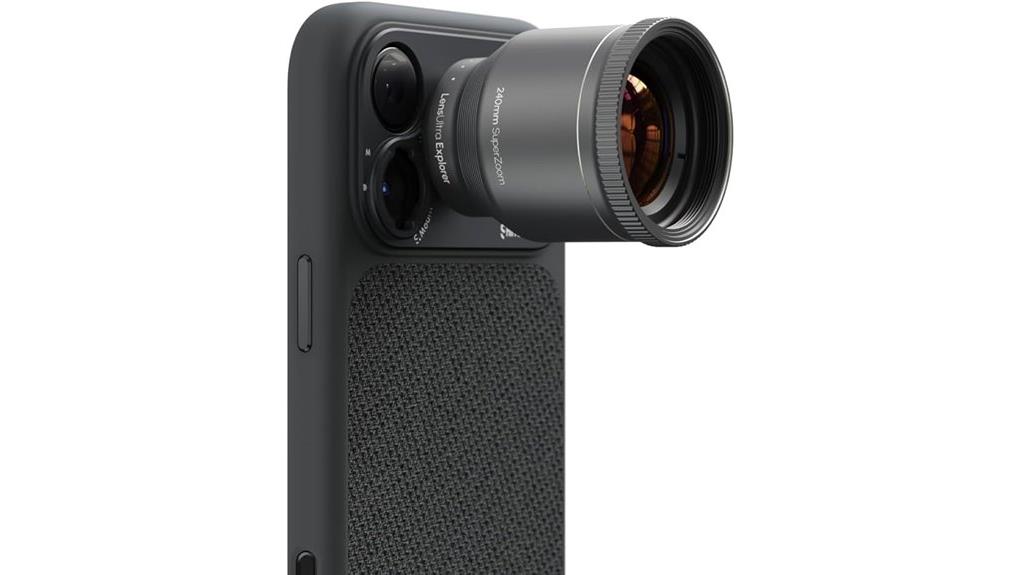
You get a compact 240mm add‑on telephoto that pairs with phone periscopes to lock a true long‑reach view while staying travel‑light at 109 g. You'll see strong center sharpness, improved color from fluorite elements, and only modest lateral fringing on extreme highlights. Stabilization is limited, so tripod or high shutter speeds are often needed for wildlife or sports. Mounting via ShiftCam or S‑Mount is straightforward. Keep going and you'll find practical tests, workflow tips, and purchase advice.
Some Key Takeaways
- Compact 240 mm add-on telephoto (109 g) extends smartphone reach without bulky DSLR glass.
- Fluorite elements improve color rendition and reduce green/magenta fringing for cleaner highlights.
- Strong center sharpness in JPEGs/PNGs; resolving power depends on phone sensor and periscope alignment.
- Stabilization limited—best on tripod/monopod or with high shutter speeds; handheld use prone to blur.
- Great for travel, wildlife, and concerts; not ideal if you need built‑in stabilization or high‑res video.
What the ShiftCam LensUltra 240mm Actually Is and Who It’s For
Although it’s a compact add-on for your phone, the ShiftCam LensUltra 240mm is a true prime telephoto designed to extend your smartphone’s optical reach to 240 mm by pairing with a phone’s periscope telephoto (locking a 5x equivalent on many devices, and 4x/8x on iPhone 17), giving you native optical compression and sharpness without digital zoom. You’ll find a purpose-built portable telephoto for the smartphone niche: 240 mm fixed focal length, fluorite elements to curb aberration, 109 g travel-ready form, and simple mounting via ShiftCam cases or S-Mount. It’s aimed at enthusiasts needing long-reach optics without bulk. The product is offered by a website that specializes in wide-angle phone lenses and related accessories for photography enthusiasts.
How the 240mm Performs: Sharpness, Color, and Chromatic Aberration in Real Shots
Put simply, the LensUltra 240mm delivers noticeably crisp results when paired with a compatible phone periscope, thanks to its fluorite elements and precise optical design. You’ll see high center sharpness across JPEGs and PNGs; resolving power depends on sensor pairing and phone periscope alignment. Color rendition stays punchy and true-to-life, with fluorite reducing green/magenta fringing. Chromatic aberration is minimal at moderate contrast edges, though extreme highlights can show slight lateral fringing that you can correct in post. Edge bokeh gradations are controlled but show mild onion-ringing on specular points. Overall, expect technical fidelity with modest post-processing. Many photographers who enjoy lens filters and optical accessories note that proper filter selection can further enhance contrast and color when shooting with periscope setups, especially when using polarizing filters.
Practical Shooting Tests: Wildlife, Sports, Concerts, and City Skyline Examples
Now that you know how the LensUltra 240mm performs in terms of sharpness, color, and aberration, let’s see how those qualities hold up in real shooting scenarios. You’ll find low light wildlife frames retain surprising edge detail though noise rises without stabilization; autofocus hunts minimally on fine branches. Stadium perspectives deliver tight subject isolation and readable crowd context at 240mm, but you’ll rely on high shutter speeds. Concert audio capture isn’t improved by the lens, yet stage detail and color remain strong under mixed lighting. Urban nightscape shots show controlled chromatic aberration and pleasing bokeh, though tripod use is recommended. For drone photographers looking to land safely while composing skyline shots, using a marked drone landing pad helps ensure consistent placement and cleaner compositions.
Mounting, Ergonomics, and Workflow: Setup, Stabilization Limits, and App Tips
Because the LensUltra 240mm is a true optical telephoto for phones, mounting and workflow deserve methodical attention to get usable results at long reach. You’ll follow a tight mounting workflow: fit ShiftCam case or S‑Mount/universal mount, secure lens, open a pro camera app (Halide, FiLMiC Pro, Blackmagic) and lock the telephoto mode. Ergonomics favor tripod or monopod—handheld use hits stabilization limits quickly. Adopt stabilization strategies: use a solid support, enable in‑app shutter delay, shoot higher shutter speeds and burst capture. Keep balance, counterweight if needed, and precompose: small framing errors are magnified at 240mm. For extended sessions where mobility and hands-free shooting matter, consider a chest mount harness to keep the camera accessible and stable while you work with other gear, especially when hiking or moving between locations with capture-the-moment constraints.
Should You Buy It? Pricing, Alternatives, Warranty, and Final Recommendation
Having covered mounting and stabilization limits, you’ll judge the LensUltra 240mm by how its performance and fit align with price, alternatives, and warranty support. You’ll find pricing comparisons favor it if you want lightweight, true optical telephoto reach without bulky glass; it undercuts pro DSLR glass by weight and cost. Consider alternative lenses if you need built-in stabilization or higher-res video. Warranty coverage is a standard 1-year manufacturer warranty, plus typical Amazon return windows—factor those into risk. Final recommendation: buy if you prioritize compact optical reach and color fidelity; skip if you require stabilized, high-res video. As a mirrorless-focused retailer, we often recommend considering sensor and mount compatibility mirrorless systems when matching lenses to your kit.
Some Questions Answered
Does It Work With Phone Cases From Other Brands Without Shiftcam Mounts?
No — it won’t reliably work with phone cases from other brands without ShiftCam mounts. You’ll need a ShiftCam case, S‑Mount, or universal mount to secure correct alignment; third party compatibility depends on case thickness, camera cutout precision, and mount geometry. Thicker or irregular cases prevent proper seating and can cause vignetting or misfocus. For consistent optical performance, use ShiftCam’s mounting solutions or a precisely measured universal mount.
Can It Be Used With Clip-On Filters or Nd/Polarizers?
Yes — you can use clip on compatibility and filter adapters, but with caveats. You’ll need a clip or adapter that securely matches the LensUltra’s threaded or mount diameter; poor alignment will vignette or degrade sharpness. Because the lens lacks image stabilization and is a long telephoto, use sturdy adapters and high-quality ND/polarizers to avoid movement-induced artifacts. Test for color cast and edge darkening before critical shoots.
Is There Any Weather Sealing or Protective Coating on the Lens?
No, the lens doesn’t offer weather resistance; ShiftCam lists no sealed gaskets or IP rating. You’ll rely on careful handling and the mount/case for protection. Lens coatings (fluorite glass treatment) are included to reduce chromatic aberration and improve contrast, but those coatings won’t stop moisture or dust ingress. If you’ll shoot in wet or dusty conditions, you should add external protection—rain cover, sealed case, or avoid exposure—to preserve optics.
How Does the Lens Affect Phone Battery and Processing During Video?
You’ll see minimal direct Battery drain from the lens itself, since it’s passive optic; any extra Battery drain and Processor load come from your phone using the periscope tele module, higher-resolution video capture (up to 1080p), and third‑party pro apps. Processor load increases slightly for autofocus and image processing with fluorite glass benefits. Expect modest extra heat and battery use during prolonged shooting, but no drastic impact compared with native tele shooting.
Can It Be Used With Portrait-Mode Computational Effects Enabled?
Yes — you can use portrait compatibility with the lens, but results vary. You’ll rely on your phone’s computational portrait pipeline while the LensUltra provides true optical reach and improved subject isolation. Bokeh accuracy depends on the phone’s depth map and telephoto pairing; expect more natural compression but occasional edge artifacts if depth sensing is optimized for native optics. Test with your camera app to verify acceptable bokeh accuracy and framing.


