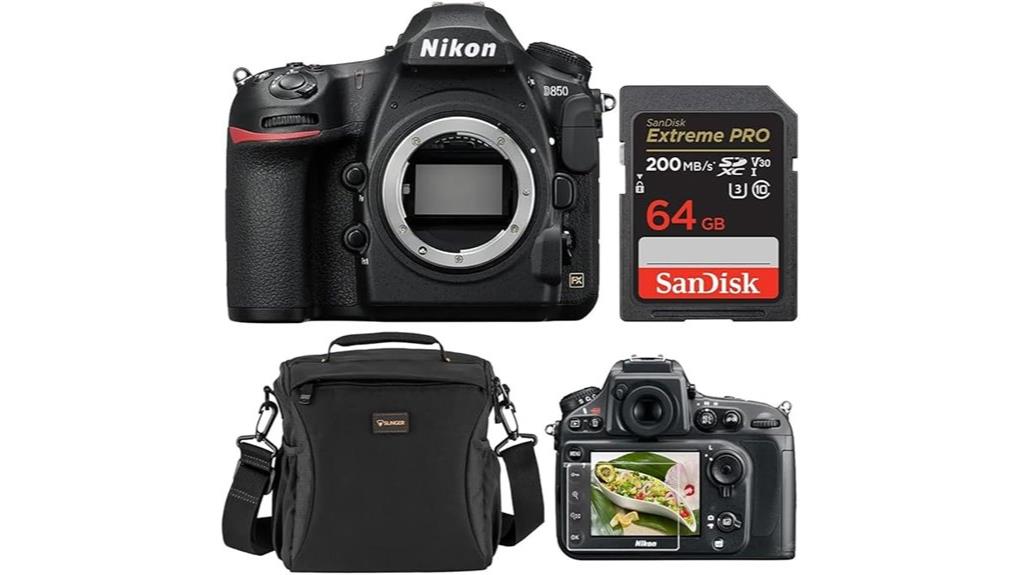
You’ll get a 45.7MP FX BSI CMOS sensor, EXPEED 5 processing, and a robust Multi-CAM 20K 153‑point AF system that delivers wide coverage and reliable acquisition down to f/8. Native ISO 64–25600, excellent dynamic range, and controlled noise make low‑light stills and 4K video strong suits. The body adds 7–9 fps shooting, a tilting touchscreen, and advanced metering and customization. Keep going and you’ll find deeper specs, use cases, and accessory recommendations.
Some Key Takeaways
- 45.7MP FX BSI CMOS sensor delivers exceptional high-resolution detail and excellent dynamic range for landscapes, studio, and commercial work.
- Multi-CAM 20K 153-point AF system offers precise, wide-coverage autofocus and reliable tracking down to f/8.
- Native ISO 64–25600 (expandable) with strong low-light performance and controlled noise for stills and 4K video.
- 4K UHD 30p recording, focus-shift timelapse to 8K, and a 3.2" tilting touchscreen enhance creative video workflows.
- Robust build, extensive customization, and recommended accessories (grips, filters, tripods, lenses) make it pro-ready and resale-friendly.
Nikon D850 at a Glance: Key Specs and Box Contents
Dig in and you'll find the D850 bundles pro-grade imaging hardware with useful accessories: a 45.7 MP FX BSI CMOS body powered by EXPEED 5, a battery and charger, camera strap, body cap and eyepiece, plus a 64GB SD card, slinger shoulder bag, screen protector, and Nikon's 1‑year limited warranty. You’ll get robust out-of-box functionality for shooting and basic workflow. The included items guarantee immediate operation, secure transport, and frontline protection. Check accessory compatibility for batteries, grips, and memory to match professional rigs. Retain documentation and original kit components to maximize resale value and streamline future upgrades or service. Consider adding essential grips, filters, and tripods from an essential gear selection to complete your DSLR kit.
Image Quality and Low‑Light Performance: 45.7MP Sensor, Dynamic Range, and ISO
Having covered what's in the box and the camera's operational readiness, let's examine how the D850's 45.7MP FX-format BSI CMOS sensor and EXPEED 5 processor shape image quality and low-light behavior. You’ll get extraordinary high resolution detail for large prints and critical cropping; the sensor’s backside illumination and optimized microlenses improve light collection per pixel. Dynamic range remains excellent, preserving shadow and highlight information through ISO stops. Native ISO 64–25600 gives usable results; expansion exists for extremes. Low light resilience is strong: noise is controlled, color fidelity holds, and you can push exposures with confidence for professional stills and 4K capture. Our store also offers essential accessories for mirrorless camera enthusiasts to help you get the most from your gear, like essential gear to enhance shooting and handling.
Autofocus, Speed, and Handling: 153‑Point AF, Burst Rates, and Ergonomics
While the D850's Multi-CAM 20K 153-point AF system may look complex on paper, it delivers fast, precise subject acquisition and tracking across a broad portion of the frame, making it well suited to sports, wildlife, and event work. You’ll find reliable focus down to f/8 and robust AF tracking supported by the 180k-pixel RGB metering sensor. Continuous shooting hits 7 fps native (9 fps with optional grip) with AE/AF maintained, letting you capture action sequences. AF customization is extensive—configurable zones, sensitivity, and subject-detection fine-tuning. Ergonomics prioritize grip comfort, control layout, and durable construction for extended use. Our Gear Guide for Enthusiast Photographers and Camera Fans highlights complementary accessories and lenses that pair well with the D850's capabilities, including recommendations for digital cameras.
Video and Creative Features: 4K/8K Timelapse, Touchscreen, and Special Modes
Beyond its fast AF and burst capabilities, the D850 also packs robust video and creative tools that extend its utility for hybrid shooters. You can record 4K UHD at 30p with full-sensor readout and use Focus Shift Mode to generate 8K timelapse movies without external processing. The 3.2" tilting touchscreen accelerates framing, touch-AF, and playback review; menu shortcuts reduce setup time. Special modes like Negative Digitizer and in-camera film emulation profiles expand creative workflows and simplify previews. Physically robust controls and customizable buttons keep manual control available while touchscreen and wireless connectivity streamline capture and offload. External camera monitors further enhance video framing and exposure control for demanding shoots.
Who Should Buy the D850 and Value Versus Alternatives
If you need a high-resolution, versatile pro body that won't compromise speed or dynamic range, the D850 remains a top choice for photographers who shoot landscapes, commercial, studio, sports, or wildlife and require both large files and reliable AF performance. You should buy it if you prioritize image fidelity, extended dynamic range, and robust build for intensive assignments. Consider resale value and futureproofing: its sensor and AF still compete with newer bodies, preserving trade-in worth. For workflow integration, RAW files and tethering fit established pro pipelines. Choose the D850 when your professional niche demands maximum resolution and proven reliability. Perfect Tripods' selection of tripod gear can help stabilize and protect your D850 for those demanding shoots, making it easier to maximize the camera's potential with the right support and accessories like sturdy ball heads and tripod compatibility.
Some Questions Answered
How Long Does the Battery Typically Last per Charge Under Mixed Use?
You’ll get roughly 900–1,200 shots per charge under mixed use, translating to a battery lifespan of about one to two days for typical shooting sessions; heavy video or continuous burst reduces that to several hours. Expect 500–800 charge cycles before noticeable capacity decline. To maximize lifespan and charge cycles, use power-saving settings, avoid full deep discharges, and store the battery partially charged at moderate temperatures between uses.
Is In-Body Image Stabilization (IBIS) Available or Compatible?
No, the D850 doesn't have in-body image stabilization (IBIS). You’ll rely on lens stabilization; Nikon VR lenses provide image stabilization, and the camera is fully compatible with lens-based stabilization systems. For handheld shooting you should use VR-equipped optics or faster shutter speeds. You can also combine stable support (tripod, monopod) with lens VR where supported. Firmware and lens-specific settings control stabilization behavior and compatibility. When considering the Nikon D500 camera specifications and features, it’s essential to note that this model excels in fast autofocus, making it ideal for action photography. Additionally, the high ISO performance allows for better low-light shooting capabilities, enhancing versatility in various environments. Many photographers appreciate the robust build quality and weather-sealing, ensuring durability in challenging conditions.
What Memory Card Types and Write Speeds Are Recommended?
Use UHS II SD cards for high speed sustained writes when shooting 4K or long RAW bursts; choose V60/V90-rated UHS II cards for reliable buffer clearing. For maximum performance and professional grade workflows, pair with CFexpress (via compatible adapter/grip) where supported to attain very high write rates for continuous shooting and video. Always pick cards from reputable brands, format in-camera, and verify sustained write specs match your shooting needs.
Does the Camera Support Tethered Shooting via USB or Ethernet?
Yes — you can do USB tethering with the camera using Nikon’s USB connection and supported tethering software (Camera Control Pro 2 or compatible third‑party apps). Ethernet compatibility isn’t native; you’ll need the optional WT-7 or WT-6 wireless/FTP transmitters or use a tethering dock that provides Ethernet over USB solutions. You’ll get reliable file transfer and remote control, but check firmware and software compatibility for full feature support.
Are There Firmware Updates and How Are They Installed?
Yes — firmware updates are released periodically; you’ll install them via memory card or Nikon’s Firmware Updater (USB connection to a computer). For installation methods, download the firmware file from Nikon’s support site, copy it to an empty formatted SD card (root directory), insert into the camera, then run the update from the setup menu. Alternatively, connect the camera to a computer and use Nikon’s updater app; follow on-screen prompts and keep power stable.


