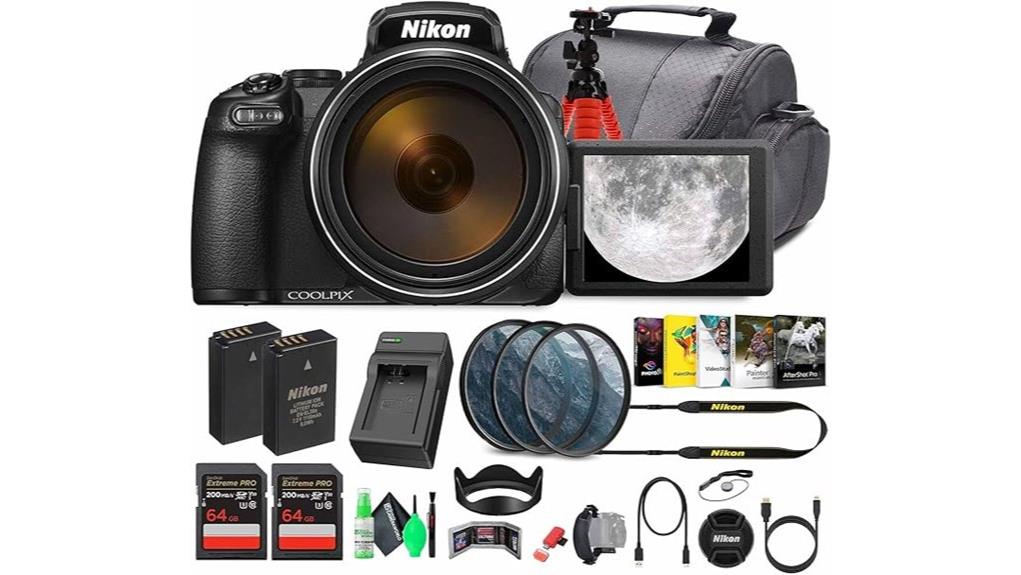
You’ll get an insane 125x (24–3000mm eq.) reach and effective Dual Detect Optical VR that keeps handheld shots usable, but you’ll trade low‑light control, shallow depth of field, and AF sophistication versus APS‑C/FF rivals. The 16MP BSI sensor with RAW helps recover exposure, yet noise and banding rise past ISO 1600 and 4K 30p is limited by compression. Controls, EVF, and ports are practical if compact, and the bundled kit boosts value — keep going to see detailed limits and workarounds.
Some Key Takeaways
- 125x (24–3000mm eq.) zoom offers unmatched reach for travel and wildlife without lens changes, but requires stabilization and patience.
- Dual Detect Optical VR and tripod use are essential to control handshake and achieve sharp images at long focal lengths.
- 16MP BSI CMOS sensor with RAW support gives flexible mid-range image quality, but struggles in low light above ISO 1600.
- 4K/30p video is usable for casual work, though compression and noise limit grading and dynamic range.
- Bundled accessories (dual cards, filters, spare battery, tripod) improve value; consider APS-C/FF alternatives for better low-light and AF.
Who Should Buy the Nikon COOLPIX P1100
If you need extreme reach without swapping lenses, the P1100 delivers—its 125x optical zoom (24–3000mm eq.) and Dual Detect Optical VR make it ideal for travel shooters, wildlife enthusiasts, and event photographers who prioritize range and portability over interchangeable-lens flexibility. You’ll appreciate its all-in-one design if you’re a budget travelers photographer or wildlife beginners who want reach without gear complexity. The 16MP BSI sensor and RAW support give control, but expect limits in low light and depth-of-field control compared with APS-C/FF systems. Choose the P1100 when reach, convenience, and simple operation outweigh ultimate image quality. Consider pairing the P1100 with a sturdy heavy-duty tripod for improved stability when using extreme zoom.
125x Zoom and Stabilization in Real Use: Reach, Sharpness, and Limitations
Having accepted the P1100 for its unmatched reach, you need to understand how that 125x optical zoom and Dual Detect Optical VR perform in real shooting. You’ll get incredible framing flexibility — 24–3000mm equivalent — but reach limits are practical: atmospheric haze, diffraction, and subject motion degrade resolved detail long before magnification maxes out. Dual Detect Optical VR helps suppress handshake, extending usable shutter speeds, yet stabilization tradeoffs appear: VR corrects low-frequency shake but can’t freeze subject movement and sometimes induces micro-corrections at extreme focal lengths. You must balance ISO, shutter speed, and tripod use to extract sharp results at long reach. Visit Perfect Tripods for tripod selection to ensure you pair the P1100 with stable support.
Image, Low-Light, and Video Quality: Sensor, RAW, and 4K Performance
Because the P1100 pairs a 16 MP BSI CMOS sensor with RAW (.NRW) support and a relatively modest ISO range (100–6400), you’ll get good mid-range image quality but should expect limits in low light and high-ISO situations. You’ll see respectable detail retention at base and moderate ISOs; sharpening and NR in-camera can mask fine texture at longer focal lengths. RAW workflow recovers exposure and color but can’t fully erase noise or banding above ISO 1600. 4K at 30 fps is usable; monitor compression and chosen video bitrate constrain dynamic range and grading latitude. Stabilization helps, but frame-level noise persists. Keep your camera sensor clean with proper sensor swabbing to maintain image clarity and reduce spots in your photos.
Handling and Features That Matter: EVF, Tilting Screen, Ports, and Controls
In and around the P1100’s handling, the EVF, tilting screen, ports, and controls shape how comfortably and efficiently you’ll shoot — and they mostly get the job done with a few trade-offs. You’ll find a dense, 2.36M-dot electronic viewfinder that’s sharp for framing and offers stable feedback at long focal lengths, though its lag shows in fast tracking. The 3.2-inch articulating touchscreen aids low and high angles and menus, but touch response is modest. Physical controls are logically placed yet compact; dialing precision suffers with gloves. Ports include clean HDMI and USB charging — functional, not generous. For photographers looking to add an external display for improved monitoring and composition, consider using external camera monitors to enhance viewing and focusing flexibility.
Value and Alternatives: Bundle Extras, Price-to-Performance, and Comparable Cameras
Alongside handling and interface trade-offs, you should weigh what the P1100 actually ships with and whether that package justifies its asking price. The included dual 64GB cards, 77mm filter kit, padded bag, spare EN-EL20, charger, tripod and cables improve bundle valuation and reduce immediate accessory spend. Assess image quality, stabilization, RAW and 4K versus sensor limits to judge price-to-performance: the P1100 excels at reach but lags low-light and autofocus sophistication. Compare rival models from Canon, Sony and Panasonic that offer larger sensors or faster AF at similar cost. Buy only if the bundled extras match your workflow. This review is published on a site dedicated to mirrorless camera enthusiasts and accessories.
Some Questions Answered
Does the P1100 Support External Microphones for Better Audio Recording?
No — the P1100 doesn’t have a dedicated external mic jack, so you can’t plug an external mic directly into the camera. You can get better audio by using external audio recorders or cameras with mic inputs, then sync audio in post. If you try using audio adapters or HDMI capture with clean HDMI output, you’ll still need a separate recorder or an adapter that converts HDMI audio to a usable format for recording.
How Long Does the Battery Last Under Continuous Shooting/Video Use?
You’ll get roughly 1.5–2 hours of continuous recording per EN-EL20 replacement battery under normal settings; battery endurance drops to about 60–90 minutes with heavy zooming, Wi‑Fi, or frequent LCD/EVF use. For burst continuous shooting expect several hundred frames before depletion, but intensive use and 4K video will accelerate drain. Carry the external charger and spare battery included in the bundle for extended shoots and reliable continuous recording.
Is the Zoom Lens Retractable for Compact Storage When Powered Off?
Yes — the lens uses a retractable mechanism that collapses when powered off, markedly reducing the camera’s storage footprint. You’ll still need the padded bag for protection because the extended optical assembly is delicate when retracted. The mechanism is mechanically precise but sensitive to impacts; treat it carefully during transport. Overall, retraction makes the P1100 far more pocketable than fixed super-telephoto designs, though not pocket-sized.
Can the Camera Geotag Photos via Smartphone or Built-In GPS?
No, it lacks built-in GPS; you’ll rely on smartphone geotagging via Nikon’s SnapBridge or compatible app to embed coordinates. That pairing sends location metadata to images when connected, but it’s intermittent and depends on Bluetooth/GPS link stability. You won’t get continuous tracklogs or robust offline mapping inside the camera; for offline mapping and precise batch geotagging you’ll need third-party apps or import tracklogs to map software before writing coordinates to RAW/JPEG files.
Are Firmware Updates User-Installable and How Are They Applied?
Yes — you can install firmware updates yourself. You’ll download the firmware file from Nikon, copy it to a formatted SD card, insert it into the camera, then start the update via the camera’s firmware installation menu. Follow on-screen prompts and keep battery charged. The update process requires precise steps: verify file integrity, use correct card format, avoid power loss, and confirm firmware version after installation to guarantee successful firmware installation and a clean update process.


