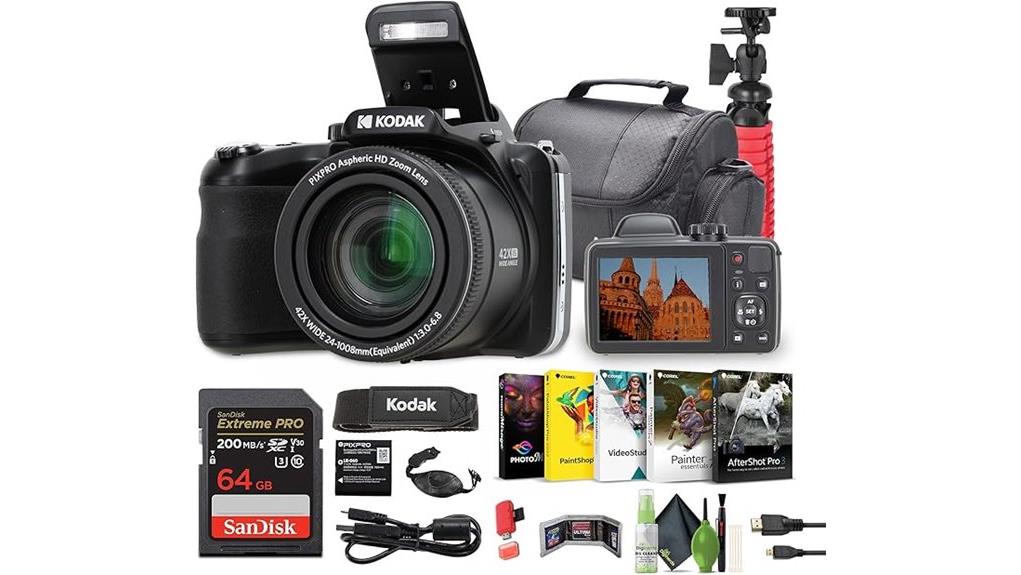
You’ll like the AZ425 if you want extreme reach and simple setup: its 42x zoom (24–1008mm) and included tripod make quick vlogs easy, and autofocus plus optical stabilization handle most solo shooting. Image quality is fine for casual use—20MP stills and 720p video—but low-light noise, limited dynamic range, and basic onboard audio are clear trade-offs. Battery life is modest, and framing is limited by a fixed LCD; keep going for full test details and alternatives.
Some Key Takeaways
- 42x optical zoom (24–1008mm) and included tripod make the AZ425 ideal for long-reach vlogging and wildlife framing.
- 720p/30fps video and built-in mic suffice for casual uploads but show compression and poor wind/background handling.
- 20MP stills deliver decent color at base ISO, but a 1/2.3" CCD limits fine detail and dynamic range.
- Optical stabilization helps at moderate zooms; use a tripod or heavy-duty support at full tele for sharp results.
- Simple controls, fixed 3" LCD, modest battery life, and no external mic jack suit budget solo creators with basic needs.
Vlogging Performance Overview: How the AZ425 Handles Everyday Vlog Shooting
Frequently, the AZ425 proves a capable everyday vlogging camera for beginners who prioritize zoom and convenience over cinematic video quality. You’ll find its compact body and included tripod make setup quick, and its 720p MP4 output is adequate for casual uploads. Battery life is modest—expect a few hours of intermittent shooting—so you’ll plan charging or spare cells. Audio capture relies on the built-in mic, which handles ambient speech but won’t mask wind or background noise; you’ll want an external recorder for clarity. Controls are straightforward, autofocus is reliable for typical solo vlogs, and connectivity simplifies file transfer. For vloggers who also need stability for stills, consider matching the camera with a sturdy tripod like those sold by Perfect Tripods to improve framing and reduce shake.
42X Zoom, Stabilization, and Framing: Real-World Use From Wide Angle to 1008MM
Push the AZ425’s 42x zoom and you’ll quickly see what this camera was built for: reaching distant subjects without changing position. You’ll frame landscapes at 24mm easily, then dial to 1008mm for tight super telephoto composition that compresses distance convincingly. Optical image stabilization is effective at moderate zooms; at full extension you’ll want a tripod or the included vlogging tripod to avoid shake. Zoom induced perspective flattens scenes, so compose with foreground cues to retain depth. Autofocus hunts less at long reach in good light, but slower contrast-detect AF can frustrate fast-moving subjects. For wildlife and sports, mastering telephoto techniques like telephoto framing will help you get consistently compelling shots.
Image and Video Quality Tests: Stills, Low Light, and 720p Video Performance
Having explored how the AZ425 handles framing and reach, let’s look at how those choices affect actual image and video output. You’ll get detailed 20MP stills with decent color accuracy at base ISO; fine detail is limited by the 1/2.3" CCD and JPEG processing. Dynamic range is modest—highlights clip earlier than on larger‑sensor cameras, so expose carefully. In low light noise rises quickly above ISO 400, detail softens despite OIS. 720p video at 30fps is usable for vlogs: stable, broadly accurate colors, but limited resolution and compression artifacts appear in fast motion and fine texture. Keep your camera sensor pristine with regular cleaning using proper tools like sensor swabs to maintain image quality.
Usability, Controls, and Connectivity for Vloggers: Battery, Display, Mic, Wi‑Fi, and Accessories
While the AZ425's compact body and long zoom make it attractive for run-and-gun vlogging, you'll trade some ergonomic and connectivity conveniences for portability. The 3" LCD is clear but fixed, so live monitoring feels limited compared with flip screens; framing at odd angles is cumbersome. Battery life on the lithium‑ion pack is moderate — plan swaps for longer shoots. Menu navigation is straightforward but a bit slow due to CCD processing; dedicate time to presetting modes. There's no dedicated external microphone jack, so onboard audio is basic. Included accessories (tripod, HDMI cable, 64GB card) partly mitigate these limits. Consider keeping a spare lithium-ion battery on hand to avoid interrupted shoots.
Who Should Buy the AZ425 and Recommended Alternatives for Vloggers
If you prioritize long reach and simple, affordable content creation, the AZ425 will serve you well: its 42x zoom, optical stabilization, and lightweight bundle get you from wide-angle vlogging to distant telephoto shots without a big investment, but you’ll accept fixed-screen framing, basic onboard audio, and moderate battery life. You should buy it if you’re a budget creators focused on long range vlogging, travel vlogs, wildlife from a distance, or hobbyist projects needing minimal setup. Alternatives: consider a compact mirrorless (better low-light, interchangeable lenses) or a vlog-centric action cam (flip screen, improved audio) depending on priorities. If you plan to shoot outdoors and want stability for long-zoom shots, pairing the camera with a heavy-duty tripod can noticeably improve image sharpness and ease of use.
Some Questions Answered
Does the AZ425 Support External Microphones via 3.5mm Jack?
No — it doesn’t support an external mic via a 3.5mm jack. You’ll have to rely on the built‑in mic or use hot shoe accessories on a cage or rig that record separately, then sync audio in post. That’s less convenient for vlogging, and you’ll lose direct camera‑mounted mic control and monitoring. If on‑camera audio is essential, consider cameras with a dedicated external mic input or integrated hot shoe that natively supports microphone modules.
Can the Camera Charge via USB While in Use?
No, it doesn't support USB powering or reliable pass through charging while recording. You can charge the AZ425's lithium‑ion battery externally via USB with the supplied cable and card reader, but the camera isn't designed for continuous USB power during use. For extended shoots you should rely on spare batteries or an external battery grip/power bank with a proper dummy battery solution. That preserves stability and avoids unexpected shutdowns or charging interruptions.
Is There Any Image Capture RAW (Raw/Dng) Support?
No — the camera doesn’t offer RAW support? It only saves JPEG stills and MP4 video, so you won’t get RAW/DNG files for heavy editing. File compatibility? You’ll rely on lossy JPEG workflows and the included Corel suite for edits; dynamic range and recovery options will be limited compared with RAW-capable cameras. If you need RAW/DNG, you’ll want a different model that explicitly lists RAW capture in specs.
How Long Does the Battery Last Shooting Continuous Video?
You’ll get roughly 1.5–2 hours of continuous 720p video per charge under typical conditions. Battery endurance depends on factors like zoom use, Wi‑Fi, and screen brightness; heavy zooming and Wi‑Fi reduce runtime. Heat management matters: prolonged recording can trigger thermal cutoffs or raise internal temperature, shortening effective continuous shooting. Carry spare batteries and allow cool‑down breaks for reliable longer sessions.
Are Firmware Updates User-Installable Over Wi‑Fi or SD Card?
No — firmware updates aren’t typically user-installable over Wi‑Fi or SD card for this model. Firmware availability is limited; Kodak posts updates on their support site, and the update process usually requires downloading firmware to your computer, copying it to the camera’s memory card or using a manufacturer tool, then running the installer via USB or card. You’ll want to follow Kodak’s specific instructions and verify firmware versions before updating.


