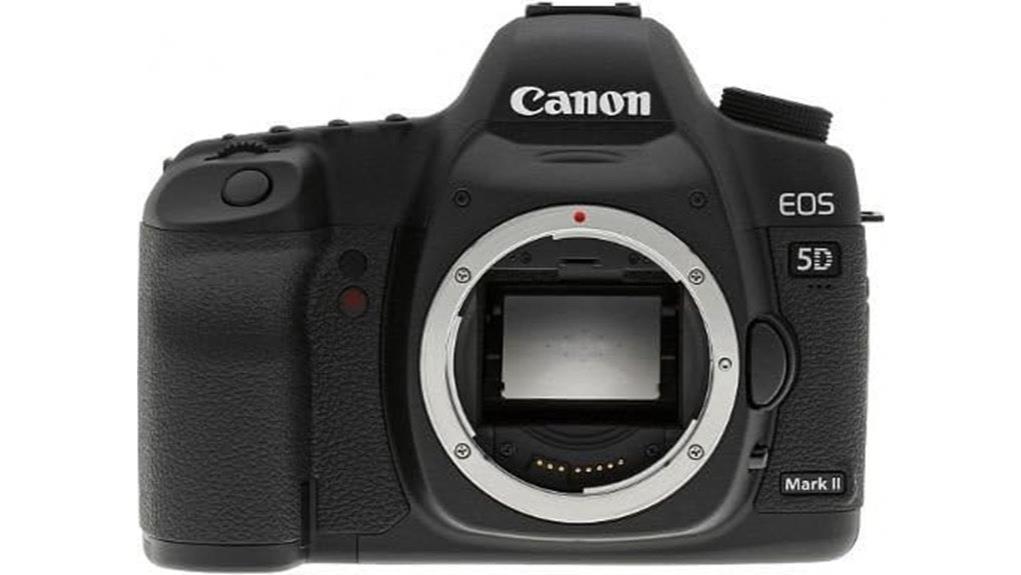
You’ll find the Canon EOS 5D Mark II delivers high‑resolution 21.1MP full‑frame stills with 14‑bit RAW, strong tonal gradation and usable dynamic range, plus Full HD (H.264) video with 4GB clip splits and HDMI output. Autofocus is accurate with center points but slower at the edges; continuous shooting is 3.9 fps and DIGIC 4 limits responsiveness and battery life. It’s rugged and well suited to portraits, landscapes and studio work — continue for a deeper look at trade‑offs and workflows.
Some Key Takeaways
- 21.1MP full-frame sensor with 14-bit RAW delivers high-resolution stills and excellent tonal gradation for landscapes and portraits.
- Full HD 1920×1080 video (H.264 MP4) is capable but limited by ~4GB clip splits and need for transcoding.
- Autofocus is accurate at center points but slower edge AF and 3.9 fps continuous speed limit action shooting.
- Clean noise performance to ISO 1600, with visible artifacts at ISO 3200–6400; good shadow recovery from RAW.
- Robust build and EF-lens compatibility make it a durable, value-packed used-camera choice despite aging DIGIC 4 responsiveness.
Quick Verdict: Is the Canon EOS 5D Mark II Still Worth Buying?
Bottom line: the 5D Mark II still holds value if you need a full-frame 21.1 MP sensor, robust build, and Full HD video in a DSLR body, but it shows its age in speed, AF coverage, and modern ergonomics. You’ll appreciate sensor durability and solid construction for long-term service, though the DIGIC 4-era power affects throughput and battery life compared with newer models. Menu layout is dated but logical once you learn it; Live View and single CF slot limit workflow. If you shop carefully, used pricing can make this a pragmatic sensor-and-image-quality purchase despite operational compromises. Consider pairing it with essential mirrorless camera gear like lenses and accessories suited to full-frame shooting.
What the 5D Mark II Offers: Key Specs and Feature Highlights
Although now a generation behind, the Canon EOS 5D Mark II still delivers a clear set of capabilities that matter for image quality and creative control: a 21.1 MP full-frame CMOS sensor paired with DIGIC 4 processing and 14-bit A/D conversion yields high-resolution stills with substantial tonal gradation, while Full HD 1920×1080 video recording (MP4, ~4 GB clip limit) brings DSLR-based movie capture into reach. You get full frame advantages in depth of field control and dynamic range potential, DIGIC performance for image throughput and noise management, 3.9 fps burst, 1/8000s shutter, CompactFlash storage, HDMI output, and Live View. The site also caters to enthusiasts with curated gear recommendations and accessories for DSLR users, emphasizing enthusiast photographers.
Image Quality, Autofocus, and Low‑Light Performance in Real Shooting
Having outlined the 5D Mark II's core specs and video capabilities, let's look at how those elements shape real-world image quality, autofocus behavior, and low-light performance. You’ll get detailed 21.1MP resolution with 14-bit RAW yielding solid dynamic range for mid- to high-contrast scenes; highlight rolloff is controlled, shadow recovery is usable. Noise handling up to ISO 1600 is clean; ISO 3200–6400 shows chroma and luminance artifacts. AF accuracy is good with center points; edge points are less reliable. Continuous AF and 3.9 fps limit tracking performance on fast subjects, so anticipate occasional focus hunting in low light. The review also considers tripod compatibility with the camera for improved stability and sharper long-exposure shots, especially when shooting landscapes with perfect tripods.
Video Capabilities and Workflow: Shooting, File Limits, and Outputs
When you switch the 5D Mark II into Movie mode, it records Full HD 1920×1080 footage with MPEG-4/H.264 compression into MP4 files, but you’ll need to plan around the camera’s 4 GB per-clip file size limit and single CompactFlash card slot. You’ll compose using Live View, monitor via the HDMI output for external monitoring, and control exposure with manual or aperture-priority settings. Audio limitations include only a mono internal mic and limited onboard gain control; use an external recorder or microphone via adapter for better sound. Workflow requires transcoding H.264 MP4s for editing and managing clip splits across cards. Consider adding an external camera monitor to improve framing and focus when shooting video with the 5D Mark II, especially for external monitoring.
Who Should Buy the 5D Mark II (Use Cases, Alternatives, and Buying Tips)
If you need a rugged, full-frame DSLR that delivers high-resolution stills and the option of Full HD video without breaking a modern budget, the Canon EOS 5D Mark II still makes sense for photographers and hybrid shooters who prioritize image quality and lens compatibility over the latest features. You’ll favor it for studio portraits, landscape photography, event coverage, and travel photography when sensor dynamics and EF-lens access matter. Consider used bargains but weigh repair considerations and single-card risks. Legacy lenses work well on the EF mount. Bring battery alternatives and plan around slower AF, modest continuous shooting, and video clip limits. For longer outings, consider carrying spare camera batteries to avoid interrupted shoots and make the most of extended sessions.
Some Questions Answered
Does the 5D Mark II Have Wi‑Fi or Bluetooth Connectivity?
No, it doesn’t have built‑in Wi‑Fi or Bluetooth. You’ll face wireless limitations with the original 5D Mark II hardware; Canon didn’t include any native wireless radios. You can add wireless capability using third‑party adapters (Wi‑Fi or tethering solutions) via the USB or HDMI ports or use compatible wireless transmitters for flash control, but integration is limited and may require external power, firmware checks, and reduced remote-control functionality compared with modern bodies.
Can I Use Ef‑S Lenses With the 5D Mark II?
No, you can't mount EF-S lenses directly on the 5D Mark II. The 5D Mark II uses the Canon EF mount designed for full-frame sensors, so EF-S lenses (designed for APS-C) will physically interfere with the mirror. For APS-C glass you can use Lens compatibility workarounds: third-party Mount adapters exist, but they typically introduce crop, optical degradation or loss of infinity focus. For best performance use native EF lenses on this body.
Is the Battery Included With Refurbished Listings?
No, the battery included varies—refurbished listings often note "battery not included" but some sellers provide one. You should check the product details and seller policies before purchasing. Verify whether a battery, charger, and any accessories are supplied, and confirm compatibility and condition. If seller policies are unclear, ask directly or choose a listing with explicit inclusion statements and return or warranty terms to avoid surprises.
How Durable Is the Weather Sealing on This Model?
The weather sealing on this model is modest; you shouldn’t expect professional-grade protection. Durability testing shows resistant gaskets at key joins and mount, but seals aren’t fully weatherproof against prolonged exposure. You’ll want routine seal maintenance—cleaning and inspecting mount/gaskets and avoiding heavy rain—to preserve performance. For demanding environments, you’ll need additional protection like a rain cover or weatherized housing, since long-term ingress risks remain.
Does the Camera Support In‑Body Image Stabilization?
No — you won’t find in body stabilization or sensor shift mechanics in this model. The 5D Mark II relies on lens-based image stabilization (IS) when available. You should plan exposures, IS-equipped EF lenses, or support to control motion blur. The camera’s sensor lacks movable mounts and vibration compensation, so stabilization performance depends entirely on the attached lens’s IS system and your shooting technique rather than any in-body sensor-shift implementation.


