You’ll find the Sony a6400 is a compact, fast APS‑C mirrorless that delivers 24.2MP stills, reliable low‑light performance and advanced autofocus (Real‑Time Eye AF, 425 points) for action and portrait work. It shoots internal UHD 4K with S‑Log3 for grading, but lacks in‑body stabilization so you’ll need stabilized glass or a gimbal for smooth handheld video. Battery life and menu density are modest; continue below to see detailed strengths, limits, and pairing suggestions.
Some Key Takeaways
- 24.2MP APS‑C sensor with BIONZ X delivers high-detail images, strong color, and wide RAW dynamic range for recoverable highlights and shadows.
- Fast, reliable autofocus: 425-point phase/contrast coverage with Real‑Time Eye AF and Real‑Time Tracking for stills and video.
- UHD 4K internal recording with S‑Log3 and HLG supports grading workflows, but no in-body stabilization (use stabilized lenses or gimbals).
- Compact, tilt touchscreen and 11 fps continuous shooting suit hybrid creators and vloggers, though battery life and video ergonomics are modest.
- Great value for AF-focused shooters; consider Fujifilm X‑S10 (IBIS) or Canon R10 (UI) as alternatives depending on priorities.
Quick Verdict: Should You Buy the Sony a6400?
If you need a compact, versatile APS-C mirrorless that excels at both stills and video, the a6400 is a strong buy: its 24.2MP sensor and BIONZ X processor deliver high detail and improved low‑light performance. You'll get advanced AF, 11 fps burst, UHD 4K and S‑Log3 support, plus a tilting touchscreen—features that create a clear value proposition for hybrid shooters. Consider purchase timing: buy during promos or after firmware updates to maximize performance and included bundles. If you prioritize portability, autofocus reliability and flexible video workflows, the a6400 offers efficient capability without unnecessary complexity. For photographers who use tripods, pairing the a6400 with a sturdy, lightweight tripod can significantly improve stability and composition for both stills and video, especially when shooting long exposures or time-lapses with a compact tripod.
What’s in the Box and Who the A6400 Is For
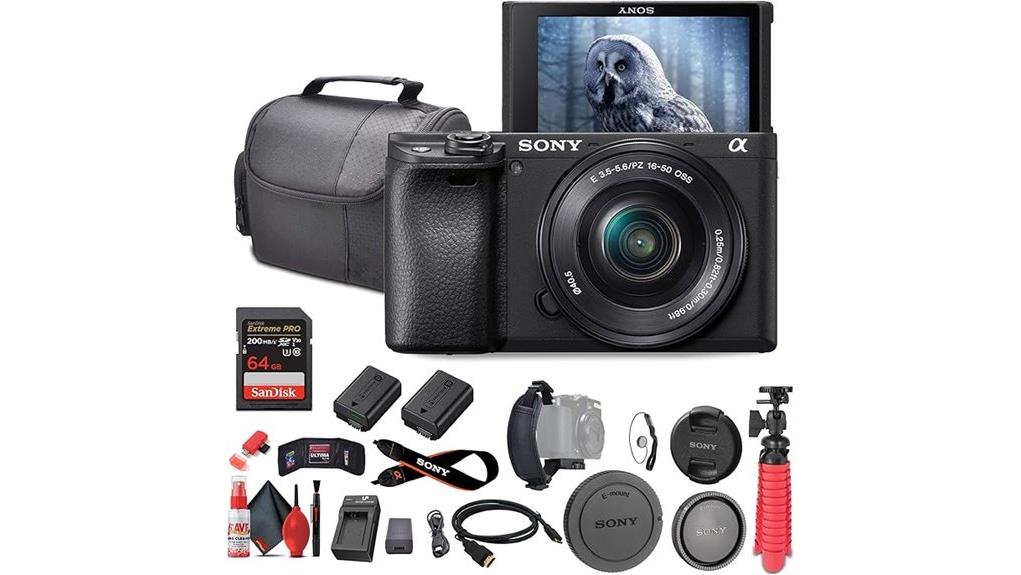
Unpack the kit and you'll find the a6400 body matched with a 16–50mm kit lens plus a complete accessory bundle—64GB Extreme PRO card, NP‑FW50 replacement battery with external charger, deluxe soft case, 12‑inch flexible tripod, Micro HDMI cable, lens cap keeper, cleaning kit, memory card wallet and reader, and a hand grip strap—giving you everything needed to shoot, transfer, and maintain files out of the box. The package targets beginner photographers and content creators who need a compact system with essential compact accessories. You’ll get a ready-to-use platform for learning controls, experimenting with framing, and developing workflows without immediate extra purchases. This kit is ideal for those exploring DSLR accessories and mirrorless systems as part of their photography gear journey.
Image Quality, Autofocus, and Low‑Light Performance Tested
When you push the a6400 hard, its 24.2MP APS-C sensor and BIONZ X processor deliver high-detail images with controlled noise and vibrant color rendition across most shooting conditions. You’ll observe wide dynamic range in RAW files, preserving highlight and shadow detail for recovery. Color reproduction is accurate straight from camera with minimal tuning, aiding critical work. Focus acquisition is rapid: Real-Time Eye AF and 425-point phase/contrast coverage lock subjects reliably for action and portraits. In low light the expanded ISO helps, while aggressive noise reduction at high ISOs trades fine detail for smoother files—manageable with conservative processing. This makes it an excellent choice for mirrorless camera enthusiasts looking for essential gear and versatility, especially when paired with the right lenses and accessories.
Video Features, Stabilization Options, and Vlogging Suitability
Having established the a6400's strong stills performance and autofocus, it's equally important to assess how those strengths carry over to video recording and creator-focused features. You get internal UHD 4K recording with S-Log3 and HLG for grading, accurate Real-Time Tracking in video, and a 180° tilting touchscreen that aids framing for vlogs. Note there's no in body stabilization, so you'll rely on stabilized lenses or gimbals for smooth handheld footage. Audio requires external microphones—hot shoe and 3.5mm jack support guarantee clean capture. Overall, the camera suits creators who prioritize AF and image quality but plan stabilization and audio workflows. For on-set monitoring and composition assistance many creators pair the camera with field monitors to enhance framing and exposure control.
Pros, Cons, Alternatives, and Recommended Buying Scenarios
Although compact and highly capable, the a6400 targets photographers and hybrid creators who value fast autofocus, image quality, and portability over in-body stabilization or advanced video-centric ergonomics. You'll get excellent stills, dependable Real-Time Eye AF, and UHD 4K video with S-Log3; battery life is modest but manageable with spares provided in the bundle. Cons: no IBIS, limited video ergonomics, and dense menu ergonomics that slow workflow. Alternatives include the stabilized Fujifilm X-S10 for handheld video, or the Canon R10 for smoother UI. Buy the a6400 if you prioritize AF, image quality, and compact system flexibility. Gear Guide readers will also find useful buying advice and kit recommendations in the site’s camera gear guide.
Some Questions Answered
Does the a6400 Support Vertical Video Recording With Metadata for Social Platforms?
Yes — you can record vertical video on the a6400, but it doesn’t embed standardized vertical metadata or portrait tagging like some smartphones do. You’ll physically rotate the camera or crop in post; files remain standard MP4/AVCHD with orientation flags that some platforms/readers respect. For reliable portrait tagging and vertical metadata, you’ll need to manually set metadata in post-production or use platform upload tools that allow orientation/portrait tagging.
Can I Use the NP-FW50 Battery From Older Sony Models Without Modification?
Yes — you can use NP-FW50 batteries from older Sony models in the a6400 without modification. Battery compatibility is native; the battery will fit and function normally. Expect variable battery lifespan depending on age, charge cycles, and storage conditions. For reliable performance, monitor capacity, avoid deep discharges, and replace cells showing significant wear. Using genuine or high-quality third-party batteries preserves performance and minimizes risk to the camera.
Is the 16-50MM Kit Lens Weather-Sealed or Suitable for Light Rain?
No, the 16-50mm kit lens isn’t weather-sealed and isn’t rated for light rain. You should avoid exposing it to moisture; weather resistance is limited by its retractable plastic construction and sealing gaps. For lens maintenance, wipe any droplets immediately, use a rain cover or plastic bag in wet conditions, and keep silica gel in your kit. If the lens gets wet, disassemble minimally, dry thoroughly, and service if functionality degrades.
What File Transfer Speeds Can I Expect Using the Included Memory Card Reader?
You can expect USB speeds up to USB 3.0/3.1 Gen1 rates (~5 Gbps) if your reader and host support it; otherwise USB 2.0 tops at ~480 Mbps. Transfer times will vary: a 64GB card at sustained 150 MB/s (read) copies in ~7–8 minutes via USB 3.0, but via USB 2.0 it takes ~2.5–3 hours. Actual speeds depend on card sustained read, reader chipset, and host USB port.
Are There Firmware Updates That Add Features or Improve Autofocus Performance?
Yes — Sony releases firmware enhancements that include autofocus tweaks and other performance improvements. You’ll install updates via Sony’s support site using a computer and USB connection or SD card. Firmware enhancements often refine Real-Time Eye AF, tracking stability, AF speed, and compatibility with lenses. You should check version notes before updating, back up settings, and make sure battery charge to avoid interruptions during the flash-based firmware install process.