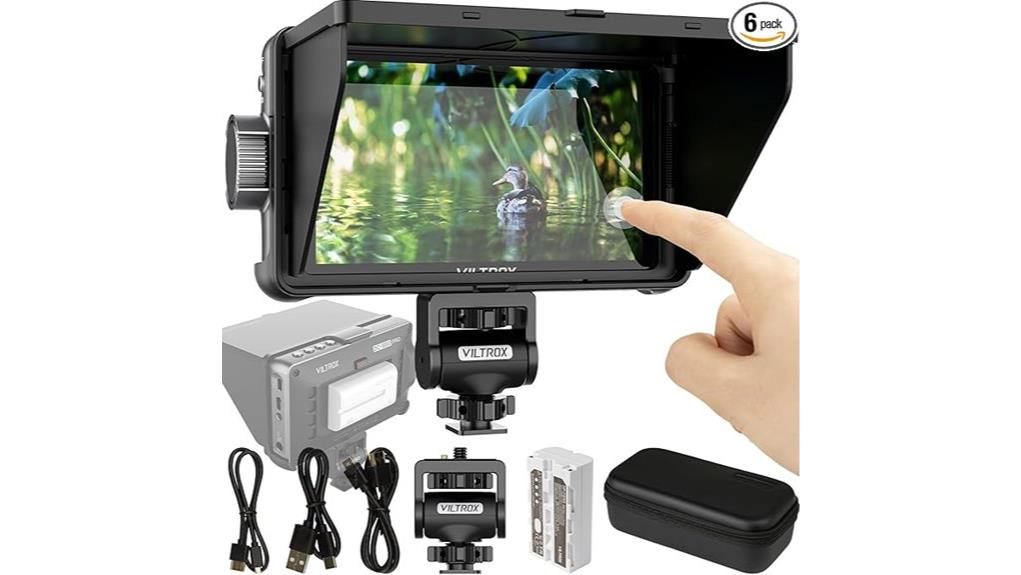
You’ll find the Viltrox DC‑550PRO is a compact, affordable 5.5" FHD touch monitor that gives you accurate Rec.709 color, 4K HDMI in/out, loadable 3D LUTs and de‑squeeze for anamorphic use. Its waveform, false color and focus assist are practical on small rigs, and the included NP‑F550 battery plus sunshade make outdoor runs easy. Touch controls can be finicky and firmware needs occasional fixes, but it’s a solid pick — scroll on to see full pros, cons and tips.
Some Key Takeaways
- Compact 5.5" Full HD monitor with Rec.709 calibration offers accurate, neutral color out of the box.
- Supports 4K HDMI input, pass-through output, de‑squeeze, and loadable 3D LUTs for on‑set grading previews.
- Practical tools include waveform, false color, and focus assist; touch controls are responsive but sometimes finicky.
- Lightweight, includes NP‑F550 battery and sunshade, suitable for handheld rigs and run‑and‑gun shoots.
- Good value for solo shooters, though UI depth and occasional firmware‑related stability issues require attention.
What the VILTROX DC-550PRO Is and Who It's For
Although compact enough to mount on a DSLR, the VILTROX DC-550PRO is a full-featured 5.5" field monitor built for shooters who need accurate, portable monitoring on set. You’ll find it suits entry level cinematography and seasoned run and gun filmmaking alike: lightweight, Rec.709-calibrated, and quick to mount. You get practical tools—waveform, false color, focus assist—without unnecessary complexity. Battery and sunshade in the box mean immediate use outdoors. It won’t replace high-end reference monitors, but it gives reliable exposure and focus feedback for handheld rigs and small crews, helping you shoot faster with confidence. It’s an ideal accessory for photographers and videographers looking to Enhance Your Video Shoots With field monitor essentials during location work.
Essential Specs and Features That Matter on Shoots (5.5 FHD Touch, HDMI 4K I/O, 3D LUT, De‑squeeze)
When you need accurate framing and exposure without a bulky rig, the DC-550PRO’s 5.5" Full HD touch screen, 4K HDMI in/out, loadable 3D LUTs and de‑squeeze function give you the core monitoring tools that actually matter on set. You’ll appreciate the responsive touch controls for framing and quick waveform checks. HDMI 4K pass-through handles modern camera outputs while de‑squeeze corrects anamorphic previews. Loadable 3D LUTs let you simulate color grading in-camera for consistent looks. Built-in Rec.709 calibration and the ability to apply custom LUTs support quick lens calibration checks and on-the-fly exposure decisions. Compact, precise, practical. Enhance your setup further with accessories and mounting options popular among users of external camera monitors for improved on-set ergonomics and versatility external camera monitors.
Real‑World Performance: Image Quality, Monitoring Tools, Battery and Ergonomics
While small, the DC-550PRO delivers surprisingly accurate images thanks to its 5.5" Full HD panel and Rec.709 calibration—colors look neutral out of the box and loadable 3D LUTs let you preview creative looks with minimal banding. You’ll appreciate the reliable color accuracy for quick client checks; waveform, false color and focus assist are responsive and readable. Touch responsiveness is good for menu tweaks, though pinch gestures feel marginal. Battery life with the included NP-F550 runs a shoot day for light use; swapping batteries is easy. Its light weight and compact form maximize portability on crowded rigs. This makes it a handy tool for photographers who need fast, reliable monitoring on the go and often pair such monitors with portable SSDs for efficient on-site backups.
Top Pros and Cons After Field Testing
Because it packs a Full HD, Rec.709‑calibrated panel and usable monitoring tools into a pocketable body, the DC‑550PRO earns top marks for color accuracy, portability, and practical on‑set features. You’ll appreciate accurate 3D LUT support, waveform, and false‑color tools that make framing and exposure reliable. Pros: lightweight build, sunshade, NP‑F550 inclusion, solid accessory ecosystem, and thoughtful battery innovation for longer shoots. Cons: touchscreen can be finicky, menu depth needs polish, and occasional need for firmware updates to refine stability. The user interface is functional but could be more intuitive for fast, multi‑camera workflows. For camera owners looking to connect external displays, reliable HDMI accessories can streamline setup and improve on‑set monitoring.
Should You Buy It? Use Cases, Alternatives, and Final Recommendation
Although it’s not perfect, the DC‑550PRO delivers exceptional color accuracy and monitoring tools in a truly portable package, so you should consider it if you need a reliable on‑camera or field monitor without breaking the budget. You’ll get accurate Rec.709, 3D LUT support, waveform, false color and de‑squeeze in a lightweight form. Ideal for solo shooters, run‑and‑gun interviews, and DSLR/4K camera rigs where space matters. Check included NP‑F550 battery and plan battery workflows for long shoots; monitor USB and HDMI pass‑through. Watch for firmware updates to fix bugs and expand codec compatibility. Overall: strong value. Brighten your shots further by pairing the monitor with on‑camera LED lights for improved subject illumination and consistent exposure, especially in compact setups with on-camera lighting.
Some Questions Answered
Does It Support Firmware Updates via USB?
Yes — you can update the firmware via USB. You’ll use the monitor’s USB/SD workflow for firmware recovery or standard updates, copying the update file to the supplied media/USB and following the on-screen procedure. You should check the manufacturer for available files and clear instructions. You’ll also want to track update frequency from Shenzhen Jueying’s support so you’re aware of new fixes and recovery tools, keeping your unit current and protected.
Can I Mount It on a Cage or Articulating Arm?
Yes — you can mount it on a cage or articulating armmount. The monitor has standard mounting points and lightweight build, so you’ll achieve solid cage compatibility and easy articulating armmount use. The included sunshade and its size keep balance on small rigs, but use a secure screw and check load ratings for heavier arms. You’ll want to confirm thread type (1/4"-20 common) and tighten to avoid wobble during shoots.
Is the Included NP-F550 Battery Compatible With My Existing Batteries?
Yes — the included NP-F550 battery is compatible with other devices using Sony NP-F style cells, so you can swap it with existing NP-F series batteries. Check battery compatibility and capacity ratings before mixing brands. For charging recommendations, use a quality NP-F compatible charger and avoid overcharging; charge at the manufacturer’s recommended current, store partially charged if unused, and keep batteries cool to prolong lifespan and guarantee safe, reliable performance.
Does It Display LUTS Applied Over HDMI Passthrough?
Yes — you can load 3D LUTs via SD card and have them applied while the HDMI signal passes through. You’ll see color grading previews on the monitor for accurate on-set decisions. Expect minimal signal latency; the unit’s processing adds slight delay but remains usable for monitoring (not ideal for pixel-perfect live output). Test your camera-to-monitor chain to confirm acceptable lag and verify LUT compatibility before critical shoots.
What Adapters Are Needed for Audio Monitoring/Recording?
You’ll need a few adapters: an RCA converter to extract analog audio from any RCA output, and a headphone amp if you want proper monitoring levels through the monitor’s audio jack. For professional mics, use an XLR adapter (XLR-to-3.5mm or XLR-to-USB) to feed clean mic-level audio. If you use wireless mics, pair a wireless receiver and route its output through the RCA converter or XLR adapter for recording.


