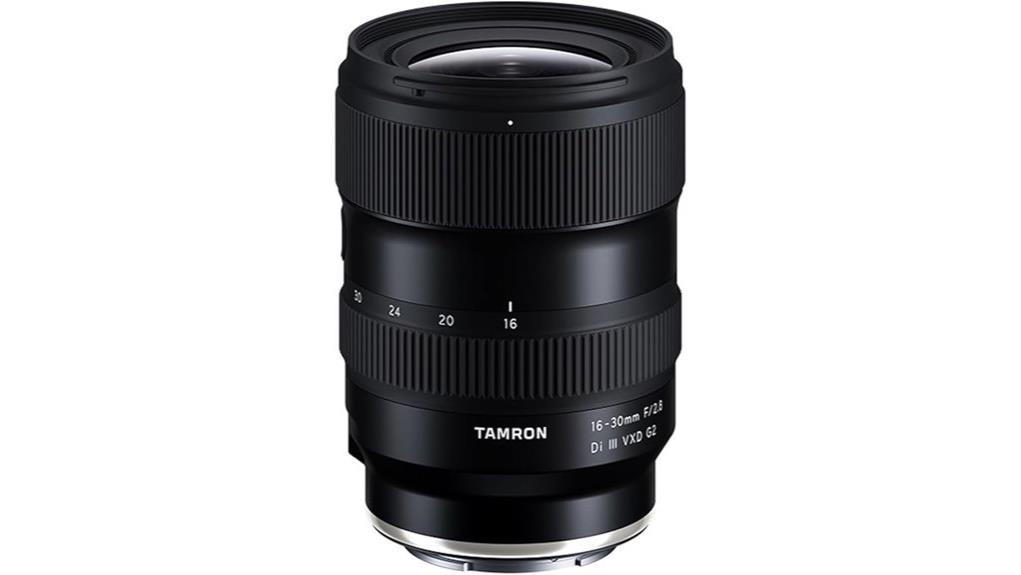
If you shoot Nikon Z and want an ultra‑wide, fast f/2.8 zoom that stays light, the Tamron 16–30mm F/2.8 Di III VXD G2 is a strong choice. You’ll get high center resolution wide open, quiet, fast VXD AF, and a compact 15.9‑ounce body that’s weather‑resistant with a fluorine front coating. Expect moderate 16mm barrel distortion, noticeable vignetting wide open and no in‑lens stabilization — continue for detailed performance, handling, and value comparisons.
Some Key Takeaways
- Excellent ultra-wide 16–30mm f/2.8 performance with sharp center resolution even wide-open, ideal for landscapes and environmental portraits.
- Compact 15.9-ounce build and robust weather resistance make it highly portable and durable for travel and outdoor use.
- Fast, quiet VXD autofocus offers reliable tracking and smooth, unobtrusive performance for both stills and run-and-gun video.
- Noticeable vignetting at 16mm wide-open and moderate barrel distortion correctable in-camera or with RAW profiles.
- Strong value versus native alternatives: matches resolution and AF speed while lacking in-lens stabilization.
Quick Verdict: Who Should Buy the Tamron 16–30mm F/2.8 Di III VXD G2
If you need an ultra-wide, fast-aperture zoom for Nikon Z that stays light on your kit and performs reliably, consider the Tamron 16–30mm F/2.8 Di III VXD G2. You’ll benefit if you shoot night landscapes requiring wide coverage and low-light throughput, or if you make travel and architecture images where compactness and resolution matter. The lens suits hybrid shooters who prioritize fast, quiet VXD autofocus and mobility over in-body stabilization. Expect controlled creative distortion at the extremes useful for expressive framing, and robust moisture-resistant handling for field work. It’s not aimed at telephoto users or those needing stabilization. This is a smart pick for mirrorless photographers seeking essential, portable gear for wide-angle work and everyday shooting with mirrorless cameras.
Key Specs That Matter for Buyers (16–30mm, F/2.8, Weight, Mount, Stabilization)
Having established who benefits most from this lens, let's examine the specifications that will directly affect your shooting choices: the 16–30mm range, constant f/2.8 aperture, compact 15.9‑ounce weight, Nikon Z mount, and lack of in‑lens stabilization. The 16–30mm span gives you ultra‑wide framing for architecture and interiors while remaining useful for environmental portraits. The constant f/2.8 aids low‑light and depth control. At 15.9 ounces the lens is highly portable for travel. Nikon Z mount guarantees native electronic integration and metering. No optical stabilization means you'll rely on in‑body stabilization or faster shutter speeds. Filter compatibility (67 mm) and corner sharpness are key practical concerns. For photographers who frequently change focal lengths, mastering how to use zoom lenses can significantly improve composition and workflow.
Real-World Image Quality: Sharpness, Distortion, Vignetting and Bokeh
Evaluate image quality across sharpness, distortion, vignetting and bokeh by focusing on measurable behavior rather than impressions. You’ll find center resolution high at f/2.8 across 16–30mm; edge sharpness improves stopped to f/5.6, with minimal drop-off at 30mm. Distortion follows predictable rectilinear patterns: moderate barrel at 16mm, straightening toward 30mm and corrected well in-camera or in RAW profiles. Vignetting is noticeable wide-open at 16mm (~1.2–1.5 stops) and reduces ~0.6–0.8 stops by f/5.6. Longitudinal CA is controlled; lateral chromatic aberration appears mostly correctable. Bokeh is smooth for an ultra-wide, with nine blades aiding rounded highlights. This lens’ performance makes it a practical choice for enthusiasts focused on telephoto lens techniques applied to sports and wildlife photography.
Handling and Video Use: Autofocus, Size/Weight, Build, Weather Resistance
Beyond measured optics, handling and video performance determine how the 16–30mm f/2.8 G2 behaves in real shooting scenarios. You’ll find autofocus behavior is rapid, quiet, and accurate thanks to VXD actuators; it locks reliably for stills and tracks smoothly for pans. For video autofocus, shifts are minimal and unobtrusive, suitable for run-and-gun work when paired with a Z-body. Weight handling is excellent: at 15.9 ounces the lens balances well on mirrorless bodies and reduces fatigue during handheld or gimbal use. Build quality is robust with moisture-resistant construction and fluorine-coated front element, delivering practical weather sealing for field use. The lens pairs naturally with many top handles designed to improve grip and comfort for photographers Top Handle Essentials.
Value Comparison: Tamron G2 vs Nikon and Third‑Party Ultra‑Wide Options
When you compare the Tamron 16–30mm f/2.8 Di III VXD G2 to native Nikon and other third‑party ultra‑wide zooms, its combination of f/2.8 speed, compact 15.9‑ounce weight, and updated G2 optics delivers an unusually strong value proposition for Z‑mount shooters; it undercuts many native equivalents on price while matching or approaching their resolution, autofocus speed, and build features (moisture resistance, fluorine coating), though it lacks in‑lens stabilization found on some competitors. You’ll get notable price competitiveness without sacrificing center sharpness or AF responsiveness. Consider sensor‑stabilized bodies to mitigate no-IS. Warranty, build quality, and coatings support lens longevity. Perfect Portrait Lenses offers resources on portrait lens selection to help you choose the right optics.
Some Questions Answered
Does This Lens Support In-Camera Lens Corrections for Nikon Z Bodies?
Yes — you’ll get in camera corrections on compatible Nikon Z bodies when the lens reports correct metadata compatibility via its electronic contacts. The Tamron communicates focal length, aperture, and distortion profiles so Nikon Z cameras can apply chromatic aberration, vignetting and geometric corrections automatically in-camera or in RAW conversion. You should update camera firmware and Tamron Lens Utility settings to guarantee full profile recognition and peak correction behavior.
Can I Use 67MM Filters With a Square Filter Holder or Adapter?
Yes — you can use 67mm filters with a square holder via a filter adapter. You’ll screw the 67mm adapter ring onto the lens filter threads, then mount a compatible square holder. Make sure the adapter matches the holder’s flange and allows for multi-slot plates if using graduated/ND filters. Watch for vignetting at 16mm; use a slim adapter and position the holder closer to the lens to minimize corner darkening.
Is There a Close-Focus or Macro Mode/Ability Near 16MM?
No — there’s no dedicated close-focus or macro mode at 16mm; the lens’s minimum focus distance limits extreme close-ups. You can focus relatively near for wide-angle perspective exaggeration, but magnification stays far from true macro. Expect good edge sharpness for landscape distances, though wide-close subjects may show reduced corner resolution and perspective distortion. For detailed close work use a macro lens or extension; this zoom favors resolution and AF speed at normal-to-infinity ranges.
Does the Lens Accept Autofocus Microadjustments via Camera Body?
Yes — you can perform autofocus fine tuning with this lens via camera body calibration compatibility on supported Nikon Z cameras. The lens uses Tamron’s VXD AF and allows body-based AF microadjustments or camera-specific AF fine tuning routines where the camera offers that feature. You’ll get improved front/back focus correction after calibration, though many users find minimal adjustment is needed due to the lens’s factory alignment and VXD precision.
Are There Firmware Updates Available Through Tamron Lens Utility?
Yes — you can update firmware via Tamron Lens Utility; firmware compatibility is confirmed for this model. You’ll connect the lens to a compatible camera or USB adapter per the update procedure, run Tamron Lens Utility on your computer, and follow on-screen prompts to install available firmware. The utility verifies version compatibility before flashing. Always make sure battery charge, back up settings, and avoid interrupting the update to prevent firmware corruption.


