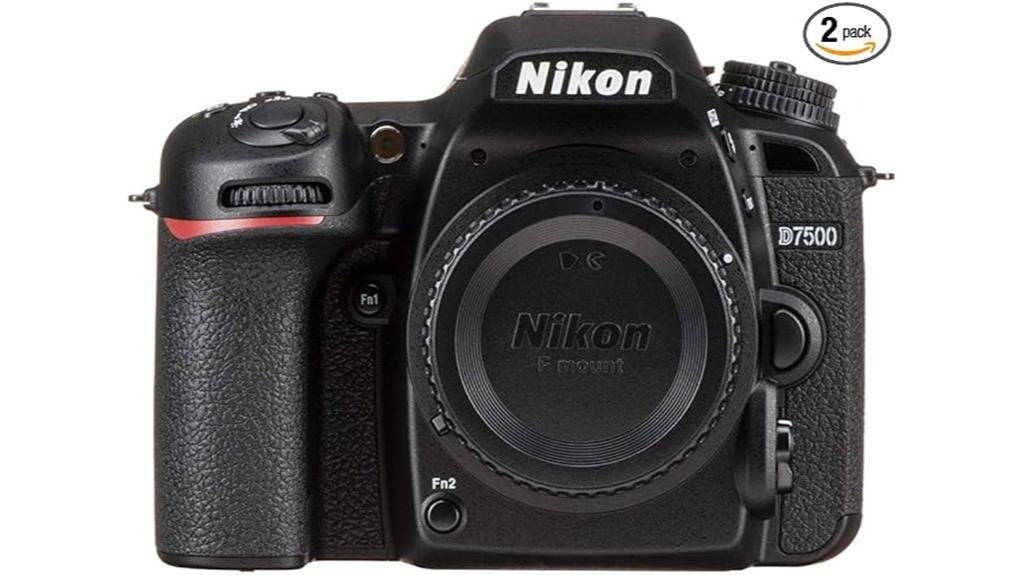
You get a ready-to-shoot Nikon D7500 kit that covers core needs: a 20.9MP DX sensor with EXPEED 5, usable ISO to 51,200, reliable AF and good mid/high tone handling, plus 4K video and HDMI output for external recording. The bundle’s batteries, dual 64GB cards, padded case and accessories save you immediate purchases and streamline field workflow. Compare bundle cost to buying parts separately to confirm value, and keep going to see detailed tradeoffs and recommendations.
Some Key Takeaways
- D7500 body offers strong 20.9MP image quality, reliable AF, and good dynamic range for enthusiast photographers.
- Bundle includes two EN‑EL15 batteries and dual 64GB cards, enabling full‑day shooting and immediate backup.
- 4K 30p, HDMI 8‑bit 4:2:2 output, and tilting touchscreen meet most hybrid photo/video needs with an external recorder.
- Included padded case, tripod, and card reader improve out‑of‑box usability but are lower‑tier compared to premium accessories.
- Compare bundle price to separate purchases of body, quality batteries, cards, and a preferred lens before deciding.
What You Get in This Nikon D7500 Bundle (Items and Real‑World Value)
While the D7500 body is the kit's centerpiece, this bundle gives you a ready-to-shoot system: two EN-EL15 batteries and dual 64GB SanDisk UHS‑I cards cover extended sessions, the padded case and memory wallet protect and organize gear, and accessories like the USB card reader, 12-inch flexible tripod, cleaning kit, hand strap, and lens cap keeper address common workflow and maintenance needs. You’ll get immediate shooting capacity, basic stabilization, and hygiene tools without sourcing extras. Consider costs if you want additional lenses or expanded warranty options; this package suits beginners and travelers who prioritize convenience and minimal setup time. This kit is particularly useful for photographers who want to keep shooting longer without hunting for replacements.
Core Performance: Sensor, ISO Range, Autofocus, and Low‑Light Results
Although it sits below Nikon’s flagship, the D7500’s 20.9 MP DX CMOS sensor paired with the EXPEED 5 engine delivers clean, detailed files that hold up across a broad ISO range. You’ll get usable results from ISO 100–51,200 with aggressive, yet controlled noise reduction when you push higher; expandable settings exist for extreme scenarios. Autofocus is responsive and reliable, benefiting from high precision metering and proven AF algorithms for tracking. In lab-style dynamic range testing the sensor preserves midtones and highlights well for its class, though shadow recovery softens as ISO climbs, as expected. For shooters who favor compact systems, mirrorless accessories and lenses can complement the D7500 for a versatile kit mirrorless camera gear.
Video and Connectivity: 4K, HDMI Output, and Practical Recording Options
Having covered stills performance, let's examine how the D7500 handles moving images and external feeds. You get 4K UHD up to 29:59 at 30 fps, and Full HD options for variable frame rates. The camera provides uncompressed 8-bit 4:2:2 4K via HDMI to an external recorder while recording MP4 or MOV to dual SD cards, enabling practical 4K workflows that separate capture and backup. The tilting touchscreen aids monitoring; HDMI output requires the included mini HDMI cable. Wireless transfer is available for quick file sharing but isn't a substitute for tethered HDMI capture or high-bitrate external recording. For photographers who frequently record or monitor footage, investing in a quality micro HDMI cable can improve reliability and preserve signal integrity.
Battery Life, Accessories, and Day‑to‑Day Usability for Enthusiasts
Consider battery life and accessories as integral parts of the D7500's daily workflow: the dual EN‑EL15 battery packs included with this bundle let you shoot a full day of mixed stills and occasional 4K clips with minimal swapping, and the camera's power draw is comparable to other DX bodies using the EXPEED 5 engine. You'll get reliable battery endurance for typical enthusiast use; carrying both spares in the padded case covers extended shoots. Accessories—cards, mini‑tripod, card reader, HDMI cable—support field workflows. Ergonomic handling remains solid: controls are accessible, the tilting touchscreen aids framing, and the kit keeps you operational without added bulk. This bundle is well aligned with our store's focus on camera batteries and accessories for photographers.
Is the Bundle Worth It? Cost Comparison, Who It’s Best For, and Final Verdict
While the bundle adds convenience and immediate readiness, you should weigh its cost against buying the D7500 body and selected accessories separately. Calculate prices: body, two EN-EL15 batteries, quality SD cards, padded case, and a reliable tripod; compare to bundle total. The bundle suits you if you want out-of-box shooting and value included consumables. Professionals or modulable hobbyists may prefer tailored purchases or higher-grade lenses instead; consider budget alternatives for trifling items. Factor in resale value of the D7500 and accessories—bodies and batteries retain value better than mass-market tripods or bags. Final verdict: pragmatic, situational buy. Many photographers also prioritize fast, reliable memory card readers to speed workflow when backing up photos.
Some Questions Answered
Does This Bundle Include Any Lenses or Is It Strictly a Body-Only Kit?
It's strictly a body-only kit; no lenses are included. You get the D7500 body, batteries, cards, case and accessories, so lens availability depends on purchasing separately or choosing other kit variations that bundle lenses. You'll need to buy lenses compatible with Nikon F-mount DX/FX or select a different retailer package if you want a lens included. Check kit variations carefully to confirm which lenses, if any, are offered.
Are Firmware Updates and Nikon Support Included With Purchase?
Yes — you get standard firmware support and access to Nikon update policies after purchase. You’ll be able to download firmware updates from Nikon’s website, follow documented update procedures, and contact Nikon support for troubleshooting, warranty service, and repair options. Firmware support covers stability, compatibility, and feature fixes; update policies (release cadence and device eligibility) are set by Nikon and can vary, so check their site for the latest notices.
Can the Dual Batteries Be Charged Simultaneously With the Included Accessories?
No — you can’t charge both batteries simultaneously with the included accessories. The bundle provides two EN-EL15 packs but only a single external charger (or camera USB charging capability), so simultaneous Battery charging isn’t supported out of the box. Charging options are limited to charging one battery in the supplied charger while the other charges only when inserted in the camera (if USB charging is used) or via a separate aftermarket dual charger you’d need to purchase.
Is There Any Manufacturer Warranty or Extended Warranty Option in the Bundle?
No—this bundle typically doesn’t include a manufacturer warranty or extended warranty by default; you’ll get whatever warranty comes with the camera body purchase (check seller). You should verify warranty transferability and specific warranty exclusions with the retailer or Nikon. If the seller offers an extended plan, read terms for coverage period, accidental damage, and service limits. Keep receipts and serial numbers to support any future claims.
Are the Sandisk Cards Pre-Formatted and Ready to Use Out of the Box?
Most likely yes — the SanDisk cards arrive with a pre formatted status for basic out of box compatibility, but you should perform card formatting in-camera for peak performance. Formatting the cards in the D7500 guarantees proper file system, allocation unit size and reduces risk of errors. For card formatting and immediate usability, insert each card, back up any data, then use the camera’s Format function before shooting.


