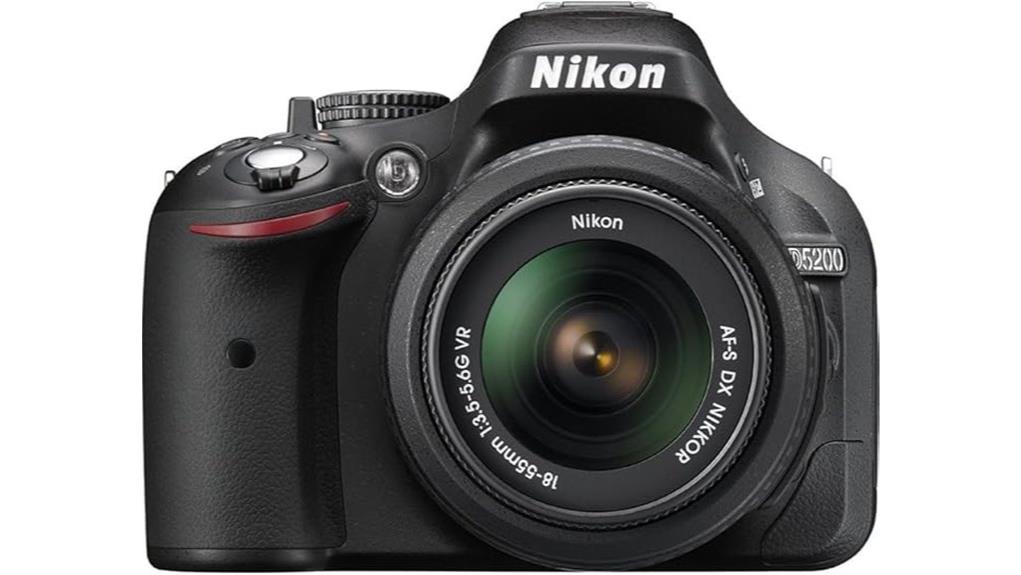
You get a 24.1 MP DX sensor that yields 6000×4000 files with fine detail and solid mid‑ISO dynamic range, though noise climbs sharply above ISO 1600 and detail drops by ISO 3200. A 39‑point AF with nine cross‑type sensors and 3D tracking handles moving subjects well, and the kit 18–55mm VR aids low‑light hand‑held sharpness. The articulating 3.0" LCD and tactile controls suit vlogging and manual work—keep going to see specific strengths and limits.
Some Key Takeaways
- 24.1 MP DX sensor delivers detailed 6000×4000 images suitable for large prints and tight cropping.
- Solid mid‑ISO dynamic range preserves highlights and shadows; aggressive RAW pulls may reveal banding.
- Low‑light performance usable to ISO 3200 with noise reduction, but noise increases sharply above ISO 1600.
- 39‑point AF with nine cross‑type sensors and 3D tracking offers reliable subject acquisition for stills.
- Compact body, articulating 3.0" LCD, and kit 18–55mm VR lens make it a practical, budget-friendly enthusiast DSLR.
Real-World Image and Video Performance: Resolution, ISO, and Low-Light Results
Although the D5200's 24.1 MP DX-format CMOS sensor delivers high-resolution 6000 x 4000 files that hold fine detail for large prints and tight crops, you’ll get the best results when you balance ISO and sharpening because noise becomes apparent as sensitivity rises. You’ll notice solid dynamic range in mid-ISO settings, preserving highlight and shadow detail for calibrated RAW processing. Color depth is adequate for nuanced grading, though banding can appear with aggressive pulls. Low light noise increases sharply above ISO 1600; high ISO performance is usable to 3200 with noise reduction, but detail loss is measurable. For consistent color and exposure when shooting RAW, using color checker cards can help ensure accurate results across different lighting conditions.
Autofocus, Metering, and Stabilization in Practice: 39-Point AF, 3D Tracking, and VR Lens
After evaluating how the D5200's sensor handles resolution and high-ISO noise, you'll find its autofocus, metering, and stabilization systems are set up to help you extract usable frames in challenging conditions. The 39-point AF uses phase detection across a dense array, nine cross-type sensors improving lateral and vertical discrimination. 3D subject tracking leverages color and distance data to maintain focus through composition changes; you'll notice reliable reacquisition for moving targets. Metering offers matrix, center-weighted, and spot modes for precise exposure decisions. The kit NIKKOR 18–55mm VR lens provides effective vibration reduction, aiding hand-held low-light sharpness. For enthusiasts, pairing the camera with essential DSLR accessories like straps, tripods, and cleaning kits rounds out a practical kit.
Handling, Controls, and the Articulating 3.0 LCD for Shooting and Vlogging
When you pick up the D5200, its compact DSLR chassis and well-placed controls make one-handed adjustments practical while you compose, and the 3.0-inch vari-angle LCD swings and tilts to accommodate high-, low-, and front-facing angles for both stills and vlogging. You’ll find tactile dials and a responsive shutter layout that let you change aperture, shutter speed, and ISO without removing your eye from the scene. The articulating screen supports handheld vlogging framing and monitoring; while the D5200 lacks full touchscreen menus, limited touch controls in live view speed focus point selection, improving quick recompose and subject tracking. The camera is also compatible with various camera remote shutters, which can further enhance hands-free shooting and vlogging flexibility.
Battery Life, Storage, and Connectivity: UHS Requirements, Wi‑Fi, Ports, and Workflow Tips
Because the D5200 balances respectable endurance with specific storage and connectivity requirements, you’ll want to plan batteries, cards, and transfer methods before long shoots or vlogging sessions. You’ll get lithium‑ion runtime adequate for hundreds of stills or ~1–2 hours of continuous HD video; carry at least one spare battery and a charging routine. Use SD cards meeting UHS requirements (U1 or higher) to sustain ~30 MB/s write rates for 5 fps RAW/JPEG and uninterrupted 1080p capture. Wi‑Fi enables remote control and quick sharing; use USB or AV‑out for wired transfers. Workflow tips: tag, back up, and transcode promptly. Also consider choosing SD cards from reputable sellers and checking compatibility to ensure reliable performance.
Who Should Buy the D5200 in 2026 and Recommended Kit vs. Upgrades
Having sorted battery, card, and transfer workflows, you can now evaluate whether the Nikon D5200 still fits your needs in 2026: it's a capable APS‑C DSLR that suits learners who prioritize image quality over the latest autofocus or video codecs, hobbyists wanting manual control and an optical viewfinder, and photographers on a budget who value solid 24.1 MP stills, reliable 39‑point AF, and an articulating 3.0‑inch LCD. You should buy it if you’re an enthusiast photographer or budget videographer needing dependable RAW capture, optical metering, and lens compatibility. Pair the kit 18–55mm VR for walkaround use; upgrade to faster primes or a telephoto for low‑light or wildlife. Many mirrorless users still rely on essential gear like tripods, extra batteries, and card readers when integrating DSLRs into their workflows.
Some Questions Answered
Does the D5200 Support External Microphones for Improved Audio?
Yes — you can use an external mic with the D5200 via its 3.5mm mic jack for improved audio. You’ll get better direct-capture sound than the internal mic, though no headphone jack for monitoring. If you need XLR mics or wireless systems, use appropriate audio adapters (3.5mm to XLR or battery-powered preamps) or a portable recorder and sync in post. Make sure mic output levels match the camera’s mic input.
Can the Camera Be Used for Astrophotography With Interval Shooting?
Yes — you can use it for astrophotography with interval shooting. You’ll perform long exposure captures to collect faint starlight, use interval shooting to record sequential frames, and compile them into time lapse sequences or stack for noise reduction. For star trails you’ll use many long exposures or a single very long exposure; enable manual exposure, disable long-exposure noise reduction if stacking, and use a sturdy tripod and wired remote/intervalometer.
Is the Refurbished Warranty Transferable to a New Owner?
No — refurbished warranty transferability usually depends on the refurbisher; certified manufacturer-refurbished Nikon units often tie the 90-day warranty to the original purchaser and registration, so it may not transfer automatically. You should check owner documentation and contact the refurbisher or Nikon support to confirm. Keep proof of purchase and any refurbishment certificates; those documents determine whether warranty transferability can be authorized or extended to a subsequent owner.
Are Third-Party Lenses and Adapters Fully Compatible With Its F-Mount?
Yes — many third party lenses will work with the F-mount, but third party compatibility varies by manufacturer and lens type. You’ll get full mechanical coupling for most AF-D and AF-S style optics, though autofocus and metering can be limited with some AF-S clones. Adapter limitations appear when mounting non-F glass (micro four thirds, Sony E, etc.): you’ll need active or mechanical adapters, lose certain AF modes, and may sacrifice EXIF, aperture control, or stabilization.
Can the D5200 Be Hacked With Custom Firmware Like Magic Lantern?
No, you can’t run Magic Lantern on the D5200 because Nikon bootloader access isn’t available for that model. You’d need a bootloader with elevated access to load third-party firmware, which hasn’t been achieved publicly for the D5200. Attempting unofficial firmware hacks risks bricking the camera, voiding warranties, corrupting shutter/AF systems, and causing data loss. If you pursue experimentation, you should only proceed with thorough backups, documented recovery tools, and acceptance of firmware risks.


