You’ll get a 16MP BSI CMOS sensor paired with an EXPEED engine and a NIKKOR 24–3000mm (35mm equiv.) 125x zoom, letting you reach wildlife and the Moon without swapping glass. Expect strong center sharpness at short to mid telephoto, softer edges past ~1500mm, rising noise above ISO 800, and about four stops of Dual Detect VR—though wind and subject motion limit max-zoom steadiness. It shoots UHD 4K with clean HDMI and USB-C; keep reading for full pros, cons, and workflow tips. the nikon coolpix p1100 zoom capabilities allow photographers to capture stunning detail from great distances, making it an excellent choice for both amateur and professional wildlife observation. Its expansive zoom range opens up a world of creative possibilities, from close-up shots of elusive animals to breathtaking landscapes under the night sky. Additionally, its user-friendly interface and compact design ensure you can take it wherever your adventures lead.
Some Key Takeaways
- 125x NIKKOR zoom (24–3000 mm equiv.) delivers extreme reach for wildlife and lunar shooting, with trade-offs in edge sharpness and chromatic aberration.
- 16 MP BSI CMOS sensor plus EXPEED processor yields good center sharpness at shorter ranges but noise rises notably above ISO 800.
- Dual Detect Optical VR provides about four stops of stabilization, though wind or subject motion limit stability at maximum zoom.
- Dedicated scene modes (Moon, Bird, Nightscape) simplify composition, AF, and noise control for telephoto wildlife and night work.
- UHD 4K30 video, clean HDMI, and USB-C tethering support pulling stills, external recording, and efficient workflow with bundled accessories.
Nikon COOLPIX P1100 at a Glance: Key Specs and Who It’s For
Although compact in body, the Nikon COOLPIX P1100 delivers a technical package centered on a 16 MP BSI CMOS sensor, EXPEED processor, and an extraordinary NIKKOR 24–3000 mm (35mm equivalent) zoom, making it a specialized tool for long-reach photography. You’ll find a broad aperture range (f/2.8–8), ISO 100–6400, UHD 4K video, USB-C and Clean HDMI output, and Dual Detect Optical VR for four stops of stabilization. This combination defines the target audience: wildlife and lunar shooters who need extreme reach without professional interchangeable lenses. Handling ergonomics favor handheld telephoto work, aided by the stabilizing hand grip and mode dial. Perfect Tripods recommends matching this superzoom with a sturdy tripod for maximum stability during long-reach shots and low-light exposures, especially when composing detailed lunar or distant wildlife images sturdy tripod.
Real-World Performance: Image Quality, 125x Zoom, and Stabilization
When you push the P1100 into its extreme focal lengths, the camera delivers usable results thanks to the combination of a 16 MP BSI CMOS sensor, EXPEED processing, and Dual Detect Optical VR, but there are measurable trade-offs in resolution, noise, and chromatic aberration as magnification increases. You’ll find center sharpness assessment favorable at wide and short telephoto ranges; diffraction and lens softness reduce edge detail beyond ~1500 mm equivalent. Noise climbs with ISO above 800, impacting perceived microcontrast. Dual Detect Optical VR extends handheld reach by about four stops, yet stabilization limits appear when subject motion or wind introduce residual blur at maximum zoom. For shooters who frequently offload and manage files, choosing the right memory card reader can streamline workflow and improve turnaround times, especially when paired with high-speed cards and reliable card readers.
Special Shooting Modes in Action: Moon, Bird, Nightscape, and Timelapse
If you want to get usable lunar close-ups, crisp bird shots, or clean long-exposure nightscapes without diving into manual menus, the P1100’s dedicated Moon, Bird, Nightscape and Timelapse modes apply optimized exposure, focus and processing parameters so you can concentrate on composition and framing. You’ll rely on Moon mode’s contrast optimization and hyperfocal presets for accurate moon composition at extreme telephoto, while Bird mode prioritizes AF tracking speed and color processing to capture subtle bird behavior. Nightscape stacks exposures and controls noise for long exposures, and Timelapse automates interval capture with consistent exposure smoothing for reliable sequences. These modes are especially helpful for photographers focused on telephoto wildlife and sports shooting, where reach and speed matter.
Video, Connectivity, and Workflow: 4K, HDMI Output, and Extracting Stills
Alongside its scene modes, the P1100’s video and connectivity features make it a practical tool for mixed photo–video workflows, especially when you need high-resolution footage and easy extraction of stills. You’ll record UHD 4K at 30 fps, letting you pull 8.3MP frames from clips with minimal interpolation for sharp reference images. Clean HDMI output supports external monitoring over USB-C or HDMI, so you can confirm framing and exposure on calibrated displays. Workflow optimization is aided by Super Lapse/Time-Lapse modes and included software; transfer speeds and tethered control streamline ingest, review, and frame-extraction in a production pipeline. External monitoring with calibrated displays and recorders can significantly improve exposure accuracy and color assessment during shoots.
Value Bundle, Pros vs Cons, and Should You Buy It?
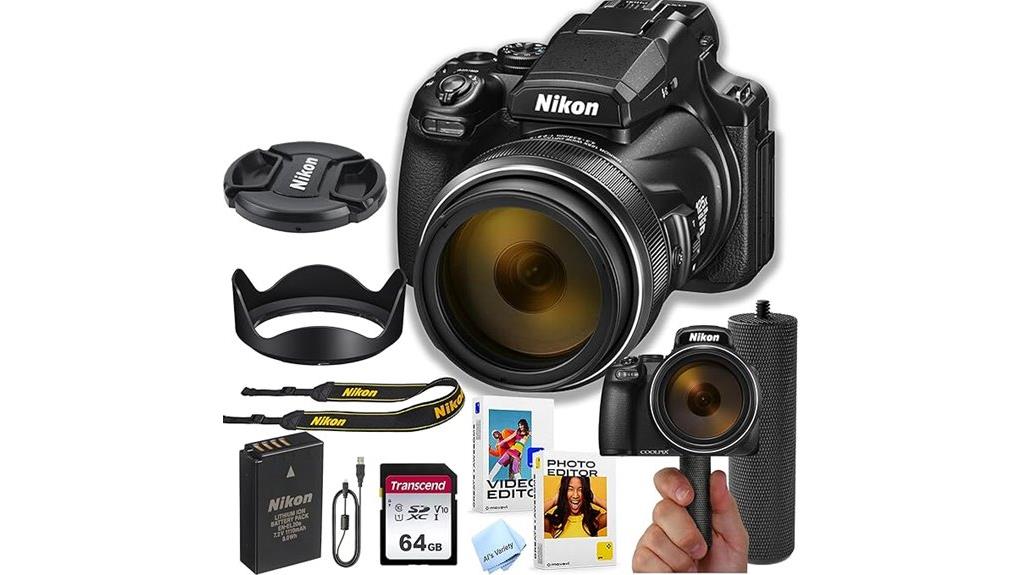
Because the P1100 Value Bundle packages the camera with a 64 GB high-speed card, stabilizing hand grip, tulip hood, cleaning cloth, editing software, and a seller-backed year of warranty, you get a ready-to-shoot kit that removes most immediate accessory decisions and supports both field use and basic postproduction workflows. The pros: extreme 125x zoom, four-stop Dual Detect VR, 4K capture and clean HDMI; bundled items improve out-of-box usability and accessory compatibility. Cons: renewed unit may show wear, limited low-light ISO ceiling, bulky telephoto handling. Buy if you need super-telephoto reach affordably; consider resale value before purchase. Including a high-quality high-speed memory card helps ensure fast write speeds and smoother continuous shooting and 4K video capture.
Some Questions Answered
Does the P1100 Support RAW (NEF) Image Capture?
No — the P1100 doesn’t support RAW (NEF) capture; raw unsupported is accurate. You’ll shoot JPEGs only, so don’t expect NEF files or post-processing latitude RAW provides. This isn’t nefarious confusion; it’s a specification limit of the camera’s firmware and processor. You can use the highest-quality JPEG settings and 4K frame extraction to maximize detail, but if NEF output is essential, you’ll need a different camera model that explicitly lists RAW support.
Can You Use External Microphones for Better Audio?
No — you can’t plug an external microphone directly into the camera body. The P1100 lacks a mic jack, so you’ll need workarounds: record sound with an external recorder or use audio adapters that accept a microphone and route audio via HDMI to an external monitor/recorder with mic input. You’ll sync audio in post. This approach preserves higher-quality external microphone capture but requires extra gear and careful synchronization during editing.
What Battery Life Can I Expect per Charge?
You’ll get roughly 300–380 shots per charge under mixed use; video recording in UHD 4K will reduce that to about 60–90 minutes. Battery longevity depends on usage patterns, temperature, and charge cycles; expect gradual capacity loss after several hundred charge cycles. To maximize lifespan, keep the battery between 20–80%, avoid extreme heat, and store partially charged if unused. Carry spares for extended shoots or heavy video work.
Is There a Built-In Intervalometer for Timelapse Without Firmware Hacks?
No — the camera doesn’t include a dedicated built‑in intervalometer. You’ll use the P1100’s timelapse controls (Super Lapse/Time‑Lapse movies) to create interval shooting sequences, but those modes offer limited interval flexibility compared with a true intervalometer. For precise, programmable intervals or longer sequences you’ll need external interval controllers, an external recorder with clean HDMI trigger, or post‑processing from continuous shooting frames captured via other modes.
Does It Accept Screw-In Filters on the Lens?
No, it doesn’t accept standard screw-in filters directly. You’ll need front lens filter adapters or a threaded cap-style adapter that mates to the fixed front lens assembly to use screw-in filters. The camera’s telescoping superzoom and integrated lens protectors prevent a native filter thread, so manufacturers supply adapter rings or clip-on solutions. You’ll attach an adapter or threaded cap, then screw on your filters for protection or effect.