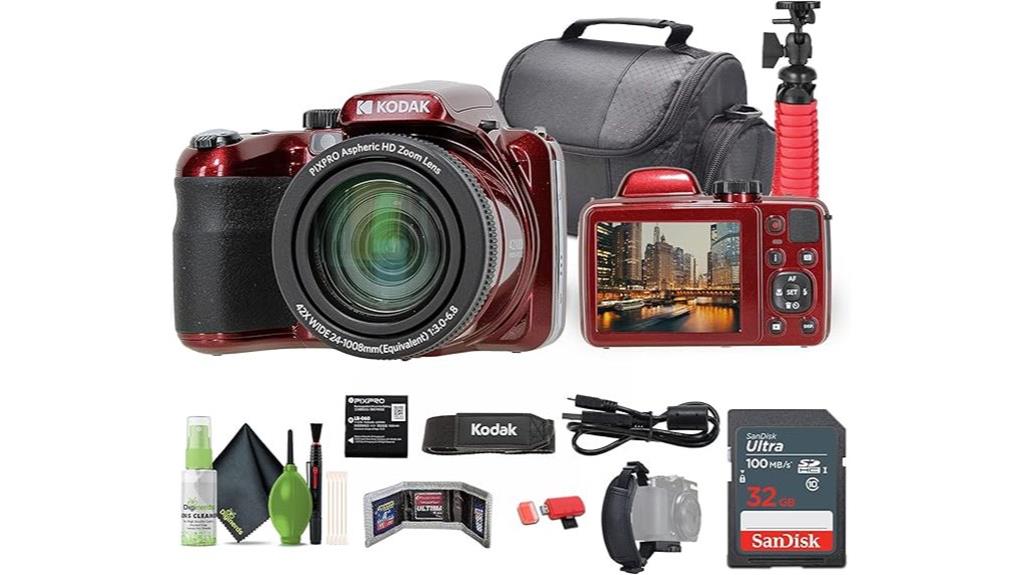
You’ll like the Kodak PIXPRO AZ425 if you want massive 42x reach in a lightweight, grab-and-go body and don’t need mirrorless-grade image quality. It shoots 20MP CCD stills that crop well, stabilizes tele shots, and flips a 3.0-inch screen for selfies, but video tops out at 720p, low-light and ISO performance lag, and there’s no external mic or touch controls. It’s great for travel vlogs with steady support—keep going to see detailed pros, cons, and gear pairings.
Some Key Takeaways
- Lightweight, compact body with 42x optical zoom suits travel vloggers needing long reach without extra lenses.
- 20MP CCD stills deliver usable photos and crops, but limited dynamic range and noise above ISO 800.
- 720p video is acceptable for casual vlogs but softer than modern 1080p/4K options.
- Flip-out 3.0" screen aids selfie framing, but no touch controls or external mic input limits usability.
- Bundled mini tripod and tripod compatibility help steady telephoto shots; bring spare battery and mic for better results.
How the Kodak PIXPRO AZ425 Fits Vloggers and Travelers
Often, you'll find the PIXPRO AZ425 suits vloggers and travelers who prioritize reach and portability over cutting-edge video specs. You’ll appreciate its lightweight portability compared with bulkier zoom rigs, making long days of shooting less tiring. The 42x zoom and bundled tripod give you range without extra lenses, so you can pivot between landscapes and close-ups quickly. For content creators, content versatility comes from panorama and intelligent detection modes that simplify varied shots. You’ll trade advanced video resolution for convenience, but if you value travel-friendly reach and straightforward operation, this camera fits the bill. If you plan to record while riding or exploring, consider how your setup pairs with a bike camera mount to keep shots steady and secure.
Real-World Image and Video Performance: 20MP Photos, 720p Video, and Stabilization
While the AZ425's 20MP CCD stills deliver good-looking photos with decent detail for prints and social sharing, you'll notice limits in dynamic range and low-light noise compared with modern CMOS sensors, especially above ISO 800. You get reliable daylight performance, punchy color accuracy and usable 20MP crops, but shadow recovery is weak. Video tops out at 720p—adequate for casual vlogs but softer than contemporary 1080p/4K rivals. Optical stabilization helps reduce motion blur at telephoto lengths and walking shots, yet it's not a cure-all: fast pans or dim scenes still show blur and noise, so manage expectations. This camera is a solid pick for hobbyists and casual users who want affordable camera gear with digital camera accessories options.
Vlogging Features That Matter: Flip Screen, Audio, Battery, and Tripod Use
Getting solid daytime photos and stabilized 720p clips is a good start, but for actual vlogging you'll care more about usability features like the flip screen, audio options, battery life, and tripod compatibility. The 3.0-inch flip screen gives decent framing for selfies but lacks touch control, so you’ll adjust settings manually. Audio relies on the built-in mic; there’s no external microphone input, so onboard sound is adequate but not studio quality. Battery life is modest; expect a few short sessions before recharging or swapping cells. The bundled mini tripod and tripod compatibility make hands-free shooting straightforward for travel creators. Consider pairing the camera with a dedicated tripod bag to protect your gear on the go.
Strengths and Limitations for Creators: Zoom, Low-Light, Autofocus, and Portability
Because the AZ425 packs a 42x zoom into a compact, travel-ready shell, you'll get reach most smartphones can't match, but that long glass also amplifies its low-light and stabilization limits. You’ll appreciate the zoom performance for distant subjects and travel scenes—details hold up at moderate telephoto, though extreme focal lengths demand steady support. Low-light results are middling: the 1/2.3" CCD and limited ISO range produce noise beyond sunset. Autofocus behavior is predictable but conservative; contrast-detection AF hunts in dim conditions and sticks to a single point. Portability is strong, yet weight and plastic build remind you it’s not mirrorless-class rugged. Consider pairing it with a lightweight tripod for steadier telephoto shots and travel convenience.
Who Should Buy the AZ425 and What to Pair It With (Accessories and Alternatives)
If you travel a lot or shoot casual vlogs and need far-reaching optics without lugging a mirrorless kit, the AZ425 gives you a rare 42x zoom in a compact, grab-and-go body. You should buy it if you value reach, simplicity, and bundled essentials—cleaning kit, 32 GB card, flexible vlogging tripod, and bag—over advanced autofocus or low-light prowess. Pair it with compact accessories: a lightweight ND filter set, spare rechargeable battery, and a mini shotgun mic for clearer audio. For alternatives, consider entry-level mirrorless cameras for image quality or other superzooms for similar reach. Great gift recommendations for travelers. The site also offers a range of tripod-related products ideal for travel photographers, from compact tripods to travel tripod accessories.
Some Questions Answered
Does the AZ425 Support External Microphones via a Mic Jack?
No — the AZ425 doesn’t provide a mic jack, so you can’t plug in an external microphone directly. You’ll need to rely on its onboard audio or use an external recorder synced in post for better sound. For accessory compatibility, that limits straightforward vlogging setups compared with cameras that include mic input. If you prioritize improved audio, compare models with dedicated mic jacks or plan to add a separate audio recorder and syncing workflow.
Can the Camera Record Time-Lapse or Slow-Motion Videos?
No — it doesn’t offer built‑in time‑lapse or dedicated slow‑motion modes. You’ll need to create time lapse techniques manually by shooting interval stills or using post‑processing, and simulate slow motion by recording at 60 fps then slowing footage in editing (quality won’t match true high‑frame slow motion). Compared to cameras with native time‑lapse/slow‑motion settings, this is more work and gives less fluid results, but it’s still usable.
Is Bluetooth or Wi‑Fi Available for Wireless Transfer?
No — the camera doesn't offer Bluetooth transfer or built‑in Wi‑Fi, so you won't do wireless transfers or direct Cloud backup from the camera. You'll need to copy files via the included USB card reader or connect the camera to a computer, then upload to cloud services. Compared with modern vlogger cameras that offer wireless syncing, this setup is more manual and slower, though the bundled accessories make transfers straightforward.
What File System and Maximum Card Capacity Are Supported?
The camera uses standard SD card formatting, so you’ll work within FAT32 limits for compatibility. You can use SD and microSD cards (via the included USB card reader), and you’ll generally be limited to 32 GB per card when formatted FAT32. Compared to cameras supporting exFAT and larger cards, this restricts maximum single-card capacity and file sizes, so you’ll swap or offload cards more often during long shoots.
Are Firmware Updates User-Installable via USB?
No — you can’t install firmware updates via USB on this model. Firmware installation typically requires dealer/service support, so the usb method isn’t user-accessible. Compared to cameras that let you load firmware on an SD card and update yourself, this is less convenient. You’ll need the manufacturer or authorized service to perform update verification and to apply updates tied to the camera’s serial number, ensuring proper matching and validation.


