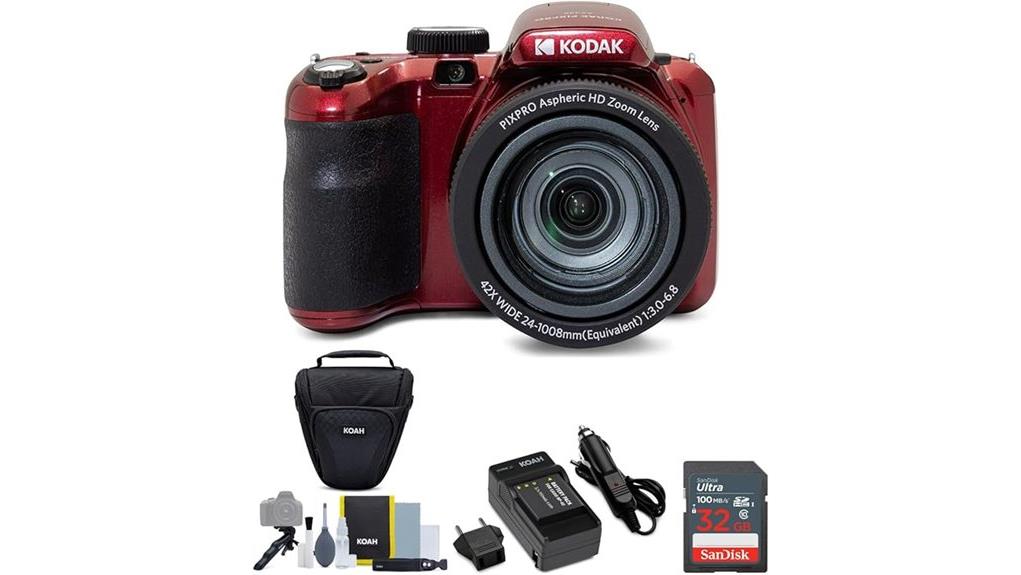
You’ll find the Kodak AZ425 PIXPRO Astro gives you a 20MP sensor with a 42x optical zoom and OIS in a compact, travel-friendly body. It delivers well-resolved daylight shots and useful telephoto reach, but noise and softness rise above ISO 400 and at full zoom. The 3-inch LCD and simple auto modes make operation easy, while modest video and battery life limit pros. Keep going and you’ll get detailed test notes, sample behavior, and accessory suggestions.
Some Key Takeaways
- 20MP sensor yields well-detailed images at base ISO, suitable for moderate cropping and 8x10 prints.
- 42x optical zoom with OIS provides excellent telephoto reach, though sharpness and chromatic aberration decline at maximum zoom.
- Image noise and detail softening become noticeable above ISO 400; use low ISO and tripod for low-light shots.
- HD video and OIS produce stable casual clips, but video resolution and manual controls are limited for enthusiasts.
- Good beginner/travel camera with included 32GB card and holster; consider extra batteries, tripod, and a protective bag.
Kodak AZ425 PIXPRO Astro At a Glance: Key Specs and Bundle Contents
While the AZ425 PIXPRO Astro targets enthusiast shooters who want reach and ease, it bundles the essentials to get you shooting immediately: a 20MP sensor, 42x optical zoom with optical stabilization, HD video and a 3-inch LCD, plus auto scene and object-tracking modes for straightforward operation. You get clear bundle highlights: the red AZ425 body, 32GB card, rechargeable battery/charger compatible with Casio NP-40/Kodak LB-060, and a DSLR-style holster. You’ll appreciate straightforward controls and post-editing tools. Evaluate ergonomics, zoom responsiveness, and stabilization against your shooting needs, and note available color options when choosing hardware. Consider pairing it with a dedicated camera bag designed for photography gear to protect and organize your kit.
How the 20MP Sensor and 3 LCD Perform in Real Shots
When you shoot with the AZ425’s 20MP sensor, expect well-resolved images at base ISO that hold fine detail for moderate cropping and 8x10 prints, though noise management becomes necessary above ISO 400 where detail softening and chroma speckling appear; the sensor renders accurate midtone color but struggles with deep shadows and highlights in high-contrast scenes. You’ll find the 3-inch LCD adequate for framing and immediate review, though its brightness and limited viewing angles can mislead exposure judgments. Evaluate shots on a calibrated monitor for color accuracy and check low light performance with a tripod and conservative ISO to preserve detail. For cleaning and maintaining optimal image clarity, keep lenses and screens free of smudges with proper lens cleaners to avoid artifacts and flare.
Testing the 42x Zoom and Optical Image Stabilization: Telephoto and Close-Up Results
Using the AZ425’s full 42x optical zoom, you’ll see strong reach for distant subjects but diminishing sharpness toward the long end. You can frame distant birds or architecture, yet fine detail softens and chromatic aberration appears. OIS helps recover usable shots handheld at moderate telephoto, but stabilization limits emerge past ~300mm equivalent where motion blur and focus hunting increase. In close-up mode the lens resolves well, delivering crisp subjects with shallow depth for 20MP output. For lens comparison, against compact superzooms you’ll find competitive reach but less edge acuity at max zoom. Adjust stance or tripod for best results. Perfect Tripods recommends using a sturdy tripod for long-zoom work to maximize image sharpness and stability with tripod support.
Video, Shooting Modes, and User Features That Matter for Everyday Use
Plunge into the AZ425’s video and shooting features to see what actually matters for everyday use: the camera records HD video with decent color and exposure control for casual clips, and its 3-inch LCD makes framing and playback straightforward. You’ll find basic video modes that prioritize stability over frame-rate flexibility; OIS helps handheld footage but avoid aggressive pans. Shooting modes like auto scene and object tracking simplify results, while post-editing aids fix minor issues. Battery life is modest for extended capture, so carry spares. User customization is limited but clear, and touchscreen controls speed menu navigation effectively. As a mirrorless-focused retailer, we recommend pairing the camera with compact mirrorless accessories for better everyday shooting.
Who Should Buy the Kodak AZ425 PIXPRO Astro? Pros, Cons, and Buying Recommendation
Having seen how the AZ425 handles video, shooting modes, and everyday controls, you can now weigh who will actually benefit from this camera's feature set. You’ll find its 20MP sensor, 42x zoom, and optical stabilization suit beginners photographers and travel vloggers who need versatile optics without complex controls. Pros: long reach, stabilized handheld shots, HD video, included 32GB card and holster. Cons: limited low-light performance, modest video resolution, no advanced manual controls for enthusiasts. Recommendation: buy if you want affordable, portable zoom capability and simple operation; skip if you need higher video specs or professional-level image quality. It’s a good match for people shopping for DSLR accessories who want complementary gear for everyday and travel photography.
Some Questions Answered
Does the Camera Include Built-In Wi-Fi or Bluetooth Connectivity?
No, it doesn’t include built-in Wi‑Fi or Bluetooth, so you won’t get native wireless transfer or remote control features. You’ll rely on the supplied 32GB card or USB tethering for file transfer and on the camera’s onboard controls for operation. That limits convenience for instant sharing and app-based remote shooting. If you need wireless transfer or remote control, you’ll want an external adapter or a different model with integrated connectivity.
Is the Camera Weather-Sealed or Water-Resistant?
No — the camera isn’t weather-sealed or water-resistant. You won’t get weather resistant construction or sealed control dials on this model, so exposure to rain, heavy moisture, or dust isn’t recommended. Internals and external moving parts lack dedicated environmental sealing, so you should avoid harsh conditions or use protective housing. For reliable outdoor use in inclement weather, choose a camera specified with ingress protection or manufacturer-tested weather sealing.
Can the Camera Shoot RAW Image Files?
No — the camera doesn’t offer RAW support; it records JPEGs only. That limits your post-processing latitude, since JPEG compression reduces recoverable highlight/shadow detail and color gradation. Image quality for everyday use remains acceptable thanks to the 20MP sensor and optical stabilization, but if you need maximum dynamic range, flexible white balance correction, or heavy editing, you’ll find JPEG-only output restrictive. Consider a camera with RAW for pro-level editing.
What Is the Battery Life in Number of Shots per Charge?
You’ll get roughly 200–300 shots per charge under typical use. That battery endurance varies with zoom use, LCD use, and video recording; heavy zoom and video will push you toward the lower end. Expect around 300 charge cycles before notable capacity drop if you maintain proper charging habits. For extended sessions, carry spare batteries or a charger; that’ll stabilize performance across varying shooting conditions.
Does the Camera Support External Microphones for Better Audio?
No — the camera lacks a dedicated external microphone jack, so you won't plug external microphone hardware directly into it. You can, however, use audio adapters and external recorders to sync higher-quality sound in post; that's the practical workaround. Evaluatively, that adds workflow complexity and potential sync drift, but it preserves audio fidelity. If on-camera capture for video is vital, consider a model with a built-in mic input to avoid adapters and post-sync.


