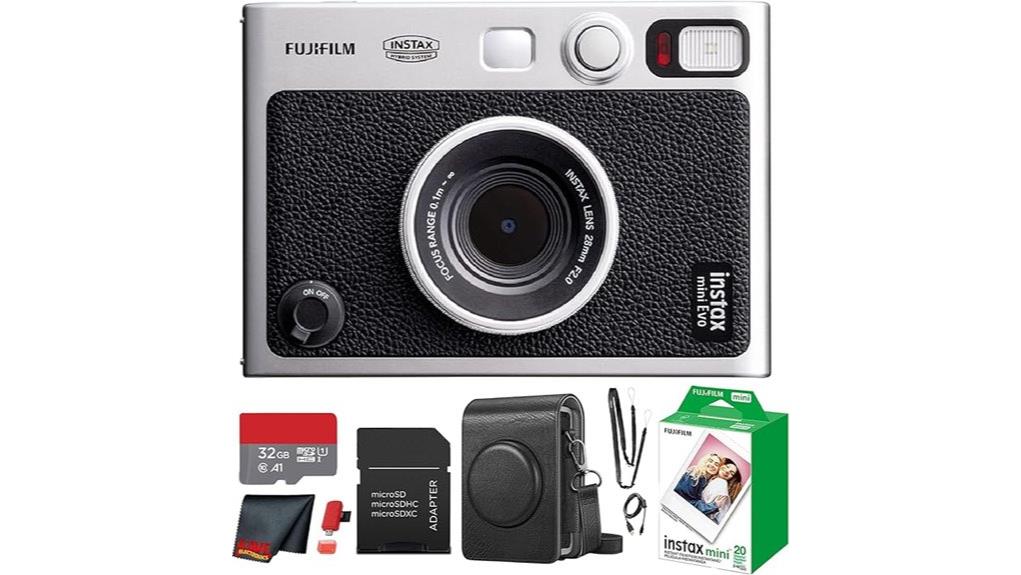
You’ll get a compact hybrid that records high‑resolution 600‑dpi stills to internal memory or microSD, previews and edits exposure, white balance and layered film/lens effects on a 3.0″ LCD, then mechanically prints punchy Instax photos with tactile analog texture. Controls are hands‑on—dual shutters, effect dials and a print lever—and the fixed 28mm‑equivalent f/2 lens suits environmental portraits. Battery, print latency and per‑frame cost limit throughput, and more specifics follow below.
Some Key Takeaways
- Hybrid mirrorless-style camera that records 600-dpi digital files and prints tactile Instax Mini photos via a mechanical film lever.
- Produces crisp, punchy prints with reliable exposure and accurate color, especially for skin tones and saturated scenes.
- Offers 3.0″ LCD preview, microSD storage, and in-camera/app edits for exposure, white balance, and 100 layered film/lens effects.
- Portable, well-built body with fixed 28mm-equivalent f/2 lens, tactile controls, and close-focus capability for environmental portraits.
- Limitations: modest battery life, noticeable print latency, per-frame film cost, limited internal storage, and no weather sealing.
Which Users Should Buy the Instax Mini EVO and Why?
If you want a compact camera that blends digital control with instant-film output, the instax mini EVO suits photographers who value tactile creativity and immediate prints. You’ll appreciate the hybrid workflow if you’re a young creatives-focused shooter or someone into travel journaling: digital capture, selectable lens/film effects, and instant prints streamline experimentation. The fixed 28mm-equivalent f/2 lens and macro mode cover typical subjects; physical dials and dual shutters speed operation. Limited internal storage and non-water-resistant construction impose constraints, but bundled microSD expands capacity. Buy it if you prioritize portability, hands-on controls, and tangible outputs over full DSLR flexibility. It’s a great fit for mirrorless camera enthusiasts who want an instant-print experience that complements their existing gear.
Quick Verdict: Image Quality, Print Experience, and Value
While the instax mini EVO won’t match a mirrorless sensor for fine detail, it delivers crisp, punchy 600-dpi prints that suit its hybrid, analog-first intent. You get reliable exposure, accurate color rendition for skin tones and saturated scenes, and usable microSD-stored previews to refine composition. Print latency and per-frame cost limit throughput, but the tactile satisfaction of the lever, film texture, and predictable chemistry justify the workflow. Value depends on your priorities: it’s costlier than basic instant cameras but offers digital controls, app pairing, and repeatable results. Buy it if you want controlled, tactile instant output with digital flexibility. Many enthusiasts pair this camera with portable photo printers when they want quicker or larger prints without relying solely on instax film.
How the Hybrid System Works: Shooting, Printing, App, and Storage
Building on the verdict’s focus on controlled, tactile output, here’s how the mini EVO’s hybrid system actually operates: you frame and capture on the 3.0″ LCD (or optical viewfinder for rough framing), the camera records a high-resolution 600‑dpi still to internal memory or an inserted microSD card, and you can preview, edit basic parameters (exposure, white balance, film/lens effects) on-screen before committing to a print. You trigger printing with the mechanical lever; the instax film chemistry produces the final tactile output. Bluetooth pairing enables remote shooting and smartphone printing; the app manages image edits, transfers, and optional cloud backup for archival security. Gear Guide for Enthusiast Photographers and Camera Fans highlights the mini EVO as a strong option for enthusiast photographers seeking tactile instant prints with digital backup.
Hands-On Features That Matter: Lens, Effects, Controls, and Build
Because the mini EVO blends a fixed 28mm-equivalent f/2 lens with a tactile control set, you’ll get a predictable, fast-handling experience that emphasizes framing and creative decisions over technical tinkering. You’ll appreciate fixed lens ergonomics: close 3.9″ focusing, wide field for environmental portraits, and consistent edge performance. Tactile controls—dual shutter buttons, effect dials, print lever—let you adjust without menu diving. Effect layering combines 10 lens and 10 film effects for up to 100 looks, applied in-camera or via the app. Build materials feel premium for the class: solid chassis, grippy finish, and reliable mechanical feedback for everyday use. It’s a great fit for DSLR enthusiasts who want instant-print fun alongside their more technical camera gear.
Real-World Performance: Battery, Speed, Prints, and Common Limitations
If you shoot frequently, you’ll notice the mini EVO’s battery life is modest and best managed with conscious habits. You should charge regularly, limit Bluetooth and LCD use, and carry the USB cable for top-ups. Capture-to-print workflow feels snappy for framing and processing, though overall shot-to-shot speed is constrained by mechanical print cycles. Print latency is noticeable — expect several seconds between exposure and ejection — and continuous printing drains power and film quickly. Limitations: 45-image internal storage, non-weatherproof body, and fixed 28mm-equivalent lens restrict versatility. For hybrid instant use it’s competent but demands operational discipline. Consider protecting the camera’s screen with a screen protector to avoid scratches and preserve resale value.
Some Questions Answered
Can I Use Third-Party Instax Mini Film With Full Functionality?
Yes — you can use third party compatibility, but expect caveats. You’ll get prints, yet film chemistry considerations matter: color balance, development timing, and emulsion sensitivity may differ from Fujifilm’s stock, affecting exposure, contrast, and stability. Camera mechanisms will still feed/print, but image quality, consistency, and long-term archival performance can vary. Test batches of third‑party film before critical shoots and adjust exposure/white balance accordingly.
Is the Camera Compatible With USB Power Banks for Extended Shooting?
Yes — you can use an external battery (USB power bank) to extend shooting, but you should respect power limits. The camera accepts USB power for charging; using a bank rated within typical 5V/1–2A limits is safe. Higher-voltage or fast-charge protocols may not be supported and could interrupt charging. Test compatibility before long shoots, and carry spare film and a modest-capacity bank to assure reliable extended use.
Does the Camera Support RAW or Higher-Resolution Image Export?
No — it doesn’t offer RAW support or high-resolution export beyond its designed 600 dpi print output and internal image format. You’ll get instax mini media files optimized for instant printing and app transfer, with effective still resolution tied to 600 dpi. You can export JPEGs via Bluetooth or microSD, but you won’t receive DSLR-style RAW or higher-resolution files for extensive post-processing. This is an instant-focused, not pro-resolution, system.
Can Multiple Users Connect to the Camera via Bluetooth Simultaneously?
No — the camera doesn’t support multiple pairing or simultaneous control. You can pair one smartphone at a time via Bluetooth to transfer images, print remotely, or control basic functions through the app. If another user connects, the previous session is disconnected. For multi-user workflows, you’ll need to disconnect/reconnect devices sequentially or share images from the paired phone rather than expect concurrent Bluetooth control.
Is Firmware Updatable and How Are Updates Installed?
Yes — the firmware’s updatable. You’ll install updates via the instax app over Bluetooth or by loading firmware files onto the microSD and updating in-camera. Check Fujifilm’s update schedule for release timing; they don’t widely advertise rollback capability, so assume limited or no firmware rollback. You should back up images before updating, follow provided instructions precisely, and contact support if an update fails to avoid bricking or compatibility issues.


