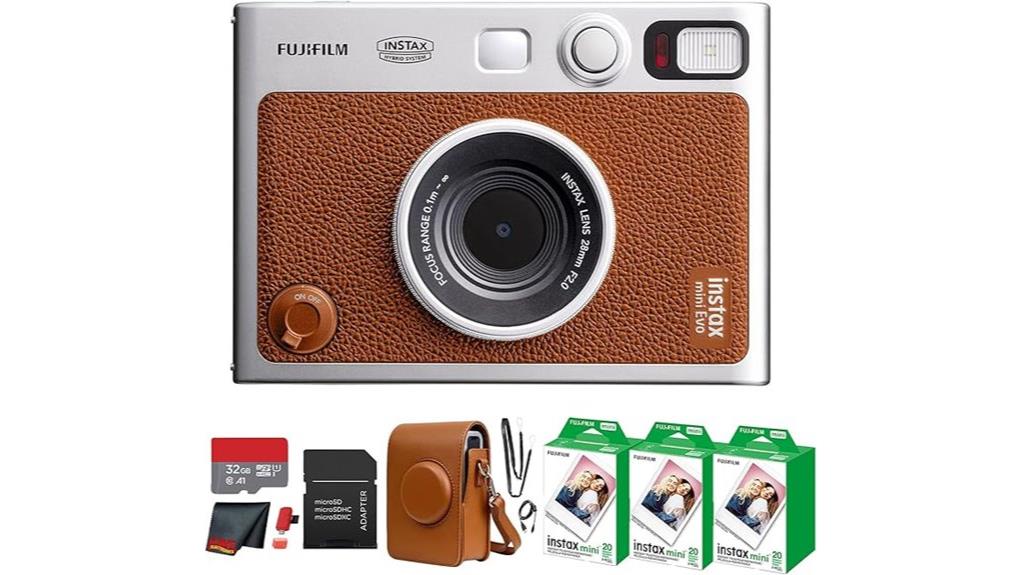
You get a compact hybrid that feels tactile yet technical: a 28mm‑equivalent f/2 wide lens with 3.9" close focus, a 3.0" LCD for live preview and on‑device edits, and physical dials plus a print lever for instant analog output. It captures digitally, applies 10 lens and 10 film effects, then prints on instax mini film; battery and prints hold up for a day. Scroll on to see detailed specs, image samples, and workflow tips.
Some Key Takeaways
- Hybrid digital-instant workflow: shoot, edit with 10 lens and 10 film effects on the 3.0" LCD, then print to instax mini film.
- Image quality: punchy 28mm-equivalent f/2 frames with mild low-light noise and slight softening of fine detail.
- Controls and handling: retro dials, print lever, selfie mirror, and on-device exposure/white-balance adjustments make creative shooting tactile.
- Connectivity and storage: Bluetooth for remote shooting/transfer, internal memory ~45 images, and microSD support for expanded storage.
- Value and use case: excellent for travelers, journalers, and parties seeking instant prints, but ongoing film costs and mid-premium price matter.
What the Instax Mini EVO Is and Who It's For
Think of the instax mini EVO as a compact hybrid that bridges digital control and tactile instant prints: you shoot with a 28mm-equivalent f/2 lens, preview and edit on a 3.0" LCD, then decide which frames to print onto instax mini film. You’ll appreciate its retro aesthetic paired with modern controls—physical dials, a print lever and selfie mirror—that deliver precise framing, exposure tweaks and instant chemical prints. It suits creators who value hands-on composition and tactile output: travelers, journalers, party hosts, and gift shoppers. Its compact dimensions, app connectivity and film-first workflow make it both practical and high in gift appeal. The site helps photographers rediscover joy in compact point-and-shoot photography.
Key Specs and Unique Hybrid Features to Know
While the instax mini EVO looks and feels like a retro instant camera, it packs a precise hybrid toolkit that lets you compose, edit and only then print—starting with a fixed 28mm-equivalent f/2 lens with a 3.9" close-focus capability and a built-in flash, plus a 3.0" LCD for live view, preview and on-device adjustments. You’ll appreciate the hybrid workflow: capture digitally, apply one of 10 lens effects and 10 film effects, then select before printing. Lens specs and exposure controls are concise; film compatibility is limited to instax mini. Internal memory holds ~45 images; microSD and Bluetooth expand storage options. For best results when maintaining that 28mm-equivalent lens, regularly clean your lens with lens cleaning solutions designed for camera optics.
Real-World Performance: Image Quality, Printing & Battery Life
Now that you know how the mini EVO captures and previews images, let’s look at how that workflow holds up in actual shooting: the 28mm-equivalent f/2 lens delivers punchy, wide-angle frames with good subject separation at close focus (3.9") and pleasing corner-to-corner sharpness at normal distances, though fine detail softens slightly compared with dedicated mirrorless lenses—especially in low light where the small sensor introduces mild noise and the camera leans on its built-in flash or higher ISO. You’ll get reliable color accuracy in daylight, accurate skin tones, and natural saturation. Prints resolve well; print longevity depends on storage and handling. Battery longevity is solid for a day’s shooting but plan recharges for extended sessions. The mini EVO pairs well with portable photo printers for on-the-go physical keepsakes, making it easy to capture moments anywhere and share tangible prints.
Creative Tools, App Integration, and Ease of Use
Because the mini EVO blends tactile controls with digital tweaks, you’ll move quickly from composition to a finished print while keeping precise control over the look, thanks to its 10 lens + 10 film effect combinations, exposure and white-balance adjustments, and live-view editing on the 3.0" LCD. You dial lens presets and film effects, preview crops, rotate, and fine-tune brightness/contrast before committing to print. The INSTAX app links via Bluetooth for remote shooting, image transfer, backup, and streamlined social sharing. Physical controls—film and lens dials, print lever—keep workflow immediate; microSD storage and efficient UI make operation straightforward and repeatable. For mobile photographers wanting more creative versatility, consider pairing the camera with clip-on lenses like macro attachments to expand close-up possibilities.
Verdict: Value, Alternatives, and Should You Buy It?
If you want a tactile, style-forward instant camera that also gives you digital control, the instax mini EVO delivers a compelling mix of hands-on mechanics and precise image tweaking. You’ll appreciate the calibrated film and lens effects, LCD live view, and tactile print lever for controlled prints. For value, factor in film costs and a price comparison with pure digital compact cameras and cheaper instax-only models; EVO sits mid-premium. Alternatives include dedicated instant basics or mirrorless compacts if image quality matters more. Buy it if you prioritize creative control, analogue output, and proven long term reliability for casual use. Consider also the broader selection of accessories and lenses available for mirrorless cameras to expand your creative options.
Some Questions Answered
Can I Print Directly From a Mac or PC Without the App?
Yes — you can print without the phone app, but options are limited. You’ll use Bluetooth printing from a smartphone or transfer images via Direct USB/microSD to the camera. For Mac/PC, copy files to the included 32GB microSD (or microSD via USB reader), insert it, then select and print from the camera’s LCD. There’s no native desktop app or direct USB printer mode for computer-controlled printing.
Is the Camera Compatible With Third-Party Instax Mini Film?
Yes — you can use third party instax mini film, but check film compatibility carefully: many third‑party foil packs mimic Fujifilm dimensions but vary in chemistry and coating, which can affect exposure, color, and ejection reliability. You’ll want to test a pack first since non returnable foil packs or single-use bundles can’t be refunded if they cause jams or inconsistent prints. Inspect seals, humidity storage, and batch reviews before bulk purchases.
How Long Is the Manufacturer Warranty Period?
The manufacturer provides a warranty duration of one year. You'll get coverage details that include defects in materials and workmanship under normal consumer use; it doesn't cover accidental damage, film, or water intrusion. You'll need proof of purchase for claims, and service may require shipping to an authorized center. Check the included warranty card or Fujifilm support for region-specific terms, claim procedures, and any optional extended-warranty offers.
Can the Camera Charge and Print While Connected to Power?
Yes — you can charge the camera while printing, but it doesn’t support true battery passthrough for continuous printing without limits. You’ll plug in power to recharge the internal battery and the camera will print, yet Fujifilm warns printing speed and duty cycle can be affected by thermal and power management. For extended continuous printing sessions, you should let the battery maintain charge and allow cool-down intervals to avoid overheating or print errors.
Is the Vintage Case Waterproof or Weather-Resistant?
No — the vintage case isn’t waterproof or officially weather-resistant. You’ll get water resistant materials on the exterior and protective stitching along seams, but they’re meant for splash protection and abrasion resistance, not submersion or heavy rain. Treat the case as a protective, stylish cover: avoid prolonged exposure to moisture, use additional waterproof covers in wet conditions, and dry promptly to prevent seepage or thread deterioration.


