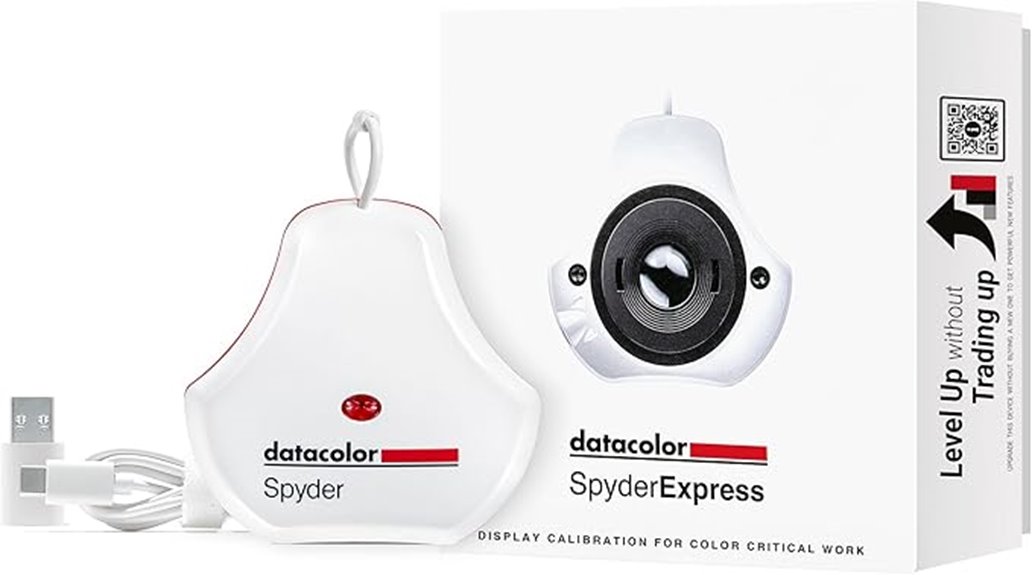
You’ll get fast, production‑ready calibration with Datacolor’s SpyderExpress: a compact USB‑C probe that profiles most monitors and Mac M4 Liquid Retina XDR panels, creates edit‑ready ICCs in about 90 seconds, and supports up to three synchronized displays with deterministic sampling for repeatable skin‑tone and midtone accuracy. The bundled base app is plug‑and‑play, with firmware updates, cloud profile sync, and optional upgrades for advanced multi‑display and ambient features — keep going to see detailed specs, workflows, and tradeoffs.
Some Key Takeaways
- Fast three-step workflow creates edit-ready ICC profiles in about 90 seconds, ideal for quick recalibration before editing sessions.
- Plug-and-play USB-C device with native macOS M4 support and streamlined installer for immediate use.
- Deterministic probe sampling yields repeatable, production-ready profiles with improved skin-tone and midtone accuracy.
- Profiles support common gamuts (sRGB, DCI-P3) and multi-display profiling up to three synchronized displays.
- Bundled base software with optional upgrades (ambient sensing, advanced multi-display, DevicePreview) and cloud profile storage.
How SpyderExpress Works and Who It’s For
Calibrate in minutes: plug the SpyderExpress into your workstation, run the included software, and follow the three-step routine to generate an accurate display profile. You’ll start a guided measurement, let the sensor sample primary and secondary patches, then save an ICC profile. The device accelerates your color workflow, delivering edit-ready color quickly and consistently. Target users include photo editors, graphic designers, and content producers who need predictable on-screen color for digital and print. You’ll appreciate the compact hardware, included base software, and upgrade path for advanced profiling. Recalibrate regularly to maintain fidelity before critical editing sessions. Perfecting your monitor for true-to-life photos ensures what you see on-screen matches your final prints and outputs.
Key Specs and Compatibility (Mac M4 Liquid Retina XDR, Monitors, 3 Displays)
While supporting everyday monitors, the SpyderExpress is specifically engineered to handle the latest Liquid Retina XDR panels, including MacBook M4 mini‑LED displays, delivering accurate profiling for high-dynamic-range and wide-gamut screens. You’ll get explicit Mac compatibility with native drivers and a streamlined installer for macOS on M4 silicon. Display gamut measurement covers DCI‑P3 and extended sRGB ranges, with target profile creation for print and web. Connection types are USB‑C direct or USB‑A via adapter; no dock required. Firmware updates are delivered through the companion app, ensuring sensor calibration and new display support. You can profile up to three displays. The SpyderExpress integrates well with color calibration workflows favored by passionate photographers.
Real‑World Speed & Accuracy: 90‑Second Calibrations and Results
Having profiled up to three displays and handled mini‑LED gamut ranges, the SpyderExpress then focuses on speed and repeatability: it produces edit‑ready color in about 90 seconds, thanks to an optimized measurement sequence and sensor-driven algorithms. You’ll appreciate the deterministic probe sampling that reduces noise and accelerates profile generation. In practice, fast recalibration before sessions takes under two minutes, letting you maintain consistent targets across workflows. Measured deltas show tight repeatability and improved perceived accuracy for skin tones and midtones versus uncalibrated outputs. The unit trades no meaningful precision for speed, delivering reliable, production-ready profiles with minimal interruption. Readers who want to deepen their understanding of color management can explore essential photography books on color calibration for practical techniques and theory.
Software Features, Upgrades, and Multi‑Display Workflow
Because the SpyderExpress bundles immediate-use software with a clear upgrade path, you can start profiling right away and add advanced features as needs evolve. You install base software, plug the SP2024EXP, and run a three-step calibration that yields an edit-ready profile in ~90 seconds. Optional upgrades enable ambient sensing, multi-display profiling, and DevicePreview without extra hardware. Profile management is straightforward: save, name, and apply profiles per display; restore previous states; and schedule recalibration reminders. When you connect up to three displays, the workflow sequences measurements, synchronizes white point and gamma targets, and exports consistent ICCs for reliable cross‑display matching. Secure cloud storage options can help photographers protect and sync those calibrated profiles across devices with dedicated cloud backups.
Value Verdict: Pros, Cons, and Who Should Buy SP2024EXP
The SpyderExpress builds on its quick, upgradeable profiling workflow to offer a straightforward value proposition: it gives photo and content professionals reliable, edit-ready color at a low entry cost and with minimal setup. You’ll get fast 90-second profiles, support for Liquid Retina XDR and everyday monitors, and upgrade paths for OLED and advanced mini‑LED without extra hardware. Pros: speed, accuracy, compact design, multi-display support. Cons: entry-level gamut ceiling, fewer advanced measurements than pro tools. Who should buy: solo editors, content creators, and studios seeking cost-effective calibration. Consider budget alternatives if you need exhaustive metrology or long term durability guarantees. For photographers who use physical targets, pairing a SpyderExpress with a white balance card can streamline achieving consistent color across shoots.
Some Questions Answered
Does It Include a Warranty and How Do I Claim It?
Yes — warranty details come from the manufacturer; you’ll find terms with the product. To claim, contact Datacolor support with your SP2024EXP serial, purchase receipt, and failure description. They’ll validate coverage, authorize repair or replacement, and provide RMA instructions. You can initiate the claim via Datacolor’s support portal or email; follow prescribed shipping and packaging steps. Keep profile and software info handy to expedite the process.
Is the Device Compatible With Tablets or Phones?
Yes — you can use it with tablets and phones, but with limits. The Spyderexpress supports tablet compatibility and mobile connections via USB or adapter; you’ll need the device’s supported OS and a compatible OTG/USB-C or Lightning adapter. The base software targets desktops, so mobile workflows require the upgraded DevicePreview or manufacturer app support. It won’t profile on every phone/tablet model; check Datacolor’s supported device list before buying.
Can I Use It on TV Screens or Projectors?
Yes — you can use it for TV calibration and basic projector compatibility. It’s designed for monitors and supports everyday displays; you’ll get accurate color readings on most TVs and projectors, though results vary with screen tech and ambient light. For advanced OLED/mini‑LED TVs or professional projector profiling, upgrade the software. Position the sensor flat against the screen, follow the three‑step workflow, and recalibrate regularly for consistent results.
What Are the Exact Physical Dimensions and Weight?
The exact dimensions are 2.6 x 4.8 x 4.8 inches and the weight specs list 5 ounces. Manufacturing tolerances aren’t specified by Datacolor; assume typical small-electronics tolerances (±0.5–1 mm, ±1–2 g) unless you request official figures. Shipping weight will be higher due to packaging; estimate roughly 6–8 ounces (including box and paperwork). If you need certified tolerances or an exact shipping weight, I can fetch manufacturer or retailer specs.
Where Can I Buy the SP2024EXP (Asin B0FMJFPTVG)?
You can buy the SP2024EXP (ASIN B0FMJFPTVG) from authorized retailers and major online marketplaces. Check Datacolor’s website for approved sellers and warranty validation. Also search Amazon, B&H Photo, Adorama and specialist pro-imaging shops for stock and shipping options. Compare listings for included base software and available software upgrades. Verify seller authorization to make certain warranty support and genuine hardware before purchasing.


