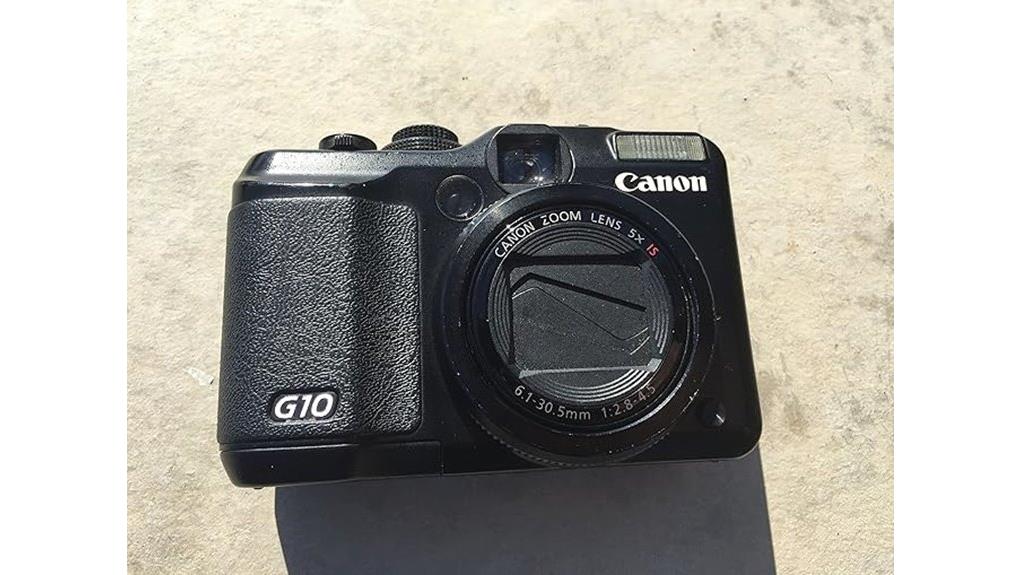
You’ll like the G10 if you want DSLR-like controls in a compact body: its 14.7MP sensor and RAW capture give precise editing control, while DIGIC 4 and effective OIS keep noise and handshake down in low light. The 28mm wide start and 5x zoom handle travel, portraits, and interiors without swapping lenses. Ergonomics and a bright 3.0-inch LCD make shooting pleasant, though battery and storage need managing—keep going and you’ll get fuller details.
Some Key Takeaways
- 14.7MP sensor with RAW support delivers detailed files and flexible post-processing, though high-ISO noise remains noticeable.
- 28mm wide-angle and 5x optical zoom give versatile framing for travel, portraits, architecture, and cramped interiors.
- Optical Image Stabilizer and DIGIC 4 processor enable lower shutter speeds handheld and quick, natural JPEG processing.
- 3.0" PureColor LCD, tactile controls, and reliable face-detection autofocus make handling intuitive for enthusiast shooters.
- Uses SD/SDHC cards and one removable battery—carry spares and high-speed cards for long shoots and large RAW files.
Image Quality, RAW Support, and Low-Light Performance (14.7MP Sensor)
Although its 14.7-megapixel sensor won't magically erase noise at high ISOs, the G10 delivers detailed images and gives you RAW capture for precise post-processing control. You’ll appreciate how dynamic noise reduction tames grain without obliterating fine detail, and RAW lets you balance noise versus sharpness on a per-shot basis. Color depth fidelity is strong for a compact, so skin tones and landscapes render naturally straight from the file. Low-light handheld shots improve thanks to the OIS and DIGIC 4 processing, though extreme ISO use still demands care. Overall, you get versatile image quality with deliberate post-processing latitude. For photographers serious about color accuracy, pairing the camera with a color checker card helps ensure consistent, true-to-life results.
28mm Wide-Angle Lens and 5x Optical Zoom: Shooting Range and Real-World Examples
A 28mm wide-angle lens paired with 5x optical zoom gives you a flexible shooting range that handles everything from roomy interiors to moderate telephoto framing without swapping lenses. You’ll appreciate the 28mm perspective for cramped rooms, architecture, and group shots; it captures context while keeping distortion controlled. Zooming in multiplies usefulness for portraits and street details, supporting travel framing that balances scene and subject. In practice you’ll switch between wide and tele quickly, composing tighter images without moving. The G10’s zoom range suits documentary-style travel and everyday use, offering practical reach and consistent image quality. Consider pairing this versatile range with a sturdy tripod for improved stability and sharper results when shooting at slower shutter speeds and in low light; Perfect Tripods can help you choose the right support.
Stabilization, Processing, and Autofocus: OIS, DIGIC 4, and Face Detection in Practice
When you shoot handheld, the PowerShot G10’s Optical Image Stabilizer and DIGIC 4 processor work together to keep images sharp and colors true, letting you use slower shutter speeds without obvious blur and still get responsive autofocus. You’ll notice solid OIS performance at longer focal lengths and in dim light; handshake is reduced enough to avoid boosting ISO in many situations. DIGIC 4 handles JPEG processing quickly with natural contrast and decent noise control. AF speed is generally snappy for stills and casual snaps, and Face detection reliably prioritizes subjects. For fast action or critical focus, expect occasional hunting. Many photographers who value precise exposure also rely on spot metering to accurately measure and capture tricky lighting.
Handling, Display, Modes, and Shooting Workflow (3.0 PureColor LCD II and Controls)
Now that OIS, DIGIC 4 and face detection are doing the heavy lifting for image quality, what you feel under your thumb and see on the screen becomes the next deciding factor. The 3.0 PureColor LCD II shows true-to-life colors and stays usable in varied light, so framing and reviewing are straightforward. Button layout is logical: dedicated dials and quick-access keys speed adjustments without digging into menus. Menu responsiveness is generally snappy, though some submenus lag slightly. Grip ergonomics feel secure for longer shoots. The touchscreen absence is noticeable if you prefer tap-to-focus, but physical controls offer confident tactile feedback. Many photographers choose lighting setups based on studio lighting kits to ensure consistent results across sessions.
Storage, Battery Life, Price Considerations, and Who Should Buy the G10
Because the G10 uses SD/SDHC cards and a single removable battery, you'll want to plan storage and spares before a long shoot. Carry multiple cards and a charged spare battery to avoid interruptions; RAW files eat capacity fast. Battery longevity is reasonable for a compact with a 3.0-inch LCD, but heavy Live View or continuous shooting will drain it faster. In price comparison, the G10 sits above basic compacts but below entry-level DSLRs, offering strong controls and image quality for the cost. Buy it if you want manual control, RAW support, and solid optics in a portable package. Consider investing in high-speed SD/SDHC cards to balance capacity and performance.
Some Questions Answered
Does the G10 Support External Flash Units?
Yes — you can use external flash units with the G10. It has a hot shoe for mounting external flashes and supports flash sync via that shoe, letting you trigger dedicated Canon-compatible and manual strobes. You’ll get better reach and control than the built-in flash, though advanced TTL features may be limited compared with Canon EOS systems. You’ll want to test sync and exposure, and carry spare batteries for consistent performance.
What Video Resolutions and Frame Rates Are Available?
You can record HD video at 1280x720 and standard video at 640x480, both with Variable frame rate options for flexible capture. You’ll get smooth results for casual clips at the higher resolution and usable footage for everyday recording at VGA. You’ll appreciate the camera’s Image Stabilizer and DIGIC 4 helping reduce blur and noise. Overall, it’s competent for quick HD clips, though not as advanced as dedicated camcorders.
Is There a Built-In Intervalometer for Time-Lapse Shooting?
No — the camera doesn’t include a built in intervalometer, so you can’t rely on internal time lapse functionality for automated long sequences. You’ll need to trigger shots manually, use an external intervalometer compatible with the G10 (via remote port), or shoot continuous RAW/JPEG sequences and assemble time-lapses in post. That said, the camera’s RAW capture and stable optics help preserve quality for stitched time-lapse results when you do the work externally.
How Fast Is Continuous Shooting (Frames per Second)?
You get about 1.9 frames per second in continuous shooting; that’s the burst speed you’ll see in typical use. Expect a modest buffer depth — roughly 8–10 JPEGs before slowing — so you’ll fill it quickly during action sequences. You’ll want to pace shots or shoot RAW in short bursts to avoid delays. Overall, it’s fine for casual action but won’t satisfy fast-paced sports or wildlife needs.
What Image File Formats and Compression Options Exist?
You can shoot RAW vs JPEG; RAW gives uncompressed, full-quality files for max editing, while JPEG applies in-camera compression. You’ll avoid Compression Artifacts with RAW and retain dynamic range; JPEG saves space but trades off quality. Choose RAW for critical work and JPEG for convenience or quick sharing. If storage or speed matters, use JPEG; if post-processing and image integrity matter, shoot RAW to preserve quality.


