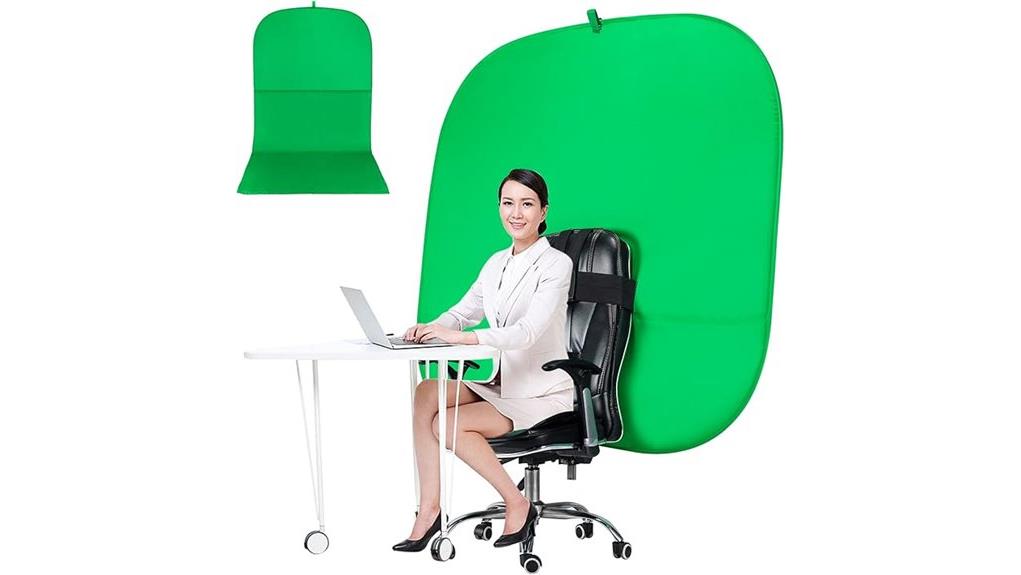
You'll get a lightweight, 59-inch foldable green screen that slips over most chairs to give you clean head-and-shoulders chroma keying on the go. It’s compact (3.6 lb) with a carry bag, wrinkle-resistant flocking, and panels that clip or strap together for larger backdrops. Good for streamers, interviews, and quick portraits, it needs even lighting and careful seams for best keys. Keep going and you’ll find setup tips, lighting tricks, and buying checks.
Some Key Takeaways
- Lightweight, foldable 59-inch chair-mounted green screen converts a chair into an instant chroma-key backdrop for head-and-shoulders framing.
- Double-sided, wrinkle-resistant flocking improves keying quality, while careful setup and tensioning reduce seams and shadows.
- Compact 3.6 lb design with carry bag makes it highly portable for streamers, interviewers, and traveling content creators.
- Best results require even lighting (two 45° soft lights plus back/hair light), low ISO, locked white balance, and test-keying.
- Limitations: not ideal for full-body shots, fabric needs care to avoid creases, and it’s not water resistant.
What the Portable Green Screen Chair Is and Who It’s For
Think of the Portable Green Screen Chair as a lightweight, foldable chroma-key solution that turns any chair into a clean studio backdrop. You get a 59-inch, double-sided green screen that clips to seating, or combines into a larger backdrop for fuller scenes. You’ll appreciate its compact carry bag, low 3.6-pound weight, and wrinkle-resistant flocking for quick setup. It’s ideal if you’re streaming, doing interviews, or producing content on the go — a true portable studio tool. Ergonomic viewers benefit because the screen keeps framing consistent, so your audience sees polished visuals without complex rigs. Designed for photography enthusiasts and content creators, it complements other green screen backdrops used to create professional-looking chroma-key effects.
How to Set Up the Chair Screen and Full Backdrop (Step-by-Step)
Start by choosing a flat, well-lit area and unpacking the chair screen and carry bag—lay out the pieces so you can see the chair-mounted panel, the larger backdrop sections, and any clips or straps. Seat the chair, slip the panel over the back, and attach clips at the top corners for a secure fit. For the full backdrop, unfold sections, position markers for spacing, and butt seams together; align seams precisely to avoid visible lines. Use straps or clips to join panels, then adjust tension across the fabric to remove wrinkles. Final check: camera view, smooth surface, and stable attachments. Many passionate photographers prefer using backdrop stands to support full backdrops and ensure stability during shoots.
Real-World Performance: Chroma Key Results, Lighting, and Camera Tips
When you put the Portable Green Screen Chair into regular use, it delivers clean chroma-key results only if you control two things: even lighting and sufficient camera resolution. You'll get best results by planning lighting placement: use two soft lights at 45-degree angles to eliminate shadows, and a hair/back light to separate you from the fabric. Adjust camera settings to reduce noise—raise resolution, lower ISO, and lock white balance. Keep the backdrop wrinkle-free and avoid reflective clothing. Test keying in your software and tweak exposure or light distance until edges stay crisp; that's the quickest path to reliable composites. For consistent subject separation and flattering illumination, consider pairing your setup with a quality ring light for portrait shots and close-ups soft lighting.
Pros, Cons, and Practical Use Cases (Video Calls, Streaming, Photography)
Because it combines portability with a sizable chroma-key surface, the Portable Green Screen Chair is a practical choice for video calls, streaming, and basic photography—you’ll get clean keys if you control lighting and camera settings, and the foldable, double-sided design makes it easy to stash or take on the road. Pros: lightweight, compact, quick setup, good chroma coverage for head-and-shoulders framing. Cons: limited full-body room, fabric needs care to avoid wrinkles, not water resistant. Practical use cases: Zoom meetings, solo streaming, product shots and quick portraits. Note comfort considerations for long sessions and minor acoustic impact from the fabric. Consider pairing it with a compact product photography box for more consistent studio-style lighting and backgrounds product photography box.
Buying Checklist: Size, Materials, Portability, and Compatibility
Having covered practical uses and trade-offs, you’ll want to check four key areas before buying: size, materials, portability, and compatibility. First, match size variations to your setup — the chair-alone 60×60 inch panel or the full 4.92×9.51 ft backdrop affects framing and spill. Inspect fabric durability: flocking, wrinkle resistance, and dust minimization matter for clean keys. For portability, confirm foldability, included carrying bag, 3.6 lb weight, and travel convenience like under-bed storage. Finally, verify compatibility with your camera and chroma key software, plus double-sided color accuracy for consistent post-production results. Consider also using a gold reflector to boost portrait lighting and complement your green screen setup.
Some Questions Answered
Is the Fabric Machine Washable or Dry-Clean Only?
No — it isn’t machine washable; you should hand wash the fabric. For fabric care, you’ll want to gently spot-clean or hand-wash the flocking material to avoid damage, shrinking, or loss of texture. You can iron and press per the warranty note, but avoid harsh detergents or machine agitation. Treat it gently, air-dry flat, and store folded in the carrying bag to keep the chroma surface smooth and ready for use.
Does the Package Include a Spare Carrying Bag?
No, the package doesn't include a spare carrying bag; it ships with a single carrying bag only. You’ll get the main bag for storage and transport, but there’s no extra pouch or replacement liner provided. If you need redundancy, plan to buy an additional bag or protective cover separately. Overall, that’s a small downside given the product’s portability and foldable design, so consider aftermarket options for extra protection.
Can Pets or Children Safely Touch the Backdrop During Use?
Yes — pets or children can touch the backdrop, but you should limit pet interaction and provide child supervision. The flocking material’s wrinkle-resistant finish tolerates light contact, yet cleaning concerns arise from oils, dirt, and chewing. Keep snacks, claws, and sharp toys away, wipe spots promptly with a gentle hand wash, and store in the carrying bag when unused. These safety tips reduce damage and maintain chroma-key performance.
Are Color Variations (Different Green Shades) Available?
No — the product is offered in a single green tone, so you won’t find different hues or multiple shade options from this model. You’ll get the supplied green optimized for chroma keying; it’s double-sided and wrinkle-resistant, but not water resistant. If you need alternate shades, you’ll have to look for other models or separate backdrops. Consider fabric sample photos or seller inquiries before buying to confirm color needs.
Is There a Warranty Beyond the 30-Day Return Period?
No, there’s no warranty beyond the 30-day return period listed; you won’t get an extended warranty from the manufacturer. You should assume accidental damage isn’t covered after returns expire, so you’ll be responsible for repairs or replacement. If you want extra protection, consider third-party extended warranty plans or your home electronics insurance, and check terms carefully to confirm they cover fabric items and accidental damage.