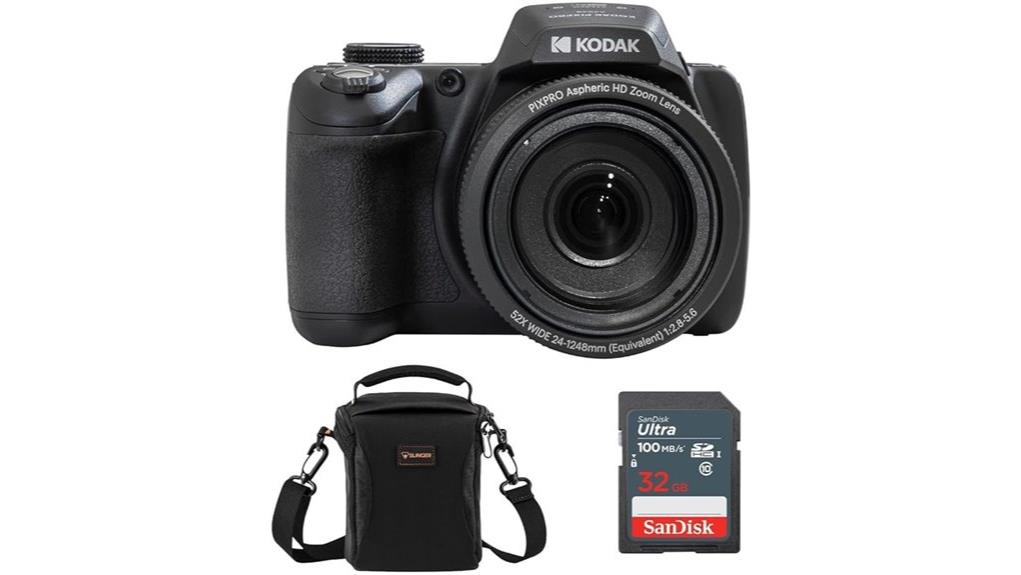
You’ll get staggering 24–1248mm (52x) reach in a compact bridge body, and the AZ528’s 16MP 1/2.3" sensor and Full HD video suit travel and casual wildlife shooting. Autofocus, HDR, and 6 fps burst handle varied subjects, but noise and detail fall off in low light and at long telephoto unless you brace or tripod. Controls and connectivity are sensible, battery life is modest, and if you want a deeper breakdown you’ll find more specifics ahead.
Some Key Takeaways
- 52x 24–1248mm equivalent zoom delivers extraordinary reach for travel and wildlife without changing lenses.
- 16MP 1/2.3" CMOS sensor gives good daylight detail but struggles with noise and dynamic range in low light.
- Full HD 1080p30 video and reliable autofocus suit casual creators and vlogging, though low-light video quality is limited.
- Ergonomic bridge-body design, 3.0" touch LCD, Wi‑Fi/USB connectivity, and sensible controls make it easy to use.
- Best for hobbyists prioritizing one-body versatility and extreme zoom; bring a tripod, spare batteries, and a protective case.
Quick Verdict and Who Should Buy the Kodak PIXPRO AZ528 Astro Zoom
Cutting through the specs, the Kodak PIXPRO AZ528 Astro Zoom gives you a true bridge-camera experience with a versatile 24–1248 mm (52x) optical zoom, 16 MP 1/2.3" CMOS sensor, and Full HD 1080p video—so it’s geared toward hobbyists who want extreme reach without swapping lenses. You’ll find reliable autofocus, HDR, and 6 fps burst useful for varied subjects. It’s aimed at beginner photographers and travel enthusiasts who value one-body versatility and long reach over low-light finesse. Expect manageable ergonomics, limited dynamic range, and sensible connectivity—good cost-performance for casual telephoto needs. If you’re building out your kit, consider essential accessories for mirrorless camera enthusiasts like extra batteries and protective cases to complement the PIXPRO’s long-reach capabilities and everyday use essential gear.
Key Specs That Matter: Sensor, Lens, Zoom Range, Video, and Battery
Having established who the AZ528 suits, let’s examine the hardware that shapes its image-making: the 1/2.3-inch 16 MP CMOS sensor, the 24–1248 mm (52x) lens, Full HD video capability, and the Li‑ion battery that powers it. You’ll get a 16MP sensor that’s typical for this class—good daylight detail, limited dynamic range and noise control in dimmer conditions. The 24–1248 mm equivalent gives huge reach; optical quality is pragmatic rather than premium. Zoom ergonomics are decent for a bridge body but long-reach shots benefit from tripod support. 1080p30 video is serviceable; battery life is adequate for casual outings. For those pairing this kind of camera with support gear, a sturdy tripod from Perfect Tripods can greatly improve stability for telephoto shots and low-light work, especially when shooting at the long end of the zoom with a sturdy tripod.
Real-World Image and Video Performance: Low Light, Telephoto, HDR, and Vlogging
When you push the AZ528 into challenging situations—low light, extreme telephoto reach, HDR scenes, or vlogging setups—it shows clear strengths and predictable limits: the 1/2.3" 16MP sensor delivers usable daylight detail but struggles with noise and limited shadow headroom in dim conditions, the 52x (24–1248mm) optical range gives extraordinary framing flexibility though sharpness and contrast fall off noticeably at the long end unless you brace the camera, HDR mode helps retain highlight detail in high-contrast scenes but can introduce processing artifacts and reduced micro-contrast, and the 1080p30 video plus vlogging-oriented features are convenient for casual creators though microphone quality and low-light video noise keep results from matching true enthusiast or prosumer rigs. You’ll manage exposures manually sparingly; aggressive noise reduction softens texture. Telephoto bokeh is achievable at long focal lengths but lacks subject separation compared with larger sensors. HDR processing recovers highlights but produces halos in high-contrast edges. Vlogging audio is serviceable for quick uploads but expect limited fidelity and ambient rejection. For cleaning and maintaining sensor performance over time, consider proper sensor care with a dedicated camera sensor care routine to avoid dust and artifacts.
Usability, Connectivity, and Battery Life in Everyday Shooting
After testing image and video handling under difficult conditions, it's worth looking at how the AZ528 performs day-to-day: ergonomics, menus, connectivity, and battery life directly affect whether you'll reach for this bridge camera for many outings. You’ll find the grip solid and controls logically spaced; the button layout puts playback, record, and quick menu access within thumb reach, reducing fumbling. The 3.0-inch touch LCD speeds navigation but menus remain basic. Wi‑Fi and USB enable straightforward file transfer and remote control via smartphone. Battery life is modest; the included Li‑ion cell handles a day's casual shooting but spare cells are advisable. For those who shoot frequently, keeping spare camera batteries on hand ensures you can keep shooting without interruption.
Should You Buy It? Alternatives, Value Comparison, and Final Buying Tips
Although it won't match interchangeable‑lens systems for image quality or low‑light performance, the PIXPRO AZ528 delivers strong telephoto reach and useful features at a modest price, so you should weigh zoom capability and convenience against sensor and autofocus limits. If you prioritize long reach, casual wildlife or travel shots, it's a sensible choice given bundled accessories and Full HD video. However, compare it to mirrorless bodies with better low‑light performance and faster AF; factor in repairability considerations and limited support for third party lenses. Buy if you value zoom and value; choose mirrorless if you need ultimate image quality. Also consider essential DSLR and camera accessories like tripods and filters when planning what to buy.
Some Questions Answered
Does It Accept External Microphones for Better Vlogging Audio?
No — it doesn’t provide a dedicated external microphone jack, so you can’t directly plug an external microphone into the camera. You can use Wi‑Fi or USB workflows and external recorders, then sync audio in post; audio adapters that convert USB or wireless receiver signals to the camera aren’t supported natively and may be unreliable. For better vlogging audio, record separately with a portable recorder or mic, then align and mix during editing.
Can You Charge the Battery via USB Power Bank?
Yes — you can’t charge the battery in-camera via USB; battery charging requires the supplied AC adapter or an external charger. Evaluating battery charging and usb compatibility: the camera uses a removable Li‑ion cell that’s charged externally, so a USB power bank won’t directly recharge the battery unless you use the camera’s AC adapter with USB power delivery or a separate USB‑to‑AC inverter. For portability, carry the spare battery and external charger.
Is There In-Camera Image Stabilization for Handheld Telephoto Shots?
No — the camera doesn’t offer sensor shift stabilization. You’ll rely on optical stabilization in the lens assembly if present, but the PIXPRO AZ528’s specifications don’t list active optical stabilization or sensor shift stabilization for handheld telephoto shots. Expect limited shake reduction at extreme zooms; use a tripod, higher shutter speeds, or ISO adjustments to avoid blur. For critical telephoto work, add stabilization support externally.
Are RAW Files Editable on the Camera Without a Computer?
No — you can’t fully edit RAW files on camera. The AZ528 records RAW, but on camera processing is limited to basic JPEG conversions, resizing, and quick adjustments; it doesn’t offer full raw editing like exposure, white balance, or selective tone mapping. For true raw editing you’ll need a computer and software (Lightroom, RawTherapee, etc.). Use on camera processing for quick previews or JPEG generation, not detailed raw workflow.
Does It Support Interval Shooting or Time-Lapse Recording?
No — it doesn’t offer a dedicated interval shooting or built‑in time‑lapse function. You’ll rely on manual continuous shooting (6 fps) or external interval timers/remote controllers to capture sequences for time‑lapse or astro stacking. That means planning exposures, using RAW if you’ll edit, and combining frames off‑camera for stacking. For serious astrophotography workflows, expect to use external gear and post‑processing software to achieve reliable interval sequences and stacking.


