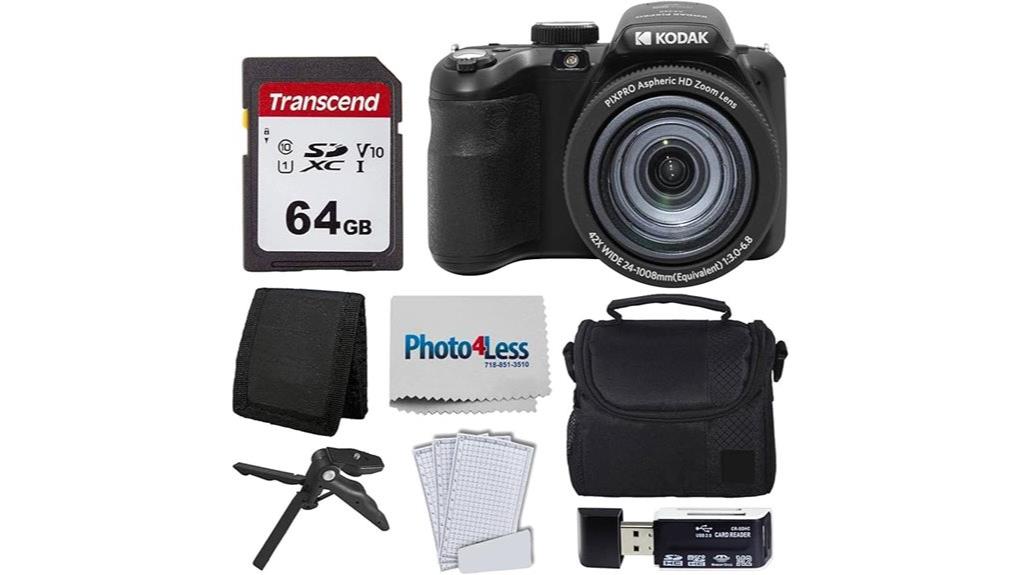
You’ll find the Kodak PIXPRO AZ425 is a compact, affordable superzoom that gives you a true 42x reach (24–1008mm equiv.), 20MP 1/2.3" CCD, optical stabilization and Full HD video—good for travel, casual telephoto shots and beginner vlogging with its bundled tripod/grip. Image quality’s fine at base ISO but noise and limited dynamic range show up in low light; autofocus and burst speed aren’t class-leading. If you want more detail on handling, battery and real-world performance, keep going.
Some Key Takeaways
- Affordable compact superzoom with a true 42x (24–1008mm equiv.) optical zoom for travel and telephoto needs.
- 20.1MP 1/2.3" CCD yields sharp results at base ISO but limited dynamic range and noisy high-ISO performance.
- Optical image stabilization helps handheld shots, though low-light and fast-action performance remain constrained.
- Full HD video and included tripod/hand-grip make it vlog-ready, but autofocus slows at long focal lengths.
- Bundled accessories (64GB card, case, tripod, SD reader) and modest battery life favor casual users out of the box.
What Kind of Buyer Should Consider the Kodak PIXPRO AZ425?
Generally, casual shooters and budget-conscious hobbyists should consider the Kodak PIXPRO AZ425. You’ll appreciate its compact form and bundled accessories that get you shooting right away without extra purchases. It suits budget travelers who need versatile reach and basic stabilization for sightseeing and snapshots. If you’re a beginner vlogger, the camera’s Full HD video, simple controls, and included tripod/hand-grip make starting easy. You won’t get pro-grade low-light performance or interchangeable lenses, so avoid this if you demand high ISO fidelity or advanced video features. For entry-level use, travel, and casual online content, it’s a pragmatic choice. The site also offers a range of essential gear that complements this camera for DSLR enthusiasts and photographers.
Key Specs at a Glance: 20MP Sensor, 42x Zoom, and Stabilization
Check the essentials at a glance: the PIXPRO AZ425 pairs a 20.1 MP 1/2.3-inch CCD sensor with a 42x optical zoom (24–1008mm equivalent) and optical image stabilization, giving you high-resolution stills and huge reach for travel or wildlife snaps while helping steady shots at long focal lengths. You’ll appreciate the straightforward sensor tech choice—20 MP CCD for detailed JPEGs at base ISO—and the versatile lens range that keeps framing flexible. Stabilization modes include optical and digital options to reduce blur when you’re zoomed in. Overall, specs favor reach and ease of use over advanced low-light prowess. Perfect Tripods recommends pairing the AZ425 with a sturdy support for improved stability when using the 42x zoom.
Real-World Photo and Video Performance: Low Light, Action, and Zoom Shots
When you push the PIXPRO AZ425 beyond bright daylight, its 20 MP 1/2.3-inch CCD and maximum ISO 3200 show clear limits: images stay sharp at base ISO and moderate zoom, but noise climbs and detail softens in dim scenes or at high ISOs, so stick to lower sensitivity and take advantage of the optical stabilization. In low light you’ll rely on OIS and slower shutter speeds; noise management is limited, so expose carefully and consider post-processing. Action shots are reasonable at short bursts but faster subjects reveal motion blur. The 42x zoom reach impresses compositionally, though focusing speed slows at long focal lengths. For outdoor shooting with a long superzoom like this, pairing the camera with a sturdy heavy-duty tripod can significantly improve stability and composition control.
Handling, Controls, and Ergonomics: LCD, Viewfinder, and Portability
After testing low-light, action, and zoom performance, you'll notice the camera's physical controls and handling start to matter just as much as image specs. You’ll find the button layout logical: frequently used controls sit within thumb and index reach, aiding quick changes. Hand comfort is decent for extended shooting, though smaller hands may wish for a deeper grip. The 3.0-inch LCD offers good screen visibility in most conditions, but direct sunlight reduces contrast. The optical viewfinder helps composition when LCD is washed out. Menu responsiveness is acceptable but not instantaneous—expect mild lag when scrolling options. Consider pairing the camera with an external monitor to improve composition and visibility in bright conditions, especially when using external camera monitors.
Battery Life, Storage, and Included Bundle Accessories
Although the AZ425's battery is a compact lithium‑ion cell, you'll find it delivers modest runtimes—enough for a full day of casual shooting but likely short for extended video or heavy zooming sessions. You’ll want spare cells for long outings; battery longevity is average given the camera’s power draw during continuous AF and stabilization. The included 64 GB card and SD reader give immediate capacity and quick transfers, while support for up to 64 GB limits storage expandability compared with some rivals. The bundle’s case, tripod/hand grip, screen protectors and card wallet add practical value out of the box. For photographers who frequently transfer files, consider a dedicated memory card reader to speed up workflow.
Strengths and Limitations Compared to Similar Superzoom Compacts
Because the AZ425 pairs a true 42x (24–1008mm equiv.) optical zoom and optical stabilization in a compact, affordable body, you'll get reach and steadiness that beat many general-purpose point‑and‑shoots while staying pocketable compared with bulky bridge cameras. You’ll appreciate long reach, solid stabilization, and straightforward handling; bundled accessories add value. Limits include a small 1/2.3" CCD that curbs high‑ISO performance and dynamic range, and contrast‑detect AF that’s slower than phase‑detect rivals. Expect some lens breathing in video at long focal lengths and color science that’s more conservative than richer, pricier competitors. It’s pragmatic, not premium. Keep silica gel packets in your camera bag to protect lenses and electronics from moisture and humidity protect camera gear.
Final Verdict: Who This Camera Is Best For and Whether to Buy
If you want long reach and simple operation without paying bridge‑camera prices, the Kodak PIXPRO AZ425 delivers a lot of practical capability for the money. You’ll appreciate 42x zoom, optical stabilization, Full HD video, and the included 64 GB kit accessories if you’re a budget travelers looking for one versatile camera. It’s best for casual shooters who want point‑and‑shoot ease and occasional wildlife or travel telephoto shots. Image quality and low‑light limits reflect its compact CCD design, and some may prefer more advanced controls or modern sensors. Buy it if value, simplicity, and a touch of vintage aesthetics appeal. As a gear resource for camera fans, this site offers guides and accessories for enthusiasts looking to complement cameras like the PIXPRO with digital camera extras.
Some Questions Answered
Does the Camera Support RAW Image Capture?
No — it doesn’t support RAW capture. You’ll be limited to JPEG file formats, so RAW support isn’t available despite the 1/2.3-inch sensor size and 20 MP resolution. That means you’ll get 8-bit color depth in saved images, restricting post-processing latitude compared with RAW. If you need maximum editing flexibility and higher color depth, you’ll want a camera that explicitly lists RAW support among its file formats.
Can It Charge via USB While in Use?
No — it doesn’t support USB charging while shooting. You won’t get battery passthrough; the camera’s power management expects the internal lithium‑ion battery to supply power during use. You can connect USB for file transfer or external power in some modes, but continuous charging while operating isn’t supported per specs. Plan to swap batteries or use a charged spare/tripod power solution for extended shooting sessions.
Is There Built-In GPS or Geotagging?
No — there’s no built-in GPS; GPS absence means the camera won’t geotag photos internally. You’ll need external geotagging solutions if you want location data. You can pair a smartphone or GPS logger, then sync timestamps to embed coordinates later in software. That’s reliable but adds steps and gear. If integrated location tagging is essential, you’ll want a model with native GPS rather than relying on external geotagging.
Are Firmware Updates User-Installable?
Yes — you can install firmware updates yourself, but Kodak doesn’t push frequent updates. You’ll download firmware files from Kodak’s support site, copy them to an SD card, insert it, then follow the camera’s firmware installation prompts. It’s straightforward if you follow instructions and guarantee battery power. Update frequency is low for this model, so check Kodak’s support page occasionally for firmware installation files and release notices before attempting an update.
Does It Accept Remote Shutter or Wireless Remotes?
No — it doesn’t support wireless triggering or infrared remotes natively. You’ll rely on the camera’s built-in timer and wired shutter options (if an accessory port exists) rather than IR or wireless remote control. That said, you can use external workarounds like a physical cable remote (if compatible) or rig a third-party wireless trigger that physically actuates the shutter, but native infrared-remote compatibility isn’t provided.


