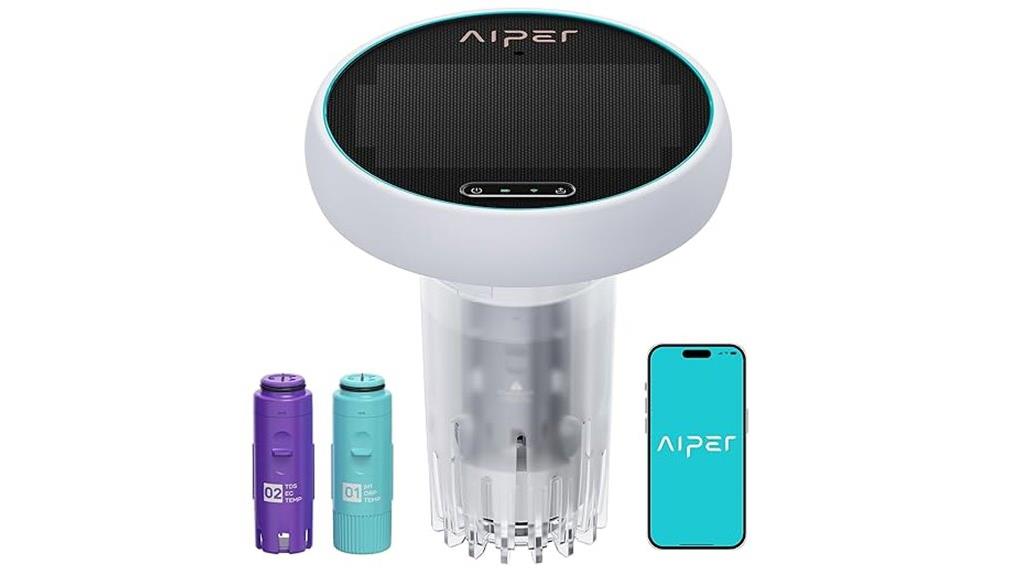
You get continuous, five‑parameter monitoring (pH, ORP, TDS, EC, temperature) with hourly automated readings, Wi‑Fi alerts, and historical trend charts so you can spot chemical shifts before they harm equipment or swimmers. Sensors respond quickly and show minimal drift, though occasional calibration’s needed. App setup and remote access are simple; installation and maintenance follow standard probe best practices. It’s pricier than single‑parameter kits but valuable for multi‑pool operators and proactive owners — keep going to see specifics and comparisons.
Some Key Takeaways
- Monitors pH, ORP, TDS, EC, and temperature continuously with hourly automated readings and low latency for near-real-time alerts.
- Mobile app offers Wi‑Fi setup, remote access, hourly trends, historical charts, and push notifications for excursions and calibrations.
- Reliable sensors show minimal drift over weeks; periodic calibration and routine cleaning restore factory accuracy.
- Best installed in steady flow zones (return lines or bypass), mounted above water with sealed fittings and proper cable routing.
- Higher-priced than single-parameter kits, suited for multi-pool operators and users prioritizing automated alerts and trend-based maintenance.
What the AIPER HydroComm Smart Pool Monitor Actually Measures and Why It Matters
Because water chemistry drives swimmer comfort and equipment longevity, the AIPER HydroComm Smart Pool Monitor tracks five key parameters—pH, ORP (oxidation-reduction potential), TDS (total dissolved solids), EC (electrical conductivity) and temperature—hourly and in real time so you can make targeted adjustments. You’ll monitor pH dynamics to prevent corrosion, scale, and skin irritation; ORP significance informs sanitizer efficacy and microbial control. TDS and EC quantify dissolved minerals and salinity trends that degrade heater and sensor performance. Temperature context refines chemical reaction rates. The device’s consolidated data lets you prioritize interventions, reduce trial-and-error, and document corrective outcomes efficiently.
Real-World Performance: Accuracy, Response Time, and Continuous 24/7 Monitoring
When you rely on continuous 24/7 monitoring, measurement accuracy and sensor responsiveness become the system’s defining metrics, and the HydroComm delivers verifiable performance across both. You get hourly automated readings for pH, ORP, TDS, EC and temperature with low data latency, so alerts and dashboards reflect near-real-time conditions. Sensors exhibit minimal sensor drift over weeks under normal use; occasional calibration restores factory tolerance. Response time to chemical changes is fast, letting you act before issues escalate. In practice the unit provides reliable, consistent trending for decision-making without frequent manual verification, improving maintenance precision.
Using the App and WiFi: Setup, Remote Monitoring, and Trend Reporting
Although getting the HydroComm online only takes a few steps, you’ll want to follow the setup sequence exactly to guarantee reliable remote monitoring and accurate trend reporting. You’ll complete WiFi setup in-app: select network, enter credentials, and confirm device pairing. Once connected, you’ll enable Remote access to view real-time pH, ORP, TDS, EC, and temperature from anywhere. App notifications alert you to parameter excursions and calibration prompts. The app’s Trend visualization displays hourly and historical charts so you can evaluate responses to treatment. Overall, the connectivity is stable and functional, offering data-driven control with minimal configuration.
Installation, Maintenance, and Troubleshooting Tips for Pools, Hot Tubs, and Spas
For a reliable HydroComm installation you’ll position the sensor where flow is steady and representative—near return lines or in a bypass loop—securely mount the unit above water level, and route the cable to avoid kinks or heat sources. Use an installation checklist: verify WiFi, seal fittings, and confirm app connection. Follow a cleaning routine: rinse probe weekly, use mild detergent monthly, and calibrate per manufacturer intervals. For sensor replacement, document serials and date, then power down and swap per instructions. If readings drift, apply troubleshooting flow steps: inspect plumbing, clear debris, check pump speed, and confirm stable power and network.
Is It Worth Buying? Pricing, Alternatives, and Who Should Choose HydroComm
If you’re weighing whether the HydroComm justifies its cost, consider that it delivers continuous 5‑in‑1 monitoring (pH, ORP, TDS, EC, temperature) with WiFi app access and trend reporting—features that let you make data‑driven chemical and maintenance decisions rather than relying on spot tests. You’ll pay a premium versus single-parameter kits; review pricing tiers to match feature needs. Compared to competitors, HydroComm wins on integrated continuous sensing and app analytics but trails on price and sensor replacement transparency. Choose HydroComm if you operate multiple pools, need automated alerts, and value historical trend data for proactive maintenance.
Some Questions Answered
Is the Hydrocomm Compatible With Saltwater Pools and Salt Chlorine Generators?
Yes — the HydroComm supports saltwater compatibility and works with salt chlorine generators. You’ll get continuous pH, ORP, TDS, EC and temperature readings that reflect salt pool chemistry, and the device’s Chlorinator interaction data helps you evaluate sanitizer production and system response. You’ll use real-time trends to adjust settings, reduce guesswork, and confirm stable salinity and sanitizer levels for reliable, data-driven maintenance in saltwater pools and spas.
Does It Require Subscription Fees for App or Cloud Features?
No, it doesn’t require mandatory subscription fees for basic app use; you’ll get real-time readings and local app access without compulsory charges. However, subscription options may be offered for enhanced cloud storage, advanced reports, or extended historical retention. You’ll evaluate value based on how much remote data archiving and analytics you want; basic monitoring stays free, while premium cloud storage and extra features typically need a paid plan.
What Is the Device’s Warranty Period and Coverage Details?
The warranty duration is typically one year from purchase; check your receipt for exact start and local variations. Coverage specifics include defects in materials and workmanship under normal use, with AIPER repairing or replacing faulty units. It won’t cover damage from misuse, improper installation, or unauthorized repairs. You should register the device and retain proof of purchase to streamline claims; contact AIPER support for country-specific terms and extended options.
Can Multiple Users Share Access to the Same Hydrocomm Device?
Yes — you can share access. You’ll use Account Linking in the HydroComm app to enable Shared Access, assigning Guest Permissions or full control per user. Family Sharing is supported so household members see real-time readings, alerts, and history. You’ll evaluate and adjust permission levels for security and data integrity; linked accounts sync configurations and reports, but administrative control can be restricted to a single owner to prevent unauthorized changes.
How Long Is the Battery Life or Power Source Requirements?
The HydroComm runs continuously; battery longevity depends on usage and WiFi activity, but you’ll typically see several weeks to months between charges. You’ll notice higher power consumption when WiFi and frequent hourly reporting are active. For minimal drain, disable constant cloud sync or reduce reporting frequency. Evaluate runtime empirically for your setup, and expect shorter battery life with heavy remote polling or poor signal strength—plan charging or mains options accordingly.